Real-time AI agents break traditional request-response load balancing paradigms because they rely on long-lived, stateful bidirectional streams that obscure true server capacity. To solve this, developers must implement application-level session tracking directly within the...
Real-time AI agents break traditional request-response load balancing paradigms because they rely on long-lived, stateful bidirectional streams that obscure true server capacity. To solve this, developers must implement application-level session tracking directly within the runtime to accurately measure the committed concurrent workload of active conversations. By feeding these precise session counts alongside standard CPU utilization metrics into a hybrid routing algorithm, infrastructure can effectively distribute stateful AI traffic and prevent individual backend bottlenecks.
To resolve the scaling bottlenecks and runtime errors caused by monolithic system prompts, engineering teams should treat prompts as build artifacts by modularizing instructions into reusable templates. By running these modular "skill files" through a transpiler, developers...
To resolve the scaling bottlenecks and runtime errors caused by monolithic system prompts, engineering teams should treat prompts as build artifacts by modularizing instructions into reusable templates. By running these modular "skill files" through a transpiler, developers can enforce static validation, catch missing dependencies at build time, and integrate prompt generation directly into their CI/CD pipelines. This deterministic approach prevents code drift and ultimately establishes a safe framework where agents can propose updates to their own logic via standard pull requests.
Google's open-source TPU microbenchmark suite provides developers with granular performance metrics across Network, Compute, HBM, Host Transfer, and Attention components to validate real-world hardware capabilities. By leveraging these benchmarks to establish a Roofline...
Google's open-source TPU microbenchmark suite provides developers with granular performance metrics across Network, Compute, HBM, Host Transfer, and Attention components to validate real-world hardware capabilities. By leveraging these benchmarks to establish a Roofline model, engineers can accurately diagnose whether their machine learning workloads are compute-, memory-, or network-bound. This empirical baseline directly guides targeted software optimizations—such as kernel tuning, mesh sharding, and rematerialization—to maximize hardware utilization for large-scale model deployments.
To prevent context window bloat and reduce token consumption, Genkit Go introduces Agent Skills based on a progressive disclosure architecture. Developers can package specialized instructions, scripts, and references into modular SKILL.md bundles where only the frontmatter...
To prevent context window bloat and reduce token consumption, Genkit Go introduces Agent Skills based on a progressive disclosure architecture. Developers can package specialized instructions, scripts, and references into modular SKILL.md bundles where only the frontmatter metadata is initially exposed to the agent's system prompt. When a task matches the skill's description, Genkit's middleware dynamically loads the full instruction body and associated assets, ensuring the model accesses precise workflows exactly when needed.
This second installment explores how Ray’s higher-level libraries—Serve, Data, and Train—abstract the complexities of running AI workloads on Google's TPU slices. Ray Serve uses a simple topology configuration to correctly gang-schedule large multi-host models, while Ray Data...
This second installment explores how Ray’s higher-level libraries—Serve, Data, and Train—abstract the complexities of running AI workloads on Google's TPU slices. Ray Serve uses a simple topology configuration to correctly gang-schedule large multi-host models, while Ray Data eliminates data-loading bottlenecks by feeding accelerators directly with native JAX batches. Finally, JaxTrainer streamlines distributed training across TPUs by automatically handling cross-slice coordination, checkpointing, and fault tolerance.
Agent Platform's evaluation service is now generally available, providing developers with a unified engine to measure agent quality consistently across local development experiments and live production traffic. You can evaluate agents using over 20 pre-built metrics,...
Agent Platform's evaluation service is now generally available, providing developers with a unified engine to measure agent quality consistently across local development experiments and live production traffic. You can evaluate agents using over 20 pre-built metrics, DeepMind-backed adaptive rubrics, or custom code-based and LLM-as-a-judge metrics stored in a centralized, versioned registry. The service integrates directly into existing workflows via the Agent Platform SDK, agents-cli, and ADK, offering built-in user and environment simulators to automate complex multi-turn testing and streamline CI pipelines.
Ray 2.55 introduces official, first-class support for Google Cloud TPUs, enabling developers to run distributed Python workloads on Google's accelerators using the familiar Ray task-and-actor APIs. To handle the strict networking requirement of keeping multi-host TPU "slices"...
Ray 2.55 introduces official, first-class support for Google Cloud TPUs, enabling developers to run distributed Python workloads on Google's accelerators using the familiar Ray task-and-actor APIs. To handle the strict networking requirement of keeping multi-host TPU "slices" together over their Inter-Chip Interconnect (ICI), the KubeRay Operator on GKE automatically provisions and labels the underlying hardware layout. Ray Core utilizes these labels via its slice_placement_group() primitive to atomically reserve complete slices, allowing developers to deploy jobs through KubeRay, Ray Train, or Ray Serve simply by declaring a hardware topology (like "4x4") without writing custom placement code.
Tunix is Google’s new JAX-native post-training library designed to eliminate TPU idling bottlenecks when training multi-turn, tool-using LLM reasoning agents. It maximizes hardware throughput by combining highly concurrent, asynchronous rollouts with a decoupled...
Tunix is Google’s new JAX-native post-training library designed to eliminate TPU idling bottlenecks when training multi-turn, tool-using LLM reasoning agents. It maximizes hardware throughput by combining highly concurrent, asynchronous rollouts with a decoupled producer-consumer pipeline, ensuring the trainer is constantly fed even while agents wait on network I/O or environment steps. Additionally, Tunix provides plug-and-play abstractions and continuous macro-level profiling, allowing developers to easily integrate custom open-source environments and optimize complex distributed workflows without massive code rewrites.
How a branch-free loop and byte-space arithmetic let GitHub case-fold every byte of code search at >45 GiB/s on a single core. The post Don’t stop early: Case-folding source code at memory speed appeared first on The GitHub Blog.
Suppose a user searches for café and your corpus contains CAFÉ, or they type straße and you’ve stored STRASSE. To make these count as matches, you need a canonical form that erases case distinctions, so that two strings which differ only in case compare equal. That form is case folding, and it shows up wherever text is matched rather than displayed: search engines, regex (?i) flags, case-insensitive usernames and hostnames.
It’s a basic operation, but at GitHub we run it a lot. Blackbird, GitHub’s code search engine, indexes over 180 million repositories—more than 480TB of source code. Every byte is case-folded before we extract ngrams and build the index, and for every potential query result, another (implicit or explicit) case folding operation is needed to locate matches. At that scale, the speed of even a basic operation starts to matter.
This post is about how we made it fast, and it starts somewhere counterintuitive: the biggest win in the ASCII fast path came from removing an optimization, not adding one. It turns out to be faster to sweep the whole buffer with no branches than to stop early at the first non-ASCII byte. We open-sourced the result as a Rust crate called casefold.
Folding is not lowercasing
It is tempting to reach for str::to_lowercase, but lowercasing and folding are different operations with different goals:
Lowercasing is for display, and it’s locale- and context-sensitive: Greek final sigma lowercases to ς at the end of a word and σ elsewhere, and Turkish I lowercases differently than English I. Case folding is for comparison, and it’s deliberately context-free and locale-independent. The point is a relation that stays stable and symmetric, so that if A folds to match B, B folds to match A in any locale. The Unicode Character Database ships an explicit CaseFolding.txt for exactly that.
The two operations diverge on real characters—ß, İ, final sigma—which is why lowercasing as a stand-in silently produces wrong matches. This crate implements only the simple (1-to-1) folds—statuses C and S in CaseFolding.txt—and not the multi-character “full” folds (ß → ss) or Turkic locale folds (the dotted İ). This isn’t an unusual choice: common tools and regex engines like ripgrep make the same restriction, and being consistent across tools is important.
The counterintuitive core: Don’t stop early
We deal mostly with source code, so the text we fold is overwhelmingly ASCII and making it run at memory speed is the single most important thing we can do. Everything else just has to keep the rare non-ASCII path from spoiling it.
The fold of an ASCII letter is trivial—A..=Z map to a..=z, everything else is unchanged—so the ASCII pass is really just “sweep the buffer, lowercase in place.” Ask any LLM for it and you might get something like this:
let bytes = s.as_bytes_mut();
for (i, b) in bytes.iter_mut().enumerate() {
    if *b >= 0x80 {
        break; // non-ASCII at index i: hand the rest to the Unicode path
    }
    if b.is_ascii_uppercase() {
        *b += 32; // 'A'..='Z' → 'a'..='z'
    }
}
It looks ideal: do the cheap byte work, and the instant you hit a non-ASCII byte, break and let the “real” Unicode path take over: “only do the cheap work until you have to.” On an Apple M4 this runs at about 3 GiB/s. That sounds fine in isolation, but it is more than 15× short of “optimal” because of the if branches.
Let’s delete every branch, line by line:
if b >= 0x80 { break } → don’t stop at all. ORevery byte into an accumulator and test it once, after the loop: high_bit_acc |= *b. Same information (was there any non-ASCII byte?), zero branches in the body.
TheA..=Zrange test → make it arithmetic. b.wrapping_sub(b'A') < 26 is true exactly for A..=Z (any other byte wraps to ≥ 26), yielding a 0/1 mask with no branch.
The conditional write → fold the mask into the store.| (is_upper << 5)sets bit 5—turning an upper-case letter lower-case and being a no-op on everything else—the byte is always written, never branched on.
What’s left has no branch in its body and no early exit:
let mut high_bit_acc: u8 = 0;
for b in &mut bytes {
    high_bit_acc |= *b; // detect any non-ASCII byte
    let is_upper = b.wrapping_sub(b'A') < 26; // branchless A..=Z test
    *b |= u8::from(is_upper) << 5; // set bit 5 → lowercase, else no-op
}
if high_bit_acc & 0x80 == 0 {
    return bytes; // pure ASCII: already folded in place, no second buffer
}
A loop with no data-dependent control flow is trivially vectorizable: LLVM emits 16-byte-at-a-time NEON and the whole thing runs at > 45 GiB/s—essentially memory bandwidth. And we come out of the pass already knowing, from high_bit_acc, whether there’s any non-ASCII work left to do.
How much did each step matter? Measuring the cumulative ladder on pure ASCII (Apple M4, 5.7 KB buffer):
Version
Throughput
Vectorized?
naive (break + branch test)
3.1 GiB/s
no (0 vector instrs)
→ branchless test/write, keep break
2.6 GiB/s
no (0 vector instrs)
→ drop the early-exit break
7.6 GiB/s
partially (25 vector instrs)
→ branchless test + write (the loop)
>45 GiB/s
fully (41 vector instrs)
The early-exit is what gates vectorization: keep the break but make the body perfectly branch-free and you still get zero vector instructions (~2.6 GiB/s); a data-dependent loop exit is enough on its own to keep the loop scalar. Only once the break is gone can the compiler vectorize. The final step—making the upper-case fold branchless—then turns a partially vectorized loop (which still compiles the conditional store to a compare-blend-masked-store, ~7.6 GiB/s) into the straight-line arithmetic that hits memory bandwidth.
Note: Branchless is apessimizationin scalar code. Look again at the table: making the body branchless while keeping the break (2.6 GiB/s) is actually slower than the naive branchy loop (3.1 GiB/s). The asm explains why. The branchy version only stores a byte when it actually changes one; its conditional strbis skipped for every lowercase letter, digit and space (the vast majority of real text), and the well-predicted branch that guards it is nearly free. The branchless version replaces that rarely taken store with an unconditionalstrbevery iteration, writing back all ~5,700 bytes instead of just the handful of upper-case ones. Extra write traffic for no benefit. Branchless-write only wins once the loop vectorizes, because then the store becomes a single 16-byte vector write regardless of content, and the per-byte cost disappears. The lesson: a branchless body is worth it only as the enabler for vectorization. On its own, in scalar code, it can cost you.
There’s also a middle ground, and it’s what standard libraries use. Instead of testing one byte at a time, [u8]::is_ascii scans a machine word at a time—on a 64-bit target it tests 16 bytes per iteration by OR-ing two u64 lanes and checking all their high bits with a single & 0x8080_8080_8080_8080 mask. You can build the ASCII fast path on top of that: chunk-scan to find the ASCII prefix, then run the branchless (vectorizable) convert over it. That keeps the early-exit ability—it still bails on the first non-ASCII block—while letting both halves go fast. The catch is that it reads the data twice (once to scan, once to convert), landing at about 23 GiB/s—roughly half of the single-pass branchless sweep, and ~7× the naive break loop. A solid, general-purpose default; just not the absolute ceiling when you control the whole loop and can fold detection and conversion into one branch-free pass.
Wouldn’tfusingthe two passes be faster? It’s the obvious next thought: keep the chunked early-exit but convert each 16-byte block right after you’ve confirmed it’s ASCII, reading the data only once. Measured, it’s ~2.6× slower—8.7 GiB/s versus the two-pass 23. The inner block convert still vectorizes to a single 16-byte op, but now there’s a data-dependent early-exit branch every 16 bytes, and that branch pins the loop to one block at a time: the compiler doesn’t unroll or software-pipeline across blocks, and each iteration pays the full load→test→branch→convert→store latency with nothing to hide it behind. Split into two passes, each one is clean: the scan is a branch-light, store-free word scan that races through memory, and the convert is the fully-vectorized branch-free sweep at >45 GiB/s. Two fast, branch-free passes beat one branchy fused pass—even though the fused version touches the data half as many times. It’s the same lesson one more time: in the hot loop, the branch is the enemy.
Avoiding the heap
Forty-Five GiB/s also means doing zero unnecessary allocation. simple_fold takes the input String by value, owning the heap buffer it can mutate and return it. If the OR-accumulator’s high bit was clear, the input was pure ASCII already folded in place. We hand the same allocation straight back, no second buffer and no copy. Otherwise, we memchrto the first non-ASCII byte and scan the tail from there, leaving the output buffer unallocated (a null write cursor) until we hit a character that folds to different bytes. Text whose multibyte content never folds—CJK, Hangul, Kana, Arabic, Hebrew, symbols—also returns the original allocation untouched, never copying a byte.
Why a second buffer rather than rewriting in place like the ASCII pass? Because folding can make the string longer: almost every fold preserves the UTF-8 length or shrinks it, but two outliers grow—U+023A (Ⱥ) and U+023E (Ɀ) are 2 bytes each yet fold to 3-byte characters (ⱥ, ɀ). Once one appears, the output no longer fits in the input’s bytes, and we need somewhere new to write.
We allocate that buffer once, sized for the worst case, rather than growing it as more folds appear. Incremental reserve calls would mean re-checking capacity, occasionally reallocating, copying everything written so far, and juggling extra length/capacity bookkeeping; a single up-front allocation lets a raw write cursor run straight to the end with none of that. And since the cursor is nulluntil that first growing/changing fold, it doubles as the “have we allocated the extra buffer yet?” flag.
Sizing it needs a bound on growth, and those same two outliers give it: every 2 input bytes yield at most 3 output bytes, capping the output at 1.5× the input—exactly the capacity we reserve:
out = Vec::with_capacity(bytes.len() + bytes.len() / 2 + 4);
After that the loop writes through a raw pointer with no capacity checks and calls set_len once at the end. Two more details keep it branch-light. The run of unchanged bytes between two folds is moved with a single copy_nonoverlapping rather than byte by byte. And each fold unconditionally writes all 4 bytes of a little-endian word before bumping the cursor by only the folded length (1–4)—dropping a branch on the output length from the hot path, with the + 4 in the reservation as the headroom that makes the final character’s over-store safe.
Making Unicode cheap too
When a character does fold, we still don’t want to fall off a cliff—decode UTF-8, hash lookup, re-encode. Unicode 16.0 has 1484 simple-fold mappings, but they’re a very sparse and very structured relation. Four observations shrink them to 1776 bytes and let the fold run without ever decoding a full character.
Even on the non-ASCII path, the overwhelming majority of characters do not fold. The hot operation isn’t really “fold this character,” it’s “does this character fold?” Almost always no. The table has to make that negative test as cheap as possible; the actual folding is the rare case on an already-rare path. That priority is what shapes the layout below—the page bitmap exists precisely so a non-folding character is rejected in a single bit test, straight from its leading UTF-8 bytes, without decoding or scanning anything.
This is exactly why a HashMap<u32, u32> is the wrong shape for the job, not just a bigger one. A hash map is optimized for the hit: it finds a present key in roughly one probe, and only spends extra work (more probes, full key comparison) when load factor or collisions bite. But our workload is dominated by misses—characters that aren’t in the table at all—and a miss is a hash map’s least favorite query: it still has to hash the key, jump to a bucket, and walk the probe sequence far enough to prove absence.
Foldable code points cluster into 64-code-point “pages”
Foldable code points bunch together. Slice the code space into 64-code-point “pages” and the ~1484 folds touch just 59 of ~1960 possible pages. A one-bit-per-page presencebitmap answers the negative test on its own: a clear bit is a definitive “no fold”—copy through, done—which is what makes fold-free scripts cheap. Only on a set bit do we consult a second structure, a cumulative-popcount side table that ranks the page (how many populated pages precede it) to find its slice of entries, storing nothing for the ~1900 empty pages.
let (word_idx, bit_idx, c_len) = if lead < 0xE0 {
    (0usize, lead & 0x1F, 2usize) // 2-byte: word 0
} else if lead < 0xF0 {
    ((lead & 0x0F) as usize, bytes[read + 1] & 0x3F, 3) // 3-byte: word = nibble

} else {
    (
        (((lead & 0x07) as usize) << 6) | (bytes[read + 1] & 0x3F) as usize,
        bytes[read + 2] & 0x3F,
        4usize,
    ) // 4-byte: merge 2 bytes
};
// reject without decoding: clear bit ⇒ no fold
if word_idx >= PAGE_BITMAP.len() || (PAGE_BITMAP[word_idx] >> bit_idx) & 1 == 0 {
    read += c_len;
    continue;
}
Because word_idxdepends only on the lead byte (and, for four-byte sequences, the first continuation byte), the bitmap load can be issued early.
Within a page, folds come in runs
A set page bit tells us something on this page folds, but not which code points or to what. The obvious encoding is one entry per foldable code point—but that is both bulky and slow to search: a page can hold dozens of folds, and we’d have to scan them all to find the one matching the current code point. The structure of the data rescues us again. Adjacent code points overwhelmingly share the same delta to their fold: A–Z all map +32, and Latin Extended is full of alternating runs like 0x0100, 0x0102, 0x0104, … where every second code point folds. Instead of per-code-point entries we store runs—start, end, stride, delta—and a 1-bit stride flag covers both the contiguous and the every-other case. This interval compression collapses the ~1484 individual folds into just 238 runs across the 59 pages (≈four per page), leaving the within-page search only a handful of entries to look at instead of dozens. This range-with-delta encoding (including the stride trick) is borrowed from Go’s unicode package, whose CaseRange records store a Lo/Hi range plus per-case deltas, with an UpperLower sentinel marking the alternating blocks. Runs are split at the page boundaries so a run never straddles two pages.
A run record is two clean bytes
With both endpoints inside one page they fit in 6 bits, split across two arrays: RUN_END_LOW[``i``] = end & 0x3F (the scan key) and RUN_START_STRIDE[``i``] = (start & 0x3F) | ((stride − 1) << 6) (read only on a hit). Because each key is one clean byte, the within-page search can go wide: rather than comparing cp & 0x3F against the runs one at a time, we load 8 end_low bytes into a single u64 and test all of them at once with one branchless SWAR step—(chunk | 0x80…80) − broadcast(low) & 0x80…80 sets the top bit of every lane whose key is ≥ cp & 0x3F. A single bit-scan of that mask (the keys are sorted, so the first set lane is the run we want) finds the slot. A page holds ~4 runs on average; that one 8-wide compare almost always resolves the entire search in a single step. One unlucky page does hold 30 runs, which puts the compare inside a short loop that strides eight keys at a time—but that loop trips at most a handful of times on exactly one page in all of Unicode, and never on the common ones. Either way: no per-run branch, and no code-point reconstruction anywhere.
/// Offset of the first run with `end_low >= low_v` in a page of `n` runs,
/// or `n` if none. Scans 8 `end_low` bytes at a time via SWAR.
#[inline]
fn scan_end_low(lo: usize, n: usize, low_v: u8) -> usize {
    const HIGH: u64 = 0x8080_8080_8080_8080;
    const ONES: u64 = 0x0101_0101_0101_0101;
    let bcast = (low_v as u64).wrapping_mul(ONES);
    let mut base = 0;
    while base < n {
        // RUN_END_LOW is padded by 8 bytes so this read is always in bounds.
        let chunk = u64::from_le_bytes(
            RUN_END_LOW[lo + base..lo + base + 8]
                .try_into()
                .expect("8-byte slice"),
        );
        // `(b | 0x80) - low_v` keeps its high bit iff `b >= low_v` (no
        // cross-lane borrow). The first set lane is the first run `>= low_v`.
        let ge = (chunk | HIGH).wrapping_sub(bcast) & HIGH;
        if ge != 0 {
            let j = base + (ge.trailing_zeros() / 8) as usize;
            return if j < n { j } else { n };
        }
        base += 8;
    }
    n
}
Folding is a little-endian byte addition
On a little-endian machine the folded character’s UTF-8 bytes, read as a u32, equal the source bytes (as a u32) plus a per-run constant. A parallel BYTE_DELTA[i] table then turns the whole fold into a masked load, one wrapping_add, and a 4-byte store:
let word = u32::from_le_bytes(next_four_bytes) & length_mask; // keep this char's bytes
let folded = word.wrapping_add(BYTE_DELTA[i]); // the fold, as one byte add
write_u32_le(dst, folded); // store all 4 bytes...
dst += utf8_len(folded); // ...advance by the folded length
Both lengths in that snippet—the length_mask for the source character and the advance by the folded length for the destination—come from one more tiny trick. A UTF-8 sequence’s length is fixed by the top four bits of its lead byte, letting the 16 possible lengths pack one nibble each into a single 64-bit constant (0x4322_1111_1111_1111); the length is then a shift and a mask, (LEN_BITS >> (4 * (lead >> 4))) & 0xF—no if chain, no table memory, nothing for the predictor to get wrong. (A count leading ones—(!lead).leading_zeros()—would also work, since a lead byte carries one leading 1-bit per byte of the sequence.)
/// Number of bytes in the UTF-8 sequence whose lead byte is `lead`.
#[inline]
pub fn utf8_len(lead: u8) -> usize {
    const UTF8_LEN_BY_LEAD: u64 = 0x4322_1111_1111_1111;
    ((UTF8_LEN_BY_LEAD >> (4 * (lead >> 4))) & 0xF) as usize
}
Because we advance by the folded length, this even handles length-changing folds—U+212A KELVIN SIGN (3 bytes) → k (1 byte), or U+023A Ⱥ (2 bytes) → U+2C65 ⱥ (3 bytes)—by writing fewer or more bytes than were read. That’s the part we believe is genuinely new: every other folder we looked at—ICU, Go’s unicode, Rust’s regex, CPython, glibc—decodes UTF-8 to a code point, applies the fold there, and re-encodes (even SIMD folders decode first). Doing the arithmetic in byte space skips both the decode and the encode, which is exactly why this path can outrun a hash map that already has the answer tabulated—the hash map still has to decode its key and encode its result. The byte-space arithmetic assumes the input is well-formed, shortest-form UTF-8—every code point encoded with the minimal number of bytes. Reading the source bytes as a u32and adding a per-run delta only lands on the correct folded encoding when the source is in canonical form; an overlong encoding (a code point padded into more bytes than necessary, e.g. / as 0xC0 0xAF) has a different byte pattern and would break thelength_mask and the delta arithmetic. This is not a real restriction in Rust—&str/String are guaranteed to hold valid UTF-8, which by definition rejects overlong sequences—but a caller feeding raw bytes from elsewhere must validate (or otherwise normalize) them first.
The ASCII shortcut in the tail loop
One more shortcut rounds out the tail loop. Remember the first pass already lowercased every ASCII byte, so when the scan meets an ASCII byte in the tail it advances a single byte and moves on—no page probe, no table touch at all. And it doesn’t copy that byte either: unmodified bytes (ASCII and non-folding multibyte alike) aren’t moved one at a time. The scan just keeps walking until it reaches a character that actually folds, then flushes the whole unchanged run between the last fold and this one with a single copy_nonoverlapping. Mixed text—CJK with ASCII spaces and punctuation, or code with the occasional accented identifier—therefore races through the ASCII filler and only consults the bitmap for genuine multibyte characters, copying in bulk rather than byte by byte.
Putting it together: the whole table
Component
Bytes
PAGE_BITMAP (1 bit per 64-cp page)
248
POPCNT_SAMPLES (cumulative popcount)
32
PAGE_OFFSET (per populated page)
60
RUN_END_LOW (scan key, end & 0x3F, +8 pad)
246
RUN_START_STRIDE (start & 0x3F | stride)
238
BYTE_DELTA (little-endian fold delta per run)
952
Total
1776
That’s 9.6 bits per fold entry, over half of it the BYTE_DELTA side table we trade for the decode-free path; the index + run records alone are ~4.4 bits/entry.
Next to the obvious alternatives, that 1776 bytes is an order of magnitude or more smaller—and unlike most of them, it never decodes a character:
Representation
Size
Naïve [(u32, u32); 1484]
~11.6 KB
regex-syntax’s case_folding_simple table
~70 KB
Go’s unicode.SimpleFold (orbit + ASCII + ranges)
~7.3 KB
A runtime HashMap<u32, u32>
~17 KB
This crate (paged bitmap + packed runs)
1776 B
Where it lands against the alternatives
On the common case, ASCII, folding runs at memory bandwidth (>45 GiB/s), more than an order of magnitude ahead of other real folders and more than 50% faster than the (non-equivalent) str::to_lowercase function. To get a rough “upper bound” for the non-ASCII case, we measured the optimized Utf8 decoding + encoding round trip without performing any actual case folding using the simdutf crate. This experiment achieves consistently about 2GB/sec and is only about twice as fast than our solution for the worst case all-folding input. A naive hash map trails everything on all workloads.
The three columns are real case folders that produce identical output: simple_fold (this crate), simd_normalizer (the simd-normalizer crate), and HashMap (naive CaseFolding.txt lookup). The workload rows are chosen to simulate different scenarios from typical to worst case:
Workload (input size)
simple_fold
simd_normalizer
HashMap (byte path)
Pure ASCII (5.7 KB)
>45 GiB/s
1.21 GiB/s
213 MiB/s
Chinese/Japanese/Korean, no folds (8.1 KB)
2.95 GiB/s
1.97 GiB/s
558 MiB/s
Symbols / Myanmar, no folds (9.0 KB)
2.96 GiB/s
1.56 GiB/s
410 MiB/s
Worst case: Latin/Greek/Cyrillic (Unicode U+0000–U+FFFF), all folding (8.8 KB)
869 MiB/s
922 MiB/s
334 MiB/s
Length-changing folds (1.7 KB)
1.26 GiB/s
716 MiB/s
233 MiB/s
Treat the absolute figures as illustrative, not portable: the whole design leans on auto-vectorization, SWAR, and little-endian byte arithmetic, so the numbers—and even the ratios between rows—can shift substantially on a different microarchitecture (a wider or narrower vector unit, different memory bandwidth, a big-endian target, x86 vs ARM).
Case folding is about as basic as text operations get, which is exactly why it was worth the effort: we run it across every byte we index. The wins came from two ideas that both cut against instinct—sweep the whole buffer branch-free instead of stopping early, and do the fold as byte-space arithmetic instead of decoding to a code point. Together they let the common case run at memory bandwidth and the rare fold run without a decode, in a table small enough (1776 bytes) to stay resident. The decode-free byte-space fold is the piece we believe is genuinely new; it’s why this path can beat a hash map that already has the answer.
There’s surely more to find here, and we’d like to see it. The crate is casefold; the generated table and full design notes live alongside the source.
Google Cloud API Gateway now offers a model routing feature in Public Preview, allowing developers to dynamically route traffic to models like Gemini, Claude, or OpenAI OSS-GPT without hardcoding endpoints or managing open-source proxies. Developers can easily configure these...
Google Cloud API Gateway now offers a model routing feature in Public Preview, allowing developers to dynamically route traffic to models like Gemini, Claude, or OpenAI OSS-GPT without hardcoding endpoints or managing open-source proxies. Developers can easily configure these routing rules directly within their OpenAPI 3.x specifications by mapping virtual model names to specific backend targets on a shared host. Once deployed, the Gateway acts as a serverless ingress layer that accepts standard OpenAI-compatible requests, automatically transcodes the payload to the native schema of the target model, and routes the traffic on the fly.
Learn how I modernized an old codebase of mine using stacked sessions and pull requests in the GitHub Copilot app. The post Stacked sessions and pull requests in the GitHub Copilot app appeared first on The GitHub Blog.
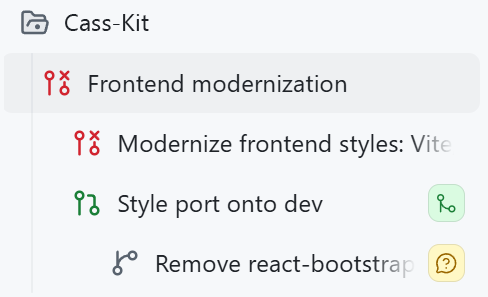
I want you to look at this screenshot for a moment from the GitHub Copilot app. It’s a small one, it’s got a lot of icons, and it tells the most glorious story that I’m really excited about.
This image is a set of stacked sessions. They’re a series of tasks in the same repository, where each session builds off each other!
More on those below, but first, why is this screenshot so magical? We need to go back more than a decade to start. I have this very old repo of mine for a personal app. I first made it ages ago (end of 2014-ish), and it’s done what I want it to do (it’s like a personal “life” dashboard of calendars and smart devices in my home and task management) for all those years. I occasionally do some updates, but those have gotten harder and harder to wrangle.
My dependencies had gotten old. Embarrassingly old. I was using React 15 (which was released in 2016), Less for CSS pre-processing, and a version of react-bootstrap from around that time. Yes, you read that right. Bootstrap. This was old.
Trying to untangle this absolute mess before AI would have taken me weeks. I had tried and given up before. It’s not the largest app in the world, but it’s juuuust big enough that it would be painful, and the juice was simply not worth the squeeze.
…but we do have AI now, and so I fired up the GitHub Copilot app, added the repo, and got started.
First step: Could I one-shot this?
No.
I tried though! This is the prompt that I used in Plan mode:
I want to modernize the frontend for this project. I first wrote a lot of this code more than 10 years ago and it should be cleaned up a lot. I'm thinking we start either using Tailwind or just vanilla CSS (please vet everything to help me decide), we remove all Less (etc), and clean everything up accessibility-wise and responsiveness-wise. Right now I really want to just focus on styles, and then slowly but surely organize and consolidate the React functionality. It might be worth modernizing dependencies, too. Let's come up with a plan around this before diving in.

1. Nothing is sacred, it's okay if we have to completely start over some parts
2. Links should change colors and add underlines on hover/focus
3. Input boxes should have a smaller border radius in general, and their labels should be cleaner
4. There should be good wrapping and a max-width on containers so that an input box doesn't span an entire wide monitor.
I passed this into Claude Opus 4.8 got a Rubber Duck review from GPT-5.5, and had to do quite a bit of back-and-forth to make decisions. Once I got to a place I was happy with, I hit “go” and let the app go to town on my project to see if it would work!
…it didn’t, and it was my fault.
Second step: Realizing I had tried this before
So, remember when I said I’d “tried and given up before?” Turns out, I actually had an old devbranch where I actually had modernized some parts, and didn’t realize the compatibility issues I’d run into.
But, that was a good thing!
When I ran the new version from this session, I realized that I was branching off main, but that my current deployment that I was using regularly was using my partially updated version on dev. So, some wanted features that I had made for myself needed to be included in this set of changes. But, the changes were just big enough that I actually had to apply those changes to the devbranch to save my sanity a bit, rather than pull in the devchanges to main.
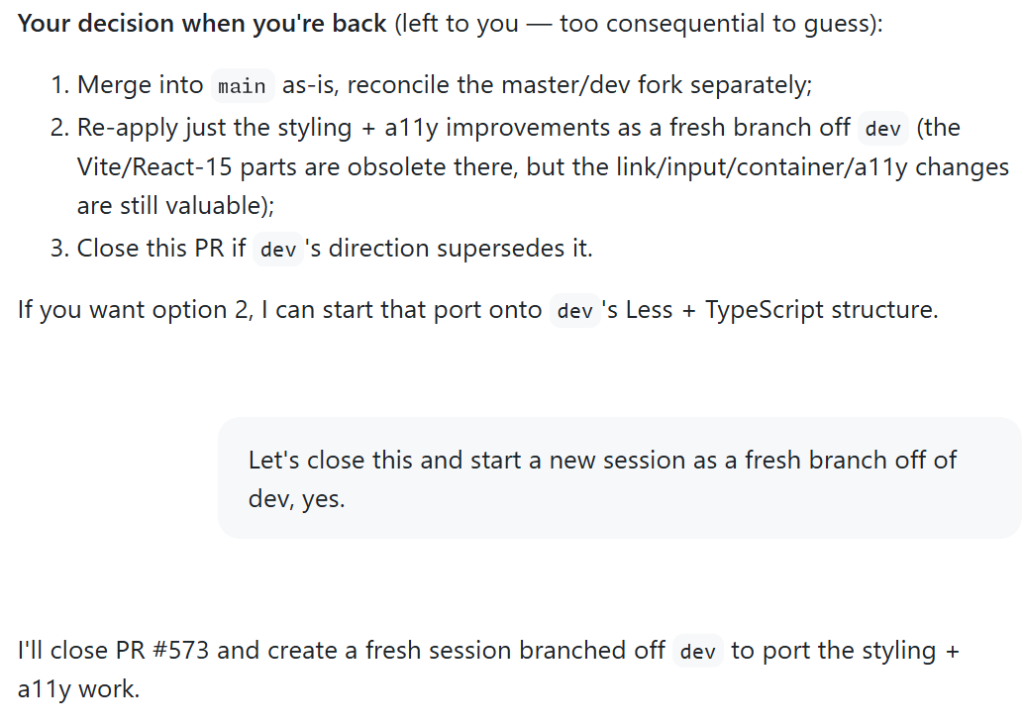
Pre-AI… my word, this would have made me pull my hair out in frustration. I was admittedly frustrated here, too. I had spent time and tokens trying to get this running with what I thought was a decent plan. But! I was able to switch gears (and sessions) with a simple ask, which was way cooler than I expected it to be:
All was not wasted! Copilot made a new session for me, closed the pull request I had attempted, and ported my styling decisions to changes it was applying to the dev branch.
Third step: Findings after testing
Whew, okay, so I had a good branch going, and a pull request I was decently happy with. As I started testing, though, I couldn’t help but notice some old warnings in my console.
My heart filled with dread as I saw old references to findDOMNodeand componentWillReceiveProps, functions I personally hadn’t touched in years and years. Ugh.
Those references were not in my codebase as much anymore, but they were in react-bootstrap. I opened up Plan mode again, because I needed to figure out if an upgrade would work, or if I should remove the library entirely:
Do you think we should remove react-bootstrap entirely (and replace with a modern alternative), or just upgrade/migrate existing components?
Running this gave me a decent plan, talked through the options, and recommended replacing the library entirely.
Fourth step: Stacking a session on top of the other
I needed to make sure my changes were safe from the existing work, but the react-bootstrap replacement felt like a lot of scope creep for what I was currently doing.
I’ve found that in a lot of my “agentic” engineering work, it’s particularly hard to avoid that kind of scope creep. Because I don’t have to write all the code myself, it’s so tempting to make 10,000 line pull requests that take care of all of the things I want to do! Which is really just a new form of procrastination, ha.
So, instead of making this mega pull request for myself to test, I broke it up with a new session, and prompted:
Let's make a pull request for the existing work, and then start a new session for this react-bootstrap replacement work that will branch off this existing work here, and be a separate pull request to merge into dev after this one.
This is the part that felt magical enough to make me want to write this blog post. The GitHub Copilot app:
Made a pull request for all of my current changes off dev
Made a “stacked session” for react-bootstrap removal (it took the previous context, made a session to run after the existing session, created a plan, had me approve the plan, and ran)
THIS WAS SO COOL. Stacked sessions and stacked pull requests? Is this the future?
YES.
In case you don’t get what that means by name: A stack is a series of pull requests in the same repository where each pull request targets the branch of the pull request below it, forming an ordered chain that ultimately lands on your main branch.
In my case, not only did the sessions follow each other, but their changes did too!
Fifth step: Sailing off into the sunset with stacked pull requests
I know I’m being somewhat cheeky with my excitement, but my happiness is sincere. The ease of shipping these changes was a delightful experience after neglecting my old codebase for ages.
Let’s look at that first screenshot again: I’ll walk you through it.
At the top, you can see the repo I pulled in.
Next “Frontend modernization” is the initial session name.
That next layer nested in is the first attempt at a pull request, that we ultimately didn’t ship (hence the red icon).
The next layer nested at the same level is where we got a working pull request for the devbranch.
The nested session below that is the draft pull request in progress, with the react-bootstrap changes.
Software development has never been smooth. But this project was made a whole lot easier with these modern tools.
If you’re looking to modernize your own codebases, give this a try!
Check out pull request stacks anywhere you commit code on GitHub, and stacked sessions in the GitHub Copilot app >
Conductor has evolved from a Gemini CLI extension into a portable plugin, bringing conversational Spec-Driven Development (SDD) to ecosystems like Antigravity CLI and Claude. Rather than relying on strict command sequences, developers can now chat naturally with their AI...
Conductor has evolved from a Gemini CLI extension into a portable plugin, bringing conversational Spec-Driven Development (SDD) to ecosystems like Antigravity CLI and Claude. Rather than relying on strict command sequences, developers can now chat naturally with their AI assistant while it dynamically manages persistent markdown artifacts (like spec.md and plan.md) in the background. This update eliminates workflow friction while ensuring your repository remains a version-controlled, single source of truth for your project's architecture and state across different AI tools.
A practical GitHub Copilot workflow for prototyping, planning, implementing, and reviewing software without chasing every new AI tool. The post The harness is all you need (mostly) appeared first on The GitHub Blog.
If you’re feeling overwhelmed by AI right now, you’re not alone.
Every day it seems there is a new tool, new MCP, new model, new skill, new workflow, new feature, new social post that is some form of “Hey look! I have completely figured out AI with this one weird prompt.”
I…don’t believe you.
I work with AI every single day, and what I’m finding is that less is way more. It’s not about what I install or configure or trick the agent into doing that makes any real difference. That stuff is interesting, but at the end of the day it feels like gimmicks.
I see the biggest gains in my productivity from how I use the harness and how well I understand it.
So in this post, I’m sharing you a simple workflow that you can use to drastically improve your effectiveness with AI just by using existing features of GitHub Copilot. No weird prompts. No skill everyone else seems to know about. Just the harness. The harness is all you need—mostly.
1. Pick a tool, any tool
This is an obvious one, right? Pick a tool! It’s so easy!
The good news is that these experiences are increasingly being centralized on the same harness. The details can differ by tool, but the core workflow is consistent. Learn the harness once, use it everywhere.
That said, I do believe that learning the harness is key, and the best way to learn it is to be as close to it as possible. So if you are just starting out, I’d recommend beginning with the GitHub Copilot CLI. It’s a terminal interface, which means it’s just text. There isn’t much UI to learn. You enter a prompt. The agent does things. But the interaction is more direct, immediate, and, frankly, very satisfying.
For this demonstration, I’ll be using the new GitHub Copilot app. But the harness that app uses is the exact same thing you’ll be using if you are using the GitHub Copilot CLI, Visual Studio Code and many other places you can find GitHub Copilot.
2. Turn on YOLO mode
YOLO mode is also known as “Allow All.” This lets the agent execute any command without asking permission. This can vary depending on the tool you are using, but for most it is simply an /allow-all command in the chat. Otherwise, the agent is going to stop and wait for your approval every single time it needs to do some work.
Agents need autonomy for you to see an increase in productivity. If you have to approve everything the agent does, you might as well just do it yourself. Besides, that’s a miserable user experience. Nobody wants to be relegated to sitting at a desk pressing the “Approve” button all day. And pressing “Approve” over and over just trains you not to read what you are being asked to approve, which defeats the purpose.
You want to be safe with agents, though. Bad things happen to good people. When using YOLO mode, you don’t want to run the agent on your local machine. This is especially true when you are using them at work—data is private on your organization’s systems, and mistakes can be costly.
One of the most magical things about AI is that you can easily prototype anything and everything up front. Historically, this was not the case. Prototyping was a full phase of a project, and were often a luxury. Now, you can make one with a prompt.
Let’s look at a few examples.
Let’s say we want to build a date picker web component. That seems straightforward, but it’s actually quite complex. Think of all the different things you might want to do with it.
How do you navigate within the component?
What does the selected date look like?
What does a selected range look like?
How does the user navigate between days, months, and years?
Start with a simple prototype and get several variations. I usually start with something like this:
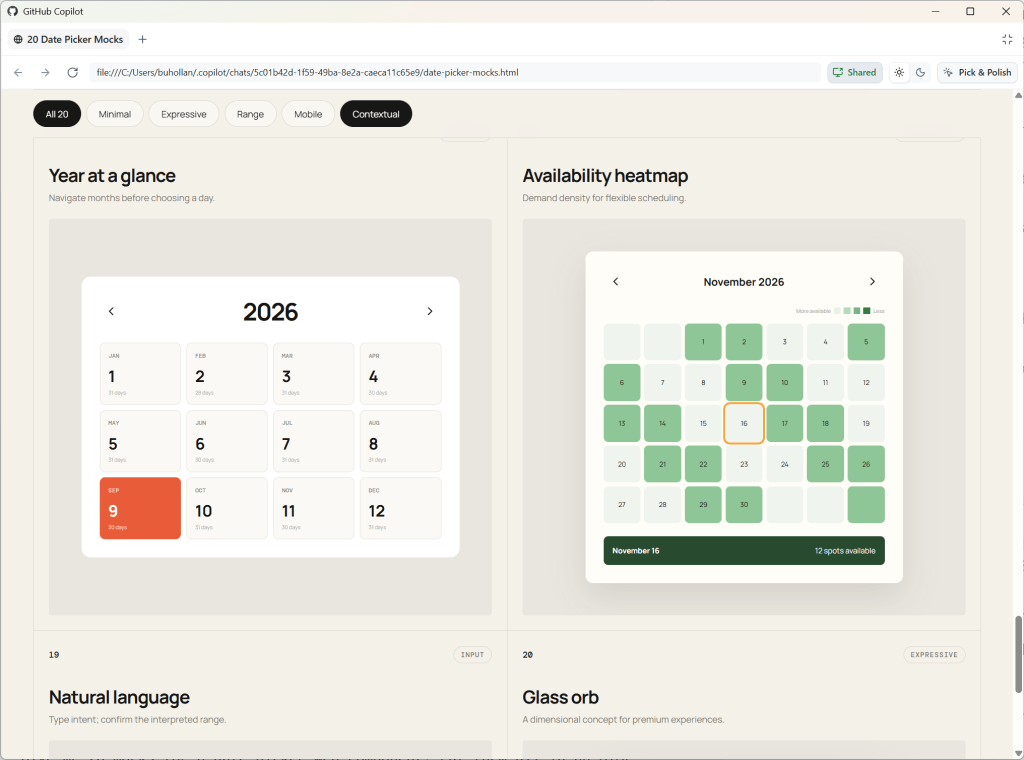
Give me 20 mocks for a date picker web component. Put them all in an HTML file so I can compare.
In this case, the AI generated a bunch of different layouts, but one of them is a mock where it starts with the year view. That’s interesting. I would like my date picker to enable the user to zoom out to the year, then into the month, and finally to the day. These are the kinds of things you don’t consider until you see them.
As humans, we process sensory-rich models like images, shapes, and tangible layouts much faster than dense text. Creating low-effort prototypes early on helps make complex concepts immediately intuitive.
And this applies to non-visual tasks as well.
For instance, if I want to add a new API endpoint, I’ll still create a visual prototype to understand the requirements and constraints before diving into the implementation.
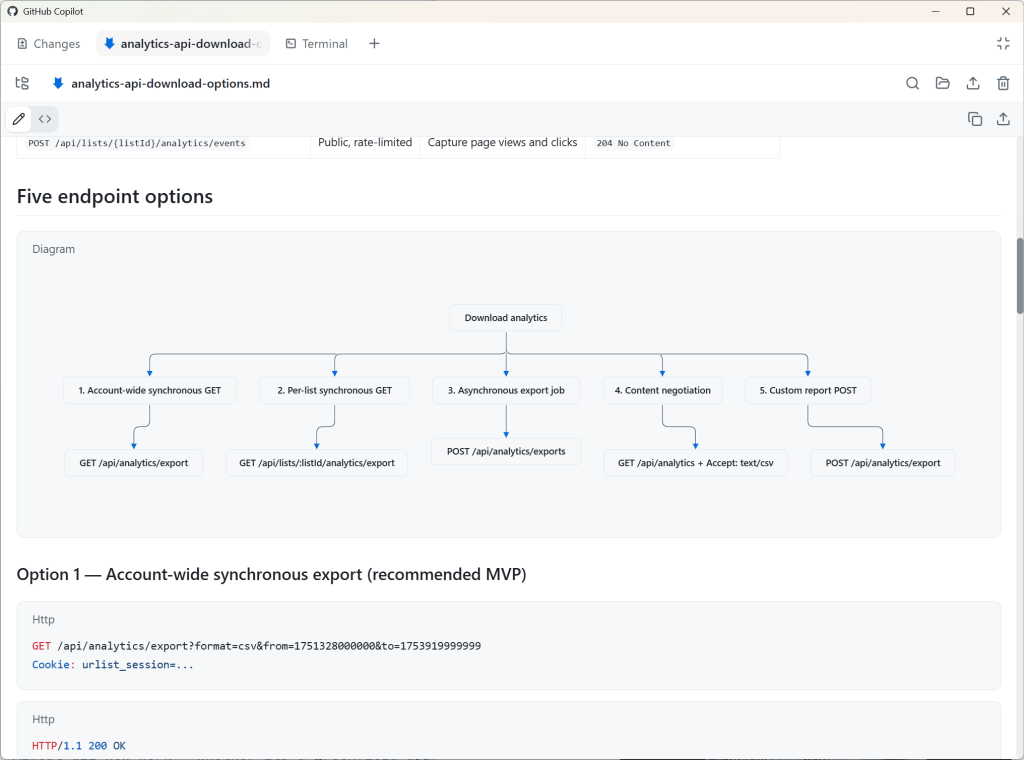
Create a visual mockup of the API for this project. Add five options for how we could handle a new API endpoint that allows the user to download their analytics data.
Since the GitHub Copilot app supports Mermaid diagrams, the agent renders this as Markdown, mapping out five different ways we could implement this API endpoint.
When working with agents, it’s easy to forget that everything is nuanced. Prototyping helps uncover the nuances up front, so you avoid spending valuable time and tokens on rework.
I recommend using a medium-sized model, such as GPT 5.6 Terra or Claude Sonnet, on medium reasoning for most work. I also recommend you stick with whatever model you choose here for the duration of this particular feature, bug, or enhancement. Prompt caching will save you tokens. As long as you don’t switch to a different model or reasoning level, your previous chats remain cached with the model, giving you a discount on future requests.
4. Plan methodically
Now that you know what you actually want versus what you initially thought you wanted, it’s time to plan out the implementation.
Switch to plan mode in GitHub Copilot without starting a new session.
/plan Build a date picker web component. I want the user to be able to zoom in and out of years, months, and days.
That’s a pretty vague prompt, and you’ll likely have more context for the model than I do here, but this is just a demonstration. If you don’t have more context, it’s OK. That’s exactly what this step is for.
In theory, you can get a model to one-shot anything if you compose the perfect prompt with the perfect context in the perfect order. In theory.
But none of us can do that. Planning helps you get closer to that ideal, though, by asking all of the questions that you would need to answer yourself along the way if you were to build this out by hand:
Can the start and end date be the same?
Are partial selections valid?
Should users be able to clear the date?
Should “today” always be a visible option?
Is manual entry allowed?
What format is the date stored in?
Should pasting in dates be allowed?
The list goes on and on. You cannot possibly think of all of these edge cases, but the model can help you identify many of them.
You can make plan mode even more aggressive in the sheer number of questions and edge cases it asks about by installing the “grill-me” skill from Matt Pocock.
/plan /grill-me Build a date picker web component. I want the user to be able to zoom in and out of years, months, and days.
This planning step is critical. The point is not for you to just accept every suggestion from the AI. If you do that, you are negating the value of this planning process. The point is for you to deeply engage with the problem and guide the model. This is where your expertise comes into play.
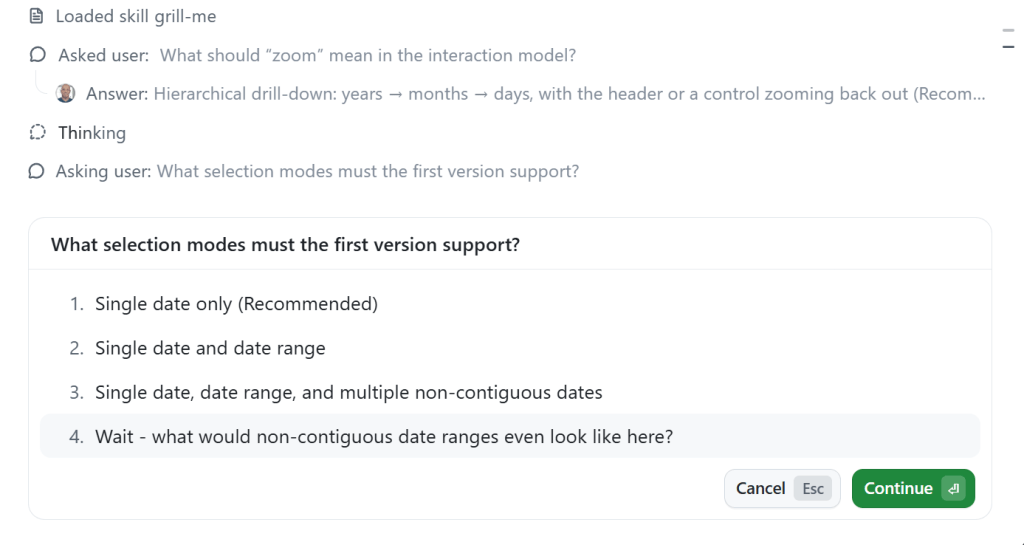
You can also ask the model questions back. In the screenshot below, it asks me about “non-contiguous dates.” I’m pretty sure I know what the model means here, but I’m going to ask for clarification so we’re on the same page.
The planning process will keep going even if you interrupt to ask clarifying questions, etc.
5. Implement with Autopilot
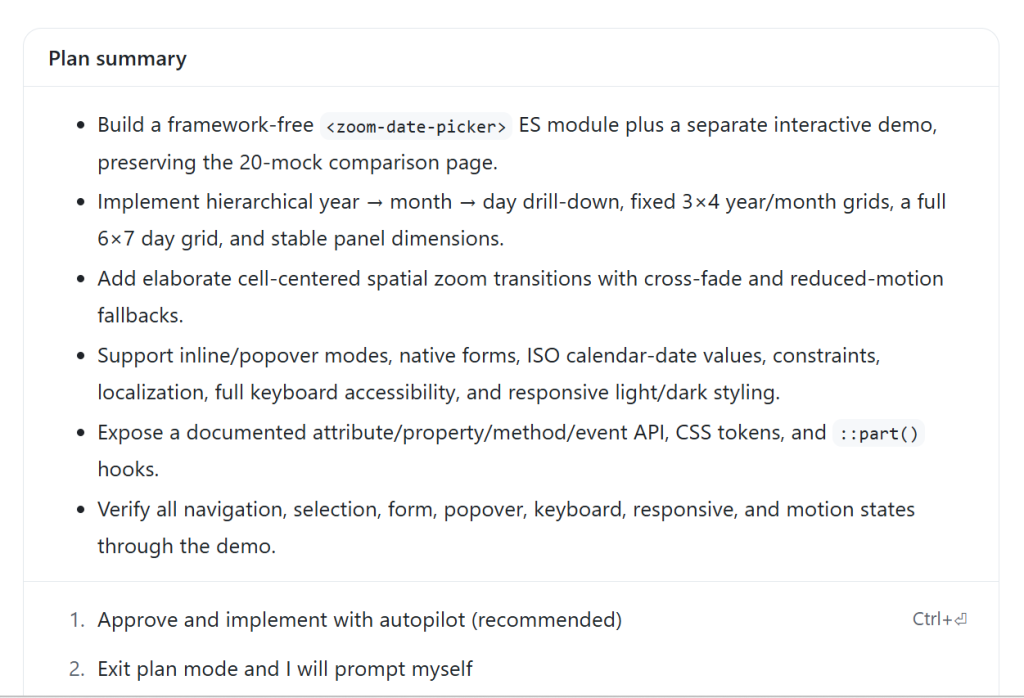
Once the plan is finished, GitHub Copilot will likely prompt you to switch to Autopilot and start implementing the plan.
Autopilot is a built-in loop. It forces the model to continue working by ensuring that it has actually done what it said it would do—which in this case is completing every item in the plan.
GitHub Copilot will automatically act as an orchestrator during this phase. If it needs to read files in the codebase, it will use the “Explore” subagent with a small model. If it deems an action relatively complex, it will likely choose the “General Purpose” subagent with a larger model. While you can get fine-grained control over orchestration in GitHub Copilot with custom agents and instructions, you don’t need to do anything special to get the advantages of subagents and multimodel workflows. This works out of the box, even if you did not know that any of these things existed.
6. Human review and iteration
This is where you get your dopamine hit. You get to see what the AI has created.
But it’s likely that you won’t get exactly what you wanted. That’s normal and expected. The model cannot read your mind, and it is error-prone. Iterate with the model until you get what you actually want. Whether that’s just code or an improved UI, this is the part where your taste will decide the quality of the final product.
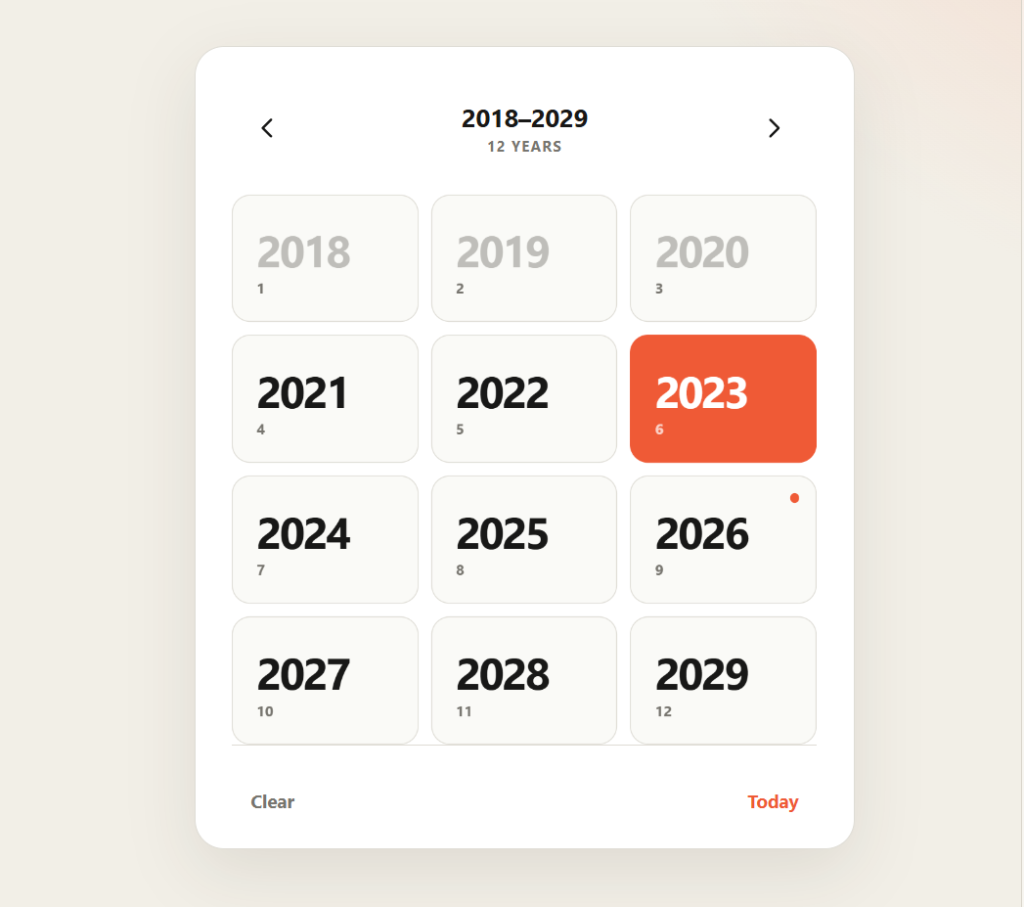
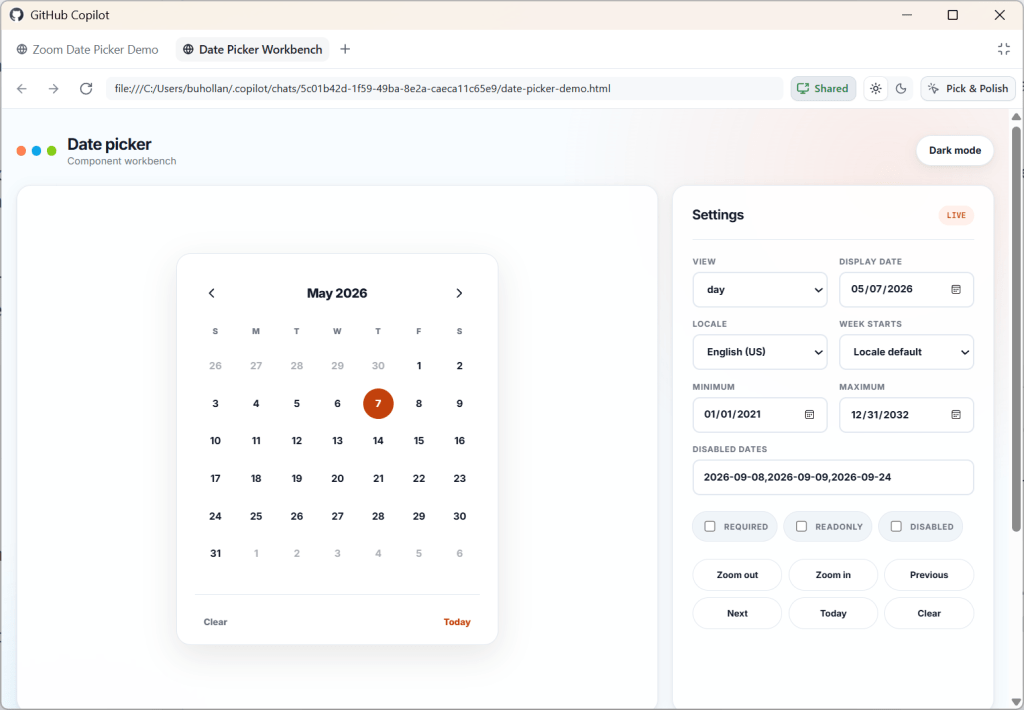
For instance, here’s the date picker that GitHub Copilot gave me.
Already I can see it has some issues:
Animations are inconsistent
Text is unreadable when hovering over a selected date because of color contrast
It doesn’t need to say “12 YEARS” at the top.
When I click “Today”, it doesn’t take me to the day if I’m in the month or year view.
Also, I don’t love the design. It looks a little too much like it was created by AI—because it was!
So here we’re just in follow-up mode. I’m going to use a CSS framework I created called Postrboard. I add it as a skill that just points to the CSS and tells the agent how to use it. You can feel free to install it yourself if you’d like to use it, or you can pick any other CSS framework out there that you like. Giving the model some design guidance is quite helpful, and often a CSS framework is all you need.
ok - we don't need a landing page here - just the component, output and settings panel in a minimal setting. Use the /postboard skill for the design and colors.

For the date picker, when I click on the day, it tries to zoom in, but can't because there is nothing to zoom to. There should be no zoom there.

It doesn't need to say "Zoom Out" at the top

When I mouse over a month or year that contains the selected day, I cannot read the hover text.

When I click "Today" it should take me to that day view, even if I'm on the month or the year.

The months don't need numbers under them and they don't need to be in boxes

Same goes for years. And it doesn't need to say "12 years" at the top."
Notice how conversational this is. Don’t overthink it. When you’re fixing a bunch of small things like this, just give it to the model. If you’ve got the context, you’ve got the prompt.
The most important thing is not to settle for AI output that is “good enough.” Insist on quality. Be ruthless about it. That part is still your responsibility, and knowing what a quality result is from something that isn’t is the value that you bring. No AI will ever replace your human touch and creativity.
Here’s what my final date picker looks like. Scroll to the end of this post to see it in action.
7. Rubber duck the result
After you’ve iterated and are happy with what you’ve created, it’s time to do a final review.
Request a Rubber Duck review from GitHub Copilot. You can do this just by asking for it:
Perform a rubber duck review on this date picker component implementation
In a Rubber Duck review, GitHub Copilot will request a review from a model of a different AI family. For instance, since I was using GPT 5.6 Terra, it requested a review from Sonnet. Different models were trained on different data, so they have different blind spots. A Rubber Duck review helps identify potential issues that might be missed by a single model.
Note that you can use this at any point in this workflow. You can rubber duck prototypes. You can rubber duck plans. It all just depends on if you want a second AI review on something.
And if you want to take this a step further, you can combine rubber duck with Autopilot to get the models to work together in a loop to improve the final result.
/autopilot rubber duck this date picker implementation. When you have the result, review it carefully and make any necessary adjustments. Repeat the rubber duck review until both you and the reviewing model agree that the only items that remain have diminishing returns.
After this step, you will have an even more refined result than before and will have likely identified many extra edge cases. This step does cost more tokens, but you are really battle-hardening the code. Think of it as an investment in your future self who won’t have to deal with these issues because you caught them now.
8. Profit
At this point, you’re ready to stage and commit, or move on to the next feature you want to add along with this pull request.
I’d recommend starting a new chat session for anything you do next that doesn’t have to do with this date picker. You can think of chat sessions as being topical; if you start to diverge too much from the main topic, it’s probably time for a new session.
Here’s the final result from my workflow building the date picker for this post.
I realize that this is a bit of a contrived example, but can we all just pause for a moment and marvel at what we’re able to pull off with AI now? Building a date picker used to be one of the hardest things you could try to do. Just ask any of the heroes out there who have built them.
Things don’t have to be complicated
This simple workflow will be enough for most people. The simplicity also helps you multitask. It’s easier to reason about what agent is in what state and what you were doing last when you keep things simple. Your context window is limited too.
There is so much happening in the AI space right now. There is no upper limit on the things that you can build and experiment with. You can add MCP servers, skills, instructions, and custom agents. You can set up workflows and loops, create agents that prompt agents, and stand up entire virtual dev teams.
But keep in mind that nobody really knows what they are doing right now. We’re all figuring this out as we go. A lot of what is today’s magical incantation for AI will be tomorrow’s anti-pattern.
Just focus on getting a repeatable, high-quality result in the simplest way that you can. Learn the harness and you’ll be just fine.