• maiweb v0.1.0
  • ★
  • Feedback

Anand Ramanathan (RC)

active · last success 2026-08-05 15:26

Visit site ↗ · Feed ↗

  • Anand Ramanathan (RC) rcanand.com ai anand-ramanathan blog developer machine-learning personal rcanand software-dev tech technology 2026-07-17 00:00

    ↗

    A new way to measure LLM value as a combination of intelligence and price - fitted to the market, resistant to cheap-model dominance, and visualized live in ollamadash.

    How do you compare two models when one is slightly smarter but costs ten times more? Raw benchmark scores ignore price entirely, and naive score-per-dollar ratios let cheap, weak models dominate the rankings. I wanted a single number that answers a simple question: for what this model costs, how much intelligence am I actually getting?

    This post describes a new “fair value” metric that combines intelligence and pricing into one score, in a way that stays calibrated as the market moves. The metric was developed in conjunction with Kimi K3, and it is live in my free web tool ollamadash, where you can see it visualized as a radar chart and rank models by it. Here is a shareable view of a subset of top models ranked by value.

    The inputs

    The metric needs exactly two things per model:

    • A score on a 0-100 scale. The primary intelligence metric is the Artificial Analysis Intelligence Index, but any benchmark works - in ollamadash the same formula is applied per benchmark axis (coding, math, agentic tasks, and so on).
    • A price in USD per million tokens. We take max(input_price, output_price) as the single representative price. Cached-token discounts and other pricing nuances are ignored - the point is a fair, simple comparison, not a billing simulation.

    Models with missing or $0 prices are excluded from the computation entirely. A $0 price in the data always means “we don’t know the price”, not “this model is free”, and treating it as free would corrupt the fit for everyone else.

    The formula

    Step 1 - price-adjusted raw value:

    raw = score - λ · log10(price / P_ref)
    
    • P_ref is a reference price of $0.05/M, the point of zero penalty. A model priced at $0.05/M keeps its full score; one at $0.50/M loses λ points; one at $5.00/M loses 2λ.
    • λ (lambda) is fitted from the dataset, not picked by hand. It is the slope of an ordinary least-squares regression of score on log10(price) across all models with a valid score and a positive price, rounded to two decimals and recomputed whenever the underlying data refreshes.

    λ has a nice interpretation: it is the market’s going exchange rate - how many points of intelligence a 10x higher price buys you on average. In the 2026-07-17 snapshot, λ ≈ 10.14 for the intelligence index (other benchmarks range from about 7 to 18). Fitting λ from the data is what keeps the metric fair over time: if intelligence gets cheaper across the board, the slope flattens and the price penalty softens automatically. A hand-picked λ would silently drift out of date.

    Step 2 - min-max scaling to 0-100:

    value = 100 · (raw - min) / (max - min)
    

    where min and max are taken over the same set of priced models, per benchmark. After scaling, 100 is the best value in the dataset and 0 is the worst. (The reference price P_ref has no effect on the scaled result - it shifts all raw values by the same constant, which min-max scaling absorbs - it just keeps the raw numbers interpretable.)

    Because λ is fitted from the same data the metric is scored on, the scaled value is essentially a normalized “beats the market” residual: how far a model sits above (or below) the intelligence-for-price trend line of the whole field.

    Why not just score / price?

    A plain ratio measures cheapness, not value. Prices in the dataset span about four orders of magnitude while useful scores span a factor of about two, so the ratio is dominated by the denominator - cheap, mediocre models float to the top. Raising the score to a power does not fix this either: the exponent required to balance the ranges is so large it makes the metric absurdly sensitive to tiny score differences. The logarithmic price penalty compresses price onto the same scale as the score, so neither variable dominates by range alone.

    Worked examples

    Using the 2026-07-17 snapshot for the intelligence benchmark (λ = 10.14, min = -24.22, max = 32.72):

    model intelligence price raw scaled value
    Grok 4.5 (high) 53.8 $6.00 53.8 - 10.14·log10(120) = 32.72 100.00
    DeepSeek V4 Flash (max effort) 40.3 $0.28 40.3 - 10.14·log10(5.6) = 32.71 99.99
    Kimi K3 57.1 $15.00 57.1 - 10.14·log10(300) = 31.98 98.71
    Claude Fable 5 59.9 $50.00 59.9 - 10.14·log10(1000) = 29.48 94.31
    GPT-4 7.0 $60.00 7.0 - 10.14·log10(1200) = -24.22 0.00

    Two things worth noticing. First, the top of the table is a photo finish between a premium model (Grok 4.5) and a budget model (DeepSeek V4 Flash) - the metric is genuinely neutral about how you get your value. Second, GPT-4 anchors the bottom: once state of the art, now both weak and expensive relative to the market, so it defines the zero point.

    See it live in ollamadash

    The metric powers the Compare view in ollamadash, my free dashboard for exploring and comparing LLMs across providers. In value mode, every axis of the radar chart shows the value-adjusted score for that benchmark instead of the raw score, and each model in the legend carries its overall value score:
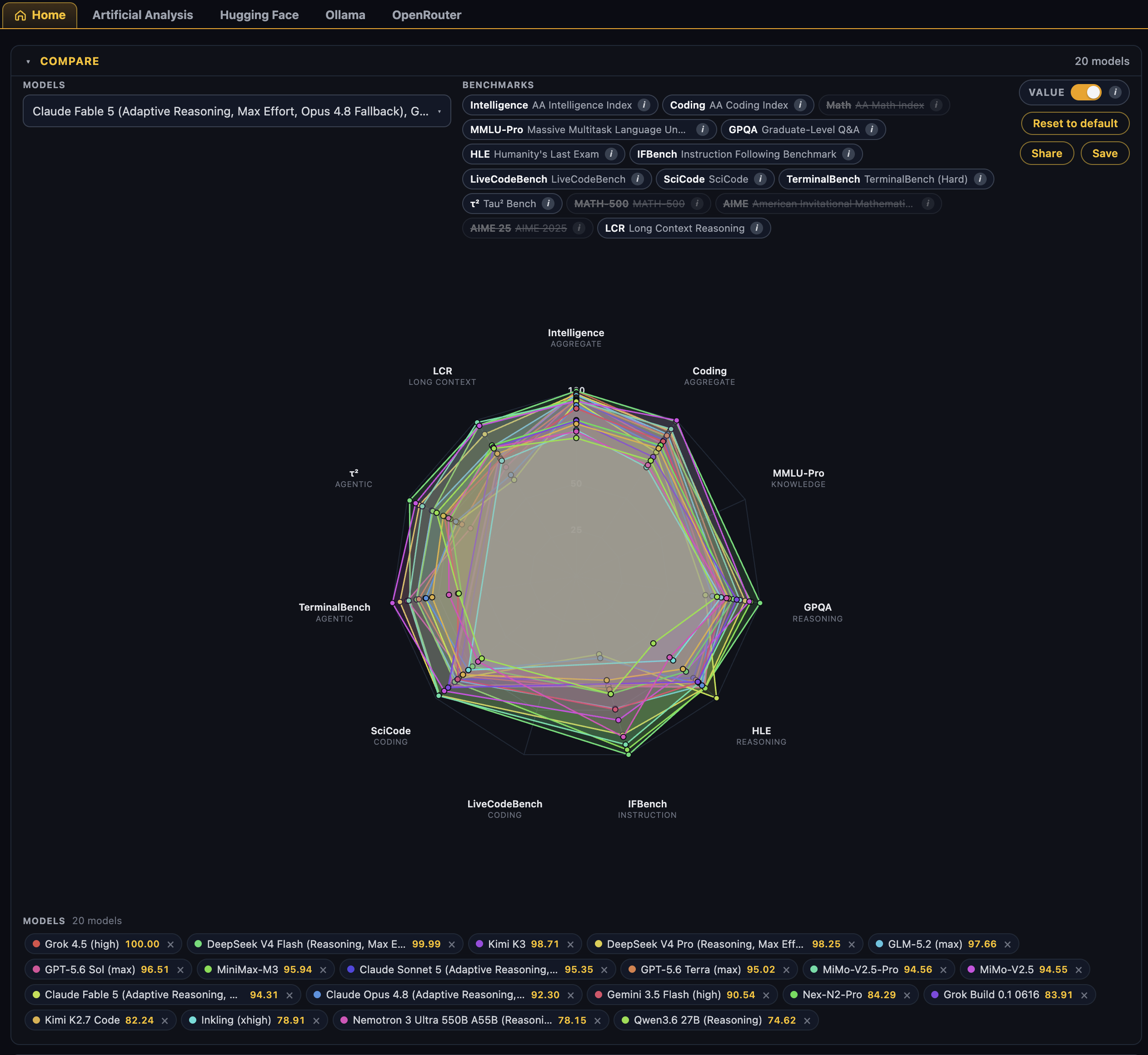
    Compare radar chart in value mode - 20 models ranked by the fair value metric

    A detail that is easy to miss: the order of models in the legend below the compare area is the ranking by value. Grok 4.5 at 100.00 first, DeepSeek V4 Flash at 99.99 second, and so on down the list. Flip the VALUE toggle off (top right of the compare area) and the exact same set of models re-sorts to a ranking by raw intelligence - a quick way to see who is winning on capability versus who is winning on capability-per-dollar.

    Hovering a legend entry shows the full breakdown: the scaled value score plus the raw computation, something like raw 31.98 = 57.1 - 10.14·log10($15.00 / $0.05), so the number is never a black box.

    Try it yourself

    The best way to get a feel for the metric is to poke at it:

    • Open the compare view and toggle VALUE on and off to see the ranking flip between value and pure intelligence.
    • Swap models in and out of the comparison - pick your daily drivers and see where they actually land on the value curve.
    • Change the benchmark axes. λ is fitted per benchmark, so a model that is great value on coding can be mediocre value on math - the radar makes that visible immediately.
    • Share your setup with the Save/Share buttons - the full comparison state is encoded in the URL, like the link in this post.

    The implementation lives in the ollamadash source (app.js for the live version, mirrored in Python in the test suite), and the exact spec is in metric.md in that repo. If you have ideas for improving the metric - different anchors, robust regression for λ, per-task weightings - I would love to hear them.
  • Anand Ramanathan (RC) rcanand.com ai anand-ramanathan blog developer machine-learning personal rcanand software-dev tech technology 2026-06-30 00:00

    ↗

    Mac Finder is grossly underconfigured by default for power users. These are some (AI generated) tweaks to customize it. Warning: Some are verified, others are not, so review each one carefully before using.

    This is a list of AI generated power user tricks to customize Mac Finder.

    ❗ AI generated - can be risky. Be careful to verify each one and using only after assuring that it is safe and is what you want. ❗ Not all steps apply to everyone - I picked a few and applied them for myself. Others may find other things they like, so keeping most of the AI generated tricks here.

    macOS Finder Power User Cheatsheet

    Commands marked killall Finder require a Finder restart to take effect. ⚠️ Some legacy defaults write keys may be silent no-ops on macOS 26 Tahoe — always verify with defaults read com.apple.finder.


    Ranked by Power User Utility


    1. Show Hidden Files (dotfiles)

    defaults write com.apple.finder AppleShowAllFiles -bool true; killall Finder
    

    Toggle on the fly: Cmd + Shift + . — no restart needed. This is the one toggle you’ll use constantly.


    2. Always Show All File Extensions

    defaults write NSGlobalDomain AppleShowAllExtensions -bool true; killall Finder
    

    Domain is NSGlobalDomain, not com.apple.finder. Affects all apps.


    3. Show Full POSIX Path in Window Title

    defaults write com.apple.finder _FXShowPosixPathInTitle -bool true; killall Finder
    

    Title bar shows /Users/you/projects/app/src instead of just src.


    4. Show Path Bar (Bottom Breadcrumb)

    defaults write com.apple.finder ShowPathbar -bool true && killall cfprefsd && sleep 1 && killall Finder
    

    Toggle: Cmd + Option + P. Right-click any segment in the path bar to jump there, open in Terminal, or copy path.


    5. Show Status Bar (Item Count + Disk Space)

    defaults write com.apple.finder ShowStatusBar -bool true; killall Finder
    

    Toggle: Cmd + /


    6. Search Current Folder by Default (Not “This Mac”)

    defaults write com.apple.finder FXDefaultSearchScope -string "SCcf"; killall Finder
    

    SCcf = current folder. SCev = This Mac (Apple’s default). Or set via GUI: Finder → Settings → Advanced → “When performing a search” → Search the Current Folder.


    7. Set Default View Mode (List / Column / Icon / Gallery)

    defaults write com.apple.finder FXPreferredViewStyle -string "Nlsv"; killall Finder
    

    View codes: Nlsv = List, clmv = Column, icnv = Icon, glyv = Gallery.

    ⚠️ This sets the default for new windows. Existing folders remember their own view via .DS_Store. To force globally, see #19 (nuke .DS_Store files).


    8. Keep Folders on Top When Sorting by Name

    defaults write com.apple.finder _FXSortFoldersFirst -bool true; killall Finder
    

    Or GUI: Finder → Settings → Advanced → “Keep folders on top: In windows when sorting by name”. Also has a separate checkbox for Desktop.


    9. Copy File Path to Clipboard (Native — No Automator Needed)

    Cmd + Option + C — copies POSIX path of selected item(s). Or: hold Option + right-click → “Copy [filename] as Pathname”. Or: drag file/folder from Finder into Terminal (auto-escaped path).


    10. Go to Any Path (Including Hidden Folders)

    Cmd + Shift + G — type any POSIX path: ~/.ssh, /usr/local/bin, ~/Library/Caches. Supports tab-completion.


    11. Reveal ~/Library Folder

    chflags nohidden ~/Library
    

    No killall needed. Also accessible via Go → Go to Folder (Cmd+Shift+G) → ~/Library.


    12. Reveal /Volumes Folder

    sudo chflags nohidden /Volumes
    

    13. Disable .DS_Store on Network Volumes

    defaults write com.apple.desktopservices DSDontWriteNetworkStores -bool true
    

    14. Disable .DS_Store on USB Volumes (new — verified)

    defaults write com.apple.desktopservices DSDontWriteUSBStores -bool true
    

    This key exists and is confirmed in multiple dotfile repos (Mathias Bynens, nickytonline).


    15. Disable Extension Change Warning

    defaults write com.apple.finder FXEnableExtensionChangeWarning -bool false; killall Finder
    

    Stops the “Are you sure you want to change the extension?” dialog.


    16. Disable Empty Trash Warning

    defaults write com.apple.finder WarnOnEmptyTrash -bool false; killall Finder
    

    Also: Cmd + Option + Shift + Delete empties trash with no confirmation dialog (one-time, no setting change).


    17. Allow Quitting Finder via Cmd+Q

    defaults write com.apple.finder QuitMenuItem -bool true; killall Finder
    

    Adds “Quit Finder” to the Finder menu. Quitting hides desktop icons until Finder relaunches.


    18. Disable All Finder Animations (Snappier Navigation)

    defaults write com.apple.finder DisableAllAnimations -bool true; killall Finder
    

    Disables window open/close animations, Get Info animations, etc.


    19. Force ALL Folders to Use Your Default View (Nuke .DS_Store)

    # Step 1: Set your desired view options in Finder → Cmd+J → "Use as Defaults"
    # Step 2: Delete all .DS_Store files so every folder falls back to defaults:
    find ~ -name .DS_Store -delete 2>/dev/null
    # and/or target specific folders/volumes
    # find ~/Projects ~/Documents ~/Desktop -name .DS_Store -delete 2>/dev/null
    killall Finder
    

    ⚠️ Aggressive — wipes per-folder view memories everywhere. Every folder will now use your default view style. On macOS 15 Sequoia+, the “Use as Defaults” button propagates more reliably than older versions, so this nuke may be less necessary. ⚠️ Also: changes the modified time on all folders that had .DS_Store in it, so use ONLY if ok with that. ⚠️ Dont use / instead of ~ : Using / will require sudo, will wipe out everything but can take a very long time, depending on your external volumes, etc.


    20. Column Auto-Resize to Fit Filenames (new — verified macOS 26.1+)

    macOS 26.1 Tahoe+: View → Show View Options (in Column View) → check “Resize columns to fit filenames”. This is a universal setting for all column view windows.

    macOS 13 Ventura – 15 Sequoia (hidden setting):

    defaults write com.apple.finder _FXEnableColumnAutoSizing -bool YES; killall Finder
    

    ⚠️ Known limitation: only resizes based on currently visible filenames, not the longest in the entire folder. Doesn’t dynamically resize when scrolling.


    21. Expand All “Get Info” Panes by Default

    defaults write com.apple.finder FXInfoPanesExpanded -dict \
        General -bool true \
        OpenWith -bool true \
        Privileges -bool true; killall Finder
    

    Get Info window opens with General, Open With, and Sharing & Permissions sections all expanded.


    22. Auto-Open Finder Window When Volume Is Mounted

    defaults write com.apple.frameworks.diskimages auto-open-ro-root -bool true
    defaults write com.apple.frameworks.diskimages auto-open-rw-root -bool true
    defaults write com.apple.finder OpenWindowForNewRemovableDisk -bool true; killall Finder
    

    23. Set New Finder Window Target (Home Folder Example)

    defaults write com.apple.finder NewWindowTarget -string "PfLo"
    defaults write com.apple.finder NewWindowTargetPath -string "file://${HOME}/"
    killall Finder
    

    PfDe = Desktop. PfLo = custom path (use with NewWindowTargetPath). Or set via GUI: Finder → Settings → General → “New Finder windows show”.


    24. Show Desktop Items (Drives, Servers, Media)

    defaults write com.apple.finder ShowHardDrivesOnDesktop -bool true
    defaults write com.apple.finder ShowExternalHardDrivesOnDesktop -bool true
    defaults write com.apple.finder ShowMountedServersOnDesktop -bool true
    defaults write com.apple.finder ShowRemovableMediaOnDesktop -bool true
    killall Finder
    

    Or GUI: Finder → Settings → General → “Show these items on the desktop”.


    25. Expand Save/Open Dialogs by Default

    defaults write NSGlobalDomain NSNavPanelExpandedStateForSaveMode -bool true
    defaults write NSGlobalDomain NSNavPanelExpandedStateForOpenMode -bool true
    defaults write NSGlobalDomain PMPrintingExpandedStateForPrint -bool true
    defaults write NSGlobalDomain PMPrintingExpandedStateForPrint2 -bool true
    

    All save/open/print dialogs open in expanded (full) view.


    26. Enable Spring-Loaded Folders

    defaults write com.apple.finder SpringloadingEnabled -bool true; killall Finder
    

    Drag a file onto a folder, hover, and the folder springs open. Also set delay via GUI: Finder → Settings → General → Spring-loading delay.


    27. Disable Window Zoom Animation

    defaults write com.apple.finder AnimateWindowZoom -bool false; killall Finder
    

    28. Show Alternating Row Stripes in List View

    defaults write com.apple.finder FXListViewStripes -boolean true; killall Finder
    

    29. Control Which Columns Show in Search Results

    defaults write com.apple.finder SearchViewSettings.ListViewSettings.columns.version.visible -boolean true
    defaults write com.apple.finder SearchViewSettings.ListViewSettings.columns.size.visible -boolean true
    defaults write com.apple.finder SearchViewSettings.ListViewSettings.columns.comments.visible -boolean true
    killall Finder
    

    30. Sidebar Icon Size (Small / Medium / Large)

    defaults write NSGlobalDomain NSTableViewDefaultSizeMode -int 1  # Small
    # -int 2 = Medium (default)
    # -int 3 = Large
    killall Finder
    

    31. Set List View Column Order, Width & Visibility via AppleScript

    AppleScript can control columns, widths, sort direction, and visibility — but only for the currently open window. To apply to many folders, you must script a loop (see #32).

    tell application "Finder"
        activate
        tell list view options of the front Finder window
            set properties to {calculates folder sizes:true, shows icon preview:false, ¬
                icon size:small icon, text size:12, uses relative dates:true, sort column:name column}
            
            tell column name column
                set properties to {index:1, sort direction:normal, width:280}
            end tell
            tell column size column
                set properties to {index:2, sort direction:normal, width:72, visible:true}
            end tell
            tell column modification date column
                set properties to {index:3, sort direction:normal, width:120, visible:true}
            end tell
            tell column creation date column
                set properties to {index:4, sort direction:normal, width:120, visible:true}
            end tell
            tell column kind column
                set properties to {index:5, sort direction:normal, width:120, visible:true}
            end tell
            tell column label column
                set properties to {index:6, sort direction:normal, width:72, visible:false}
            end tell
            tell column version column
                set properties to {index:7, sort direction:normal, width:72, visible:false}
            end tell
            tell column comment column
                set properties to {index:8, sort direction:normal, width:240, visible:false}
            end tell
        end tell
        tell the front Finder window
            set current view to list view
        end tell
    end tell
    

    ⚠️ Changing index (column order) works but may require navigating away and back to see the change render. Column width must be between minimum and maximum values enforced by Finder. Some columns like “Date Added” and “Date Last Opened” are not accessible via AppleScript’s list view options — use System Events UI scripting for those.


    32. Apply List View Settings Recursively to All Subfolders (AppleScript)

    Save as apply-list-view.applescript, adjust column settings in resetFinderWindow(), then run from Script Editor with the target folder open in Finder:

    set shortDelay to 0.2
    set mediumDelay to 0.5
    
    tell application "Finder"
        set targetFolder to target of front Finder window
        try
            set theSubfolders to every folder of the entire contents of targetFolder
            if class of theSubfolders is not list then set theSubfolders to theSubfolders as list
        on error
            set theSubfolders to {}
        end try
    end tell
    
    set theFolders to (targetFolder as list) & theSubfolders
    set progress total steps to (count of theFolders)
    set progress completed steps to 0
    
    repeat with aFolder in theFolders
        tell application "Finder" to set the target of Finder window 1 to aFolder
        resetFinderWindow()
        set progress completed steps to (progress completed steps) + 1
    end repeat
    
    on resetFinderWindow()
        tell application "Finder"
            tell front Finder window
                set current view to list view
            end tell
            tell application "System Events" to tell process "Finder"
                delay shortDelay
                tell menu item "Show View Options" of menu of menu bar item "View" of menu bar 1 to if exists then click
                delay mediumDelay
                repeat with boxName in {"Date Modified", "Date Created", "Date Last Opened", "Date Added", "Size", "Kind", "Version", "Comments", "Tags"}
                    if boxName is in {"Date Modified", "Date Created", "Size", "Kind"} then
                        tell checkbox boxName of group 1 of window 1 to if value is 0 then click
                    else
                        tell checkbox boxName of group 1 of window 1 to if value is 1 then click
                    end if
                end repeat
                delay mediumDelay
                tell menu item "Hide View Options" of menu of menu bar item "View" of menu bar 1 to if exists then click
                delay mediumDelay
            end tell
            tell front Finder window
                set options to its list view options
            end tell
            tell options
                set properties of column name column to {index:1, width:280}
                set properties of column size column to {index:2, width:72}
                set properties of column modification date column to {index:3, width:120}
                set properties of column creation date column to {index:4, width:120}
                set properties of column kind column to {index:5, width:120}
                set properties of column label column to {index:6, width:0}
                set properties of column version column to {index:7, width:0}
                set properties of column comment column to {index:8, width:0}
            end tell
        end tell
    end resetFinderWindow
    

    ⚠️ Slow for large directory trees — Finder must open each folder. Best run on specific project directories, not your entire home folder.


    33. Create Smart Folders with Raw mdfind Queries

    Smart Folders are .savedSearch plist files in ~/Library/Saved Searches/. The Finder GUI supports a “Raw Query” criteria that lets you embed mdfind-style Spotlight Query Language:

    1. Finder → File → New Smart Folder (Cmd + Option + N)
    2. Click + to add criteria, then click the first dropdown → Other…
    3. Search for “Raw query” and select it
    4. Enter any mdfind-compatible query, e.g.:
      • kMDItemFSCreationDate > $time.now(-300) — files created in last 5 min
      • kMDItemContentType == "com.adobe.pdf" && kMDItemFSSize > 1000000 — PDFs > 1MB
      • kMDItemUserTags == "Red" — files tagged Red
    5. Click Save, name it, check “Add to Sidebar”

    ⚠️ Hold Option (⌥) while criteria are visible to change + into …, which lets you add “Any of the following are true” (OR logic) groups. ⚠️ There is no undo in Smart Folder editing — changes apply immediately. Duplicate .savedSearch files before modifying complex ones.


    34. mdfind — Spotlight Search from the Shell

    # Basic content search
    mdfind "search term"
    
    # Filename-only search
    mdfind -name "config"
    
    # Search within specific directory
    mdfind -onlyin ~/Projects "kMDItemContentType == 'com.adobe.pdf'"
    
    # Live-updating results (ctrl-C to stop)
    mdfind -live "kMDItemFSCreationDate > $time.now(-60)"
    
    # Count only
    mdfind -count "kMDItemUserTags == 'Red'"
    
    # Files modified in last 3 days in home folder
    mdfind -onlyin ~ 'kMDItemFSContentChangeDate >= $time.today(-3)'
    
    # All folders with "doc" in name
    mdfind 'kind:folder' -name doc
    
    # Tagged Red AND is a folder
    mdfind 'kMDItemUserTags == "Red" && kMDItemContentType == "public.folder"'
    
    # All images
    mdfind 'kMDItemContentType == "public.image"'
    

    Key attributes: kMDItemDisplayName, kMDItemFSName, kMDItemFSSize, kMDItemFSCreationDate, kMDItemFSContentChangeDate, kMDItemContentType, kMDItemKind, kMDItemUserTags, kMDItemTextContent Modifiers: c = case-insensitive, d = diacritic-insensitive, w = word-based. Example: kMDItemDisplayName ==[c] "steve" Use mdls /path/to/file to see all available metadata attributes for a specific file.


    35. Create “Copy Full Path” Quick Action (Automator)

    1. Automator → New → Quick Action
    2. Set “Workflow receives current: files or folders in Finder.app”
    3. Add “Run Shell Script” action. Set shell to /bin/zsh, pass input “as arguments”:
      printf '%s\n' "$@" | pbcopy
      
    4. Save as “Copy Full Path”
    5. Right-click any file in Finder → Quick Actions → Copy Full Path

    36. Create “Open in Terminal” Quick Action (Automator)

    1. Automator → New → Quick Action
    2. Set “Workflow receives current: folders in Finder.app”
    3. Add “Run AppleScript” action:
      on run {input, parameters}
          repeat with theItem in input
              set thePath to POSIX path of theItem
              tell application "Terminal"
                  activate
                  do script "cd " & quoted form of thePath
              end tell
          end repeat
          return input
      end run
      
    4. Save as “Open in Terminal”
    5. Assign keyboard shortcut: System Settings → Keyboard → Keyboard Shortcuts → Services → Files and Folders → Open in Terminal

    37. Shortcuts App Quick Actions (Alternative to Automator)

    The Shortcuts app (macOS 12+) can also create Quick Actions:

    1. Open Shortcuts → create new shortcut
    2. Click Details (ⓘ) → check “Use as Quick Action” → check Finder
    3. Build workflow with drag-and-drop actions
    4. Enable in System Settings → Privacy & Security → Extensions → Finder

    ⚠️ Some users report Shortcuts-based Quick Actions don’t always appear in Finder’s right-click menu, while Automator-based ones reliably do. For Finder-specific actions, Automator is currently more reliable.


    38. Custom Keyboard Shortcuts for Any Finder Menu Item

    System Settings → Keyboard → Keyboard Shortcuts → App Shortcuts → +

    • App: Finder
    • Menu Title: exact name as it appears in the menu (e.g., “New Smart Folder”, “Go to Folder”, “Compress”)
    • Assign any available key combo

    39. Custom Finder Toolbar

    Finder → View → Customize Toolbar (Cmd + Option + ;):

    • Add: Path (breadcrumb dropdown), New Folder, Delete, Connect, Get Info, Quick Look
    • Drag-reorder, remove defaults you don’t use

    40. Open Folders in Tabs Instead of New Windows

    Finder → Settings → General → “Open folders in tabs instead of new windows” ✓

    • Cmd + T — new tab
    • Cmd + Shift + T — new tab with same folder
    • Cmd + W — close tab
    • Window → Merge All Windows — combine multiple windows into tabs

    41. Key Keyboard Shortcuts Reference

    Shortcut Action
    Cmd + Shift + . Toggle hidden files
    Cmd + Option + C Copy path to clipboard
    Cmd + Shift + G Go to folder (type any path)
    Cmd + Option + N New Smart Folder
    Cmd + Option + P Toggle path bar
    Cmd + / Toggle status bar
    Cmd + Shift + P Toggle preview pane
    Cmd + J Show View Options
    Cmd + 1/2/3/4 Icon / List / Column / Gallery view
    Cmd + Option + I Inspector (persistent Get Info — updates as selection changes)
    Cmd + Option + Y Quick Look slideshow
    Space Quick Look preview
    Cmd + Option + V Move (instead of copy) — “cut and paste”
    Cmd + Shift + N New folder
    Cmd + Option + Shift + N New folder with selection
    Cmd + Delete Move to Trash
    Cmd + Shift + Delete Empty Trash
    Cmd + Option + Shift + Delete Empty Trash (no confirmation)
    Cmd + Up Go to parent folder
    Cmd + Ctrl + Up Open parent in new window/tab
    Cmd + Down Open selected item
    Cmd + [ / Cmd + ] Back / Forward
    Cmd + click window title Breadcrumb dropdown of enclosing folders
    Return Rename selected file
    Cmd + D Duplicate
    Cmd + Ctrl + A Make alias
    Cmd + Shift + C/D/H/O/U/I/K Computer / Desktop / Home / Documents / Utilities / iCloud / Network
    Cmd + Option + L Downloads folder
    Cmd + Shift + R AirDrop window
    Cmd + T New tab
    Cmd + Option + T Toggle toolbar
    Cmd + Option + S Toggle sidebar
    Cmd + Option + D Toggle Dock

    42. Reset All Finder Settings to Defaults

    defaults delete com.apple.finder
    killall Finder
    

    Nuclear option — wipes every customization. Finder restarts with factory defaults.


    43. Verify Current Settings

    # Read all Finder preferences
    defaults read com.apple.finder
    
    # Read a specific key
    defaults read com.apple.finder FXPreferredViewStyle
    
    # Read global domain settings
    defaults read NSGlobalDomain AppleShowAllExtensions
    

    44. Verify Which defaults Keys Actually Exist

    # Full plist as XML
    defaults read com.apple.finder > ~/finder_prefs.txt
    
    # Or convert plist to XML directly
    plutil -convert xml1 -o - ~/Library/Preferences/com.apple.finder.plist
    

    Only keys you’ve modified appear in the plist. Keys that are no-ops won’t show up after killall Finder if macOS ignored them.


    45. macOS 26 Tahoe Column View Bug Warning

    If you’re on macOS 26 Tahoe and use Column View with scroll bars set to “Always Show”:

    • The horizontal scroll bar covers the column resize handles at the bottom of each column
    • macOS 26.3 partially fixed this (shortened vertical scrollers) but the horizontal bar still overlaps filenames
    • Workaround: set scroll bars to “When scrolling” in System Settings → Accessibility → Display → Scroll bars
    • Or: hide path bar + status bar (the bug doesn’t occur without them)

  • Anand Ramanathan (RC) rcanand.com ai anand-ramanathan blog developer machine-learning personal rcanand software-dev tech technology 2026-06-29 00:00

    ↗

    Run 07 of the model-ID glossary analysis - re-researches the four hedged claims in the analysis report (Ollama MLX backend, FP4 in llama.cpp, Apple Silicon FP4/FP8 hardware, MLX long-context decode) with sources.

    v2 verification: resolving the hedged claims in the analysis report

    Each item below was a place in Model-ID glossary analysis where I hedged (knowledge-cutoff uncertainty / “in this dataset’s world”). Re-researched here with sources, so v2 can state them as fact. Findings as of the environment date (June 2026).

    1. Ollama MLX backend + NVFP4 on Apple Silicon (CONFIRMED, real)

    • Ollama 0.19 preview, released 2026-03-30, rebuilds the Mac inference stack on Apple’s MLX framework; keeps llama.cpp for Linux/Windows. Official announcement on the Ollama blog.
    • Ollama uses NVFP4 on Apple Silicon for 4-bit; on M5 / M5 Pro / M5 Max it uses the new GPU Neural Accelerators to speed up both TTFT and decode.
    • Measured (M5 Max, Qwen3.5-35B-A3B, NVFP4): prefill 1,154 -> 1,810 tok/s, decode 58 -> 112 tok/s (~+57% / ~+93%); int4 path even higher (1,851 prefill / 134 decode). Preview needs a Mac with

      32 GB unified memory.

    • Sources:
      • Ollama blog - Ollama is now powered by MLX on Apple Silicon (preview): https://ollama.com/blog/mlx
      • MacRumors - Ollama now runs faster on Macs thanks to MLX: https://www.macrumors.com/2026/03/31/ollama-now-runs-faster-apple-silicon-macs/
      • andrew.ooo - Ollama 0.19 MLX review (2x faster): https://andrew.ooo/posts/ollama-mlx-apple-silicon-review/
      • RunAIHome - Ollama MLX on Apple Silicon 2026: https://runaihome.com/blog/ollama-mlx-apple-silicon-2026/
      • QUASA - Ollama full MLX support, 2x + NVIDIA-quality 4-bit: https://quasa.io/media/ollama-just-got-blazing-fast-on-macs-full-mlx-support-brings-2-speedups-and-nvidia-quality-4-bit-inference
      • Sebastian Gingter - Ollama goes MLX: https://gingter.org/2026/04/23/ollama-goes-mlx/

    2. FP4 in llama.cpp (CONFIRMED)

    • NVFP4 merged into llama.cpp (GGML_TYPE_NVFP4 = 40) via PRs late Mar-Apr 2026; CUDA dp4a / MMQ / SYCL / Vulkan kernels in mainline, Blackwell-native tensor-core dispatch in PR #22196. Older NVIDIA cards run FP4 but only get the memory savings (no tensor-core acceleration).
    • MXFP4 (OCP variant) is in ik_llama.cpp (gguf-py constants merged Nov 2025, kernels since).
    • Sources:
      • llama.cpp PR #19769 - add NVFP4 quantization type: https://github.com/ggml-org/llama.cpp/pull/19769
      • InsiderLLM - FP4 just landed in llama.cpp (NVFP4 vs MXFP4): https://insiderllm.com/guides/fp4-inference-llamacpp-nvfp4-mxfp4/
      • NVIDIA Dev Forums - llama.cpp native MXFP4 for Blackwell PR: https://forums.developer.nvidia.com/t/llama-cpp-experimental-native-mxfp4-support-for-blackwell-pr/355639
      • llama.cpp Discussion #22498 - MXFP6 to improve NVFP4: https://github.com/ggml-org/llama.cpp/discussions/22498

    3. Apple Silicon FP4/FP8 hardware (CORRECTION to my earlier claim)

    • My earlier “Apple GPUs lack FP4 tensor cores, so it’s storage/bandwidth only” was outdated.
    • M5 / A19 GPUs add “GPU Neural Accelerators” (matrix units, Apple’s analog of tensor cores), reachable via Metal 4 / MLX. They natively support FP8 and INT4 at full throughput (prior M-series emulated low precision). Up to ~4x TTFT speedup vs M4 on matmul-heavy LLM prefill.
    • Nuance that stays true: there is no Apple equivalent of NVIDIA’s dedicated NVFP4 tensor-core path. NVFP4 specifically is an NVIDIA Blackwell format; on Mac the win comes from (a) memory/ bandwidth and (b) M5 Neural Accelerators running the matmuls in their native low-precision modes. Pre-M5 Macs (M1-M4): no matrix accelerators -> low precision emulated -> mainly memory/bandwidth.
    • Sources:
      • Apple ML Research - Exploring LLMs with MLX and the M5 GPU Neural Accelerators: https://machinelearning.apple.com/research/exploring-llms-mlx-m5
      • tzakharko - Investigating the GPU Neural Accelerators on A19/M5: https://tzakharko.github.io/apple-neural-accelerators-benchmark/
      • TechBoards - Apple A19/M5 GPU Neural Accelerators: https://techboards.net/threads/apple-a19-m5-gpu-neural-accelerators.5297/
      • Skorppio - Apple M5 Max vs NVIDIA DGX Spark LLM benchmark: https://skorppio.com/blog/apple-m5-max-vs-nvidia-ai-deep-dive
      • arXiv - Orion: Characterizing Apple’s Neural Engine for LLM: https://arxiv.org/pdf/2603.06728

    4. MLX long-context decode vs llama.cpp (CONFIRMED, with concrete cause)

    • At 30K+ context, MLX decode is ~50% slower than llama.cpp with Flash Attention (M3 Ultra community testing). Root cause is documented, not vague: MLX’s attention kernel is not fully IO-aware (FlashAttention-style); there is an open mlx-lm issue requesting it. So the crossover is a real, current limitation, expected to narrow if/when MLX gains IO-aware attention.
    • Sources:
      • mlx-lm Issue #763 - token generation on long context ~50% lower than llama.cpp: https://github.com/ml-explore/mlx-lm/issues/763
      • Towards AI - MLX 3x faster than llama.cpp until 40K context: https://pub.towardsai.net/apples-mlx-runs-local-llms-3x-faster-than-llama-cpp-until-your-context-hits-40k-715ec441afbb
      • yage.ai - MLX vs llama.cpp, M5 Neural Accelerators, why Ollama switched: https://yage.ai/share/mlx-apple-silicon-en-20260331.html

    Net edits for v2 (only inside the previously-hedged sections)

    • Methodology note (intro): drop “indicative… not guarantees / can’t vouch” tone; keep the factual “absolute numbers/ordering depend on hardware, context, batch, GPU gen, runtime.”
    • Section 3 platform table + bullets: state Ollama 0.19 MLX backend + NVFP4 as fact; correct the Apple low-precision cells to reflect M5 Neural Accelerators (native FP8/INT4) vs pre-M5 emulation.
    • Section 5 table long-context row + Section 10 factor 3: replace “(version-dependent)” with the documented cause (MLX lacks IO-aware FlashAttention; ~50% slower decode at 30K+).
    • Section 8 footnote 3 + Section 9 worked answer: drop “in this dataset’s world”; state the Ollama 0.19 / M5 facts directly.
    • Section 4.2 (added on request): the line “everything else … no FP4 tensor cores … bandwidth only” lumped all Apple GPUs together. Added a clarifying paragraph: M5/A19 run FP8/INT4 natively (real compute win), no dedicated NVFP4 unit, M1-M4 bandwidth-only. The bare “no FP4 tensor cores” remains literally true (Apple has no FP4-specific unit even on M5) but needed the fuller picture.
    • Added a new “Verification pass (v2)” section before the Bibliography summarizing items 1-4 and the added Section 4.2 clarification, with method and the sources added this pass.
  • Anand Ramanathan (RC) rcanand.com ai anand-ramanathan blog developer machine-learning personal rcanand software-dev tech technology 2026-06-29 00:00

    ↗

    Run 06 of the model-ID glossary analysis - classifies stems into the three orthogonal axes (numeric encoding, runtime, build-time technique) and tabulates which combinations stack, warn, or are mutually exclusive.

    Stem axis classification and combinability (generated)

    Generated by model_glossary_run_06_combination_matrix.py.

    Axis A - numeric encodings (pick one)

    Encoding ~bits/weight ~quality vs FP16 native platform
    F16/FP16 16.0 100% all
    BF16 16.0 100% all
    FP8 8.0 99% NVIDIA Hopper+
    MXFP8 8.0 99% Hopper/Blackwell-class
    Q8_0 8.5 99% all (GGUF)
    Q6_K 6.5 98% all (GGUF)
    Q5_K_M 5.5 97% all (GGUF)
    Q5_K_S 5.4 96% all (GGUF)
    Q5_0/Q5_1 5.5 95% all (GGUF, legacy)
    Q4_K_M 4.5 94% all (GGUF)
    Q4_K_S 4.3 92% all (GGUF)
    Q4_0/Q4_1 4.3 90% all (GGUF, legacy; QAT target)
    NVFP4 4.0 93% NVIDIA Blackwell (native)
    MXFP4 4.1 90% Blackwell-class
    INT8 8.0 98% broad (vendor stacks)
    INT4 4.0 88% broad (vendor stacks)
    Q3_K_L 3.5 84% all (GGUF)
    Q3_K_M 3.4 82% all (GGUF)
    Q3_K_S 3.3 80% all (GGUF)
    Q2_K 2.6 70% all (GGUF)

    Axis B - runtime / container (pick one)

    Runtime platform
    MLX Apple Silicon only
    GGUF/llama.cpp all (Mac/Linux/WSL/CPU)
    TensorRT/vLLM NVIDIA GPU (Linux/WSL)

    Axis C - build-time techniques (stack any)

    Technique effect
    QAT recovers quant loss (+1-3% vs PTQ); orthogonal to format
    MTP speculative-decode head; ~1.8x TPS where runtime supports
    MoE/A22B decode at ACTIVE params; RAM/disk at TOTAL params
    distill smaller student; faster+smaller, small quality gap vs teacher
    DPO preference alignment; no size/speed change
    LASER SVD rank-reduction on select layers; task-dependent quality
    YaRN/gradient context extension; costs decode speed + KV at long ctx
    MatFormer E2B/E4B nested submodel size; stored size > effective (PLE)
    abliteration/uncensored removes refusals; behavior change only

    Selected cross-stem combination checks

    A B result why
    QAT Q4_K_M OK (stacks) orthogonal: stacks
    QAT Q4_0/Q4_1 OK (stacks) orthogonal: stacks
    QAT NVFP4 OK (stacks) orthogonal: stacks
    NVFP4 MLX WARN (works, see note) stored only; Apple has no FP4/FP8 tensor cores (no compute speedup)
    NVFP4 GGUF/llama.cpp OK (stacks) GGUF carries this encoding
    NVFP4 Q4_K_M X (mutually exclusive) same axis (encoding): pick one per tensor group
    MXFP8 MLX WARN (works, see note) stored only; Apple has no FP4/FP8 tensor cores (no compute speedup)
    FP8 MLX X (mutually exclusive) FP8 tensor-core exec is an NVIDIA path, not MLX
    Q4_K_M MLX WARN (works, see note) MLX uses its own quant, not GGUF Q*; convert to MLX quant
    BF16 MLX OK (stacks) MLX runs bf16/f16 (e.g. mlx-bf16)
    MTP Q4_K_M OK (stacks) orthogonal: stacks
    MTP NVFP4 OK (stacks) orthogonal: stacks
    MoE/A22B Q4_K_M OK (stacks) orthogonal: stacks
    MoE/A22B NVFP4 OK (stacks) orthogonal: stacks
    distill Q4_K_M OK (stacks) orthogonal: stacks
    YaRN/gradient MLX OK (stacks) orthogonal: stacks
    NVFP4 MXFP4 X (mutually exclusive) same axis (encoding): pick one per tensor group
    Q8_0 Q4_K_M X (mutually exclusive) same axis (encoding): pick one per tensor group
    FP8 NVFP4 X (mutually exclusive) same axis (encoding): pick one per tensor group
  • Anand Ramanathan (RC) rcanand.com ai anand-ramanathan blog developer machine-learning personal rcanand software-dev tech technology 2026-06-29 00:00

    ↗

    Run 05 of the model-ID glossary analysis - verified findings and source links on the GGUF quant ladder, MLX vs llama.cpp, NVFP4/MXFP4/FP8, QAT, TTFT vs TPS, and orthogonal build-time techniques.

    Performance & combination research notes (for Model-ID glossary analysis)

    Verified findings + links collected as encountered. These feed the analysis report. All numbers are indicative ranges from public benchmarks (mostly 2026), not guarantees; hardware, model, context length, and runtime version move them substantially.

    GGUF quant ladder (quality / speed / size) - llama.cpp / Ollama

    • Quality retention vs FP16 (approx): Q4_K_M ~92-95%; Q5_K_M ~+1.5% over Q4_K_M; Q6_K ~+2%; Q8_0 ~+3% (near-lossless). Perplexity gap Q4_K_M->Q8_0 ~8%; task accuracy drop 1-5% (HumanEval/GSM8K).
    • Speed (TPS) is INVERSE to bits because decode is memory-bandwidth bound: lower bits = less data moved per token = higher tok/s. RTX 4090 Llama-3.2-8B: Q4_K_M 112 tok/s vs Q8_0 83 tok/s (+35%). CPU 12 threads: Q4_K_M 14.2 vs Q5_K_M 8.5 vs Q8_0 6.8 tok/s.
    • Size on disk ~= bits/weight x params. 7B: FP16 ~13.5 GB -> Q4_K_M ~4.1 GB. VRAM/RAM ~= disk + KV cache + overhead. RTX 4090 Q4_K_M 5.8 GB vs Q8_0 9.1 GB.
    • Sources:
      • Markaicode Ollama quant benchmark: https://markaicode.com/benchmarks/ollama-quantization-benchmark/
      • Markaicode Ollama CPU benchmark: https://markaicode.com/benchmarks/tool-cpu-benchmark/
      • dasroot GGUF quality vs speed on consumer GPUs: https://dasroot.net/posts/2026/02/gguf-quantization-quality-speed-consumer-gpus/
      • Vucense GGUF Q4_K_M vs Q8_0 vs F16: https://vucense.com/dev-corner/gguf-quantization-explained-q4-k-m-vs-q8-0-vs-f16-2026/
      • WillItRunAI Q4_K_M vs Q5_K_M vs Q8 guide: https://willitrunai.com/blog/quantization-guide-gguf-explained
      • RunAIHome Q4/Q5/Q6/Q8 quality loss: https://runaihome.com/blog/quantization-q4-q5-q6-q8-quality-loss-2026/

    MLX vs llama.cpp/GGUF on Apple Silicon (Mac only)

    • MLX ~1.4-1.8x faster than raw llama.cpp for decode (TPS); “3x faster than Ollama” is mostly Ollama overhead. MLX edge grows at long context (KV cache stays in unified memory).
    • TTFT/prefill: llama.cpp (Metal + Flash Attention) is often FASTER at TTFT than MLX. At short prompts GGUF can beat MLX on combined effective tok/s; at 30K+ context MLX decode can be ~50% slower than llama.cpp w/ Flash Attention (varies by version).
    • MLX is Apple-silicon-only. GGUF is cross-platform.
    • Sources:
      • Towards AI MLX 3x faster until 40K: https://pub.towardsai.net/apples-mlx-runs-local-llms-3x-faster-than-llama-cpp-until-your-context-hits-40k-715ec441afbb
      • Medium Benchmarking MLX vs llama.cpp (Kunar): https://medium.com/@andreask_75652/benchmarking-apples-mlx-vs-llama-cpp-bbbebdc18416
      • Ante Kapetanovic Ollama vs llama.cpp vs MLX Qwen3.5: https://antekapetanovic.com/blog/qwen3.5-apple-silicon-benchmark/
      • Contra Collective llama.cpp vs MLX vs Ollama vs vLLM: https://contracollective.com/blog/llama-cpp-vs-mlx-ollama-vllm-apple-silicon-2026
      • yage.ai MLX vs llama.cpp + why Ollama switched: https://yage.ai/share/mlx-apple-silicon-en-20260331.html
      • Starmorph Apple Silicon LLM inference guide: https://blog.starmorph.com/blog/apple-silicon-llm-inference-optimization-guide
      • llama.cpp Apple Silicon perf discussion #4167: https://github.com/ggml-org/llama.cpp/discussions/4167

    NVFP4 / MXFP4 / FP8 / BF16 (GPU compute formats)

    • Hardware: NVFP4 + MXFP4 + FP6 are NATIVE on NVIDIA Blackwell (5th-gen tensor cores); FP8 native on Hopper+; on Ampere FP8/FP4 are emulated (slow). => these are GPU-only, effectively Linux/WSL with a recent NVIDIA GPU. Not Apple/Metal, not CPU.
    • NVFP4 vs MXFP4: NVFP4 block-16 + E4M3 scale + FP32 global scale (finer) vs MXFP4 block-32 + E8M0 (power-of-two) scale. NVFP4 ~88% lower quant error than MXFP4; on AIME’24 NVFP4 scored ~2% above FP8. Best practice: NVFP4 weights + FP8/BF16 attention (mixed), not pure FP4.
    • Throughput stair on Blackwell: FP4 ~4x, FP8 ~2x, BF16 ~1x. RTX PRO 6000 NVFP4 ~6-8k tok/s, ~1.7-2x A100; NVFP4 also gives fastest TTFT on Blackwell.
    • Sources:
      • NVIDIA Introducing NVFP4: https://developer.nvidia.com/blog/introducing-nvfp4-for-efficient-and-accurate-low-precision-inference/
      • Spheron FP4 on Blackwell cost/when worth it: https://www.spheron.network/blog/fp4-quantization-blackwell-gpu-cost/
      • Edge-AI-Vision Blackwell impact of NVFP4: https://www.edge-ai-vision.com/2025/10/nvidia-blackwell-the-impact-of-nvfp4-for-llm-inference/
      • iFactory FP4 vs FP8 vs FP16 quality/speed: https://ifactoryapp.com/sap-integration/on-prem-ai/fp4-vs-fp8-vs-fp16-llm-inference
      • Microbenchmarking Blackwell (arXiv): https://arxiv.org/pdf/2512.02189
      • Introl FP8 training infrastructure: https://introl.com/blog/fp8-training-infrastructure-next-generation-precision-guide

    QAT combination + quality

    • QAT is ORTHOGONAL to the numeric format: it fine-tunes while simulating quant, then exports to a target format. Gemma 3/4 QAT ships as Q4_0 (the canonical QAT+GGUF combo). QAT recovers up to ~70% of lost accuracy, +1-3% on GPQA/MMLU-Pro vs PTQ. QAT also exists for NVFP4 (quant-aware distillation) => QAT + NVFP4 valid; QAT + Q4_K_M valid (export to any int quant).
    • Sources:
      • Google Gemma 4 QAT: https://blog.google/innovation-and-ai/technology/developers-tools/quantization-aware-training-gemma-4/
      • Unsloth QAT docs: https://unsloth.ai/docs/blog/quantization-aware-training-qat
      • PyTorch QAT for LLMs: https://pytorch.org/blog/quantization-aware-training/
      • NVIDIA QAT low-precision accuracy recovery: https://developer.nvidia.com/blog/how-quantization-aware-training-enables-low-precision-accuracy-recovery/
      • Quantization-Aware Distillation for NVFP4 (arXiv): https://arxiv.org/pdf/2601.20088

    Ollama / llama.cpp / MLX format support (the “can it even run” axis)

    • All Ollama models are GGUF; llama.cpp backend recognizes only GGUF. In this dataset’s 2026 world Ollama 0.19 added an MLX backend (Apple Silicon) and NVFP4 as an option on Apple Silicon (NVIDIA contributed); FP4 (NVFP4/MXFP4) merged into llama.cpp Mar-Apr 2026.
    • Key mental model: numeric format (GGUF Q*, FP8, NVFP4, MXFP4, BF16) is an ENCODING of weights; MLX/GGUF are CONTAINERS+RUNTIMES; the GPU arch (Blackwell etc.) determines native vs emulated. MLX quant is its own scheme (not GGUF Q4_K_M); MLX-bf16 = bf16 weights in MLX.
    • Sources:
      • Ollama Quantization (DeepWiki): https://deepwiki.com/ollama/ollama/4.6-quantization
      • InsiderLLM FP4 in llama.cpp NVFP4 vs MXFP4: https://insiderllm.com/guides/fp4-inference-llamacpp-nvfp4-mxfp4/
      • Gingter Ollama goes MLX: https://gingter.org/2026/04/23/ollama-goes-mlx/
      • Contra Collective GGUF vs MLX quant formats: https://contracollective.com/blog/gguf-vs-mlx-quantization-formats-apple-silicon-2026
      • ThinkSmart GGUF vs MLX deep dive: https://thinksmart.life/research/posts/gguf-vs-mlx-deep-dive/

    TTFT vs TPS fundamentals (why rankings split)

    • Prefill = compute-bound, high arithmetic intensity => sets TTFT. Decode = memory-bandwidth bound (streams weights + growing KV cache) => sets TPS. Quantization shrinks bytes moved per token, so it helps DECODE (TPS) much more than PREFILL (TTFT). Speculative decoding (MTP) and bigger batches also target decode.
    • => A format can win on TPS but not TTFT (e.g., MLX vs llama.cpp), and quality/speed rank order flips with context length, batch size, GPU generation, and task (math/code sensitive to bits).
    • Sources:
      • Towards Data Science Prefill compute-bound, decode memory-bound: https://towardsdatascience.com/prefill-is-compute-bound-decode-is-memory-bound-why-your-gpu-shouldnt-do-both/
      • Redis Prefill vs Decode: https://redis.io/blog/prefill-vs-decode/
      • BentoML Prefill-decode disaggregation: https://bentoml.com/llm/inference-optimization/prefill-decode-disaggregation
      • Medium Why LLM inference is memory-bound: https://medium.com/@arjunravi726/why-llm-inference-is-memory-bound-not-compute-bound-ba59c48739e0

    Orthogonal build-time techniques (travel with weights, platform-independent)

    • MoE (A22B): compute/TPS scales with ACTIVE params (~22B), RAM/disk scales with TOTAL (~235B).
    • MTP: speculative-decoding draft head; ~1.8x decode speedup where runtime supports it; no quality loss. (Qwen3-Next, DeepSeek-V3.)
    • distill: smaller student => faster+smaller, small quality gap vs teacher.
    • QAT/DPO/LASER/abliteration: change weights’ quality/behavior, not size or runtime.
    • YaRN/gradient: extend context; cost is longer-context compute + KV cache, not base size.
    • MatFormer (E2B/E4B): pick a nested submodel size; PLE makes stored size > effective compute.
  • Anand Ramanathan (RC) rcanand.com ai anand-ramanathan blog developer machine-learning personal rcanand software-dev tech technology 2026-06-29 00:00

    ↗

    Run 04 of the model-ID glossary analysis - resolves context for obscure codename tokens (rnj, hy3, jt, rsnsft, laguna, ling, etc.) by matching them against identifier strings across all three datasets.

    Run 04 - Context resolution for obscure codename tokens

    Source code: model_glossary_run_04_codenames.py
    Raw output: model_glossary_run_04_output.txt

    Code

    import json, re
    DATA=".../data"
    strings=[]
    oll=json.load(open(f"{DATA}/ollama_models.json"))['models']
    for mdl in oll:
        strings.append(("ollama-family", mdl.get('family','')))
    orr=json.load(open(f"{DATA}/openrouter_models.json"))['data']
    for m in orr:
        if m.get('id'): strings.append(("or-id", m['id']))
    aa=json.load(open(f"{DATA}/artificialanalysis_benchmark_data.json"))['data']
    for m in aa:
        if m.get('slug'): strings.append(("aa-slug", m['slug']))
        if m.get('name'): strings.append(("aa-name", m['name']))
    
    # obscure / candidate-codename tokens to resolve via context
    targets=['rnj','hy3','jt','rsnsft','speciale','x1','owl','tars','midm','kat','trinity','n2','mk1',
             'laguna','seed','ling','ring','nova','step','saba','hanami','motif','muse','spark',
             'nanbeige','longcat','doubao','apriel','apertus','pareto','virtuoso','tri','terminus']
    for t in targets:
        matches=sorted(set(s for k,s in strings if re.search(r'(?i)\b'+re.escape(t)+r'\b', s) or t in s.lower()))[:4]
        print(f"{t:12s} -> {matches}")
    

    Output

    rnj          -> ['essentialai/rnj-1-instruct', 'rnj-1']
    hy3          -> ['Hy3-preview (Non-reasoning)', 'Hy3-preview (Reasoning)', 'hy3', 'hy3-non-reasoning']
    jt           -> ['JT-35B-Flash', 'JT-MINI', 'jt-35b-flash', 'jt-mini']
    rsnsft       -> ['midm-250-pro-rsnsft']
    speciale     -> ['DeepSeek V3.2 Speciale', 'deepseek-v3-2-speciale']
    x1           -> ['sao10k/l3.1-70b-hanami-x1']
    owl          -> ['openrouter/owl-alpha']
    tars         -> ['bytedance/ui-tars-1.5-7b']
    midm         -> ['midm-250-pro-rsnsft']
    kat          -> ['KAT Coder Pro V2', 'KAT-Coder-Pro V1', 'kat-coder-pro-v1', 'kat-coder-pro-v2']
    trinity      -> ['Trinity Large Thinking', 'arcee-ai/trinity-large-thinking', 'arcee-ai/trinity-mini', 'trinity-large-thinking']
    n2           -> ['Qwen2 Instruct 72B', 'Qwen2.5 Coder Instruct 32B', 'Qwen2.5 Coder Instruct 7B ', 'Qwen2.5 Instruct 32B']
    mk1          -> ['perceptron/perceptron-mk1']
    laguna       -> ['laguna-xs.2', 'poolside/laguna-m.1:free', 'poolside/laguna-xs.2:free']
    seed         -> ['Doubao Seed Code', 'HyperCLOVA X SEED Think (32B)', 'Seed-OSS-36B-Instruct', 'bytedance-seed/seed-1.6']
    ling         -> ['Ling 2.6 Flash', 'Ling-1T', 'Ling-2.6-1T', 'Ling-flash-2.0']
    ring         -> ['Ring-1T', 'Ring-2.6-1T', 'Ring-flash-2.0', 'inclusionai/ring-2.6-1t']
    nova         -> ['Nova 2.0 Lite (Non-reasoning)', 'Nova 2.0 Lite (high)', 'Nova 2.0 Lite (low)', 'Nova 2.0 Lite (medium)']
    step         -> ['Step 3.5 Flash', 'Step 3.5 Flash 2603', 'Step 3.7 Flash', 'Step3 VL 10B']
    saba         -> ['Mistral Saba', 'mistral-saba', 'mistralai/mistral-saba']
    hanami       -> ['sao10k/l3.1-70b-hanami-x1']
    motif        -> ['Motif-2-12.7B-Reasoning', 'motif-2-12-7b']
    muse         -> ['Muse Spark', 'muse-spark']
    spark        -> ['Muse Spark', 'muse-spark']
    nanbeige     -> ['Nanbeige4.1-3B', 'nanbeige4-1-3b']
    longcat      -> ['LongCat Flash Lite', 'longcat-flash-lite']
    doubao       -> ['Doubao Seed Code', 'doubao-seed-code']
    apriel       -> ['Apriel-v1.5-15B-Thinker', 'Apriel-v1.6-15B-Thinker', 'apriel-v1-5-15b-thinker', 'apriel-v1-6-15b-thinker']
    apertus      -> ['Apertus 70B Instruct', 'Apertus 8B Instruct', 'apertus-70b-instruct', 'apertus-8b-instruct']
    pareto       -> ['openrouter/pareto-code']
    virtuoso     -> ['arcee-ai/virtuoso-large']
    tri          -> ['Tri-21B-Think', 'Tri-21B-think Preview', 'Trinity Large Thinking', 'arcee-ai/trinity-large-thinking']
    terminus     -> ['DeepSeek V3.1 Terminus (Non-reasoning)', 'DeepSeek V3.1 Terminus (Reasoning)', 'deepseek-v3-1-terminus', 'deepseek-v3-1-terminus-reasoning']
    
  • Anand Ramanathan (RC) rcanand.com ai anand-ramanathan blog developer machine-learning personal rcanand software-dev tech technology 2026-06-29 00:00

    ↗

    Run 03 of the model-ID glossary analysis - lists Ollama tags carrying advanced quantization, format, and training stems (NVFP4, MXFP8, FP8, QAT, MTP, MLX, INT4, INT8).

    Run 03 - Ollama tags carrying advanced quant/format/training stems

    Source code: model_glossary_run_03_advanced_quant.py
    Raw output: model_glossary_run_03_output.txt

    Code

    import json
    DATA=".../data"
    oll=json.load(open(f"{DATA}/ollama_models.json"))['models']
    hits=set()
    for mdl in oll:
        for key in ('tags','detailed_tags'):
            for t in mdl.get(key,[]):
                ft=t.get('full_tag','')
                up=ft.upper()
                if any(s in up for s in ('NVFP','MXFP','FP8','QAT','MTP','MLX','INT4','INT8')):
                    hits.add(ft)
    print("Ollama full_tags carrying advanced quant / format / training stems:")
    for x in sorted(hits):
        print(" ", x)
    

    Output

    Ollama full_tags carrying advanced quant / format / training stems:
      embeddinggemma:300m-qat-q4_0
      embeddinggemma:300m-qat-q8_0
      gemma3:12b-it-qat
      gemma3:1b-it-qat
      gemma3:270m-it-qat
      gemma3:27b-it-qat
      gemma3:4b-it-qat
      gemma4:12b-it-qat
      gemma4:12b-mlx
      gemma4:12b-mlx-bf16
      gemma4:12b-mxfp8
      gemma4:12b-nvfp4
      gemma4:26b-a4b-it-qat
      gemma4:26b-mlx
      gemma4:26b-mlx-bf16
      gemma4:26b-mxfp8
      gemma4:26b-nvfp4
      gemma4:31b-coding-mtp-bf16
      gemma4:31b-it-qat
      gemma4:31b-mlx
      gemma4:31b-mlx-bf16
      gemma4:31b-mxfp8
      gemma4:31b-nvfp4
      gemma4:e2b-it-qat
      gemma4:e2b-mlx
      gemma4:e2b-mlx-bf16
      gemma4:e2b-mxfp8
      gemma4:e2b-nvfp4
      gemma4:e4b-it-qat
      gemma4:e4b-mlx
      gemma4:e4b-mlx-bf16
      gemma4:e4b-mxfp8
      gemma4:e4b-nvfp4
      laguna-xs.2:mlx-bf16
      laguna-xs.2:mxfp8
      laguna-xs.2:nvfp4
      qwen3.5:0.8b-mlx
      qwen3.5:0.8b-mlx-bf16
      qwen3.5:0.8b-mxfp8
      qwen3.5:0.8b-nvfp4
      qwen3.5:27b-coding-mxfp8
      qwen3.5:27b-coding-nvfp4
      qwen3.5:27b-int4
      qwen3.5:27b-int8
      qwen3.5:27b-mlx
      qwen3.5:27b-mlx-bf16
      qwen3.5:27b-mxfp8
      qwen3.5:27b-nvfp4
      qwen3.5:2b-mlx
      qwen3.5:2b-mlx-bf16
      qwen3.5:2b-mxfp8
      qwen3.5:2b-nvfp4
      qwen3.5:35b-a3b-coding-mxfp8
      qwen3.5:35b-a3b-coding-nvfp4
      qwen3.5:35b-a3b-int4
      qwen3.5:35b-a3b-int8
      qwen3.5:35b-a3b-mlx-bf16
      qwen3.5:35b-a3b-mxfp8
      qwen3.5:35b-a3b-nvfp4
      qwen3.5:35b-mlx
      qwen3.5:4b-mlx
      qwen3.5:4b-mlx-bf16
      qwen3.5:4b-mxfp8
      qwen3.5:4b-nvfp4
      qwen3.5:9b-mlx
      qwen3.5:9b-mlx-bf16
      qwen3.5:9b-mxfp8
      qwen3.5:9b-nvfp4
      qwen3.6:27b-coding-mxfp8
      qwen3.6:27b-coding-nvfp4
      qwen3.6:27b-mlx
      qwen3.6:27b-mlx-bf16
      qwen3.6:27b-mtp-bf16
      qwen3.6:27b-mtp-q4_K_M
      qwen3.6:27b-mtp-q8_0
      qwen3.6:27b-mxfp8
      qwen3.6:27b-nvfp4
      qwen3.6:35b-a3b-coding-mxfp8
      qwen3.6:35b-a3b-coding-nvfp4
      qwen3.6:35b-a3b-mlx-bf16
      qwen3.6:35b-a3b-mtp-bf16
      qwen3.6:35b-a3b-mtp-q4_K_M
      qwen3.6:35b-a3b-mtp-q8_0
      qwen3.6:35b-a3b-mxfp8
      qwen3.6:35b-a3b-nvfp4
      qwen3.6:35b-mlx
    
  • Anand Ramanathan (RC) rcanand.com ai anand-ramanathan blog developer machine-learning personal rcanand software-dev tech technology 2026-06-29 00:00

    ↗

    Run 02 of the model-ID glossary analysis - tokenizes every identifier across all three datasets and produces a unified stem frequency table, including special architectural tokens.

    Run 02 - Unified stem frequency table (all IDs tokenized)

    Source code: model_glossary_run_02_stems.py
    Raw output: model_glossary_run_02_output.txt

    Code

    import json, re
    from collections import Counter
    DATA=".../data"
    
    strings=[]
    oll=json.load(open(f"{DATA}/ollama_models.json"))['models']
    for mdl in oll:
        for key in ('tags','detailed_tags'):
            for t in mdl.get(key,[]):
                if t.get('full_tag'): strings.append(t['full_tag'])
    orr=json.load(open(f"{DATA}/openrouter_models.json"))['data']
    for m in orr:
        for k in ('id','canonical_slug','hugging_face_id'):
            if m.get(k): strings.append(m[k])
    aa=json.load(open(f"{DATA}/artificialanalysis_benchmark_data.json"))['data']
    for m in aa:
        if m.get('slug'): strings.append(m['slug'])
    
    # drop CSS scraping-artifact tags (contain ':' style props baked into full_tag)
    CSS=('padding','margin','font','border','width','px','weight','collapse','align','center','left','bottom','top','size','100','family','apple','system','mailto')
    def is_css(s):
        return any(c in s.lower() for c in ('padding','margin','font-','border-','-width','px;','weight:','collapse')) or re.search(r'\d+px', s)
    clean=[s for s in strings if not is_css(s)]
    
    tok=Counter()
    for s in clean:
        for p in re.split(r'[\/:\-_\.\s]+', s):
            if p: tok[p.lower()]+=1
    
    special=Counter()
    for s in clean:
        for m in re.findall(r'(?i)\b(?:Q\d+_?K?(?:_[SMLX]+)?|Q\d+_\d+|FP\d+|INT\d+|NVFP\d+|MXFP\d+|BF\d+|F\d+|MLX|GGUF|GPTQ|AWQ|QAT|MTP|MOE|A\d+B|\d+x\d+b)\b', s):
            special[m.upper()]+=1
    
    print(f"total identifier strings: {len(strings)}  (after CSS filter: {len(clean)})")
    print(f"distinct tokens: {len(tok)}")
    print()
    print("== TOKENS BY FREQUENCY (count>=2) ==")
    for t,c in tok.most_common():
        if c>=2: print(f"{c:6d}  {t}")
    print()
    print("== SINGLETON TOKENS (count==1) ==")
    print(", ".join(sorted([t for t,c in tok.items() if c==1])))
    print()
    print("== SPECIAL / ARCHITECTURAL TOKENS ==")
    for t,c in special.most_common():
        print(f"{c:6d}  {t}")
    

    Output

    total identifier strings: 9548  (after CSS filter: 9526)
    distinct tokens: 719
    
    == TOKENS BY FREQUENCY (count>=2) ==
      3626  k
      2102  1
      1867  7b
      1735  q4
      1731  instruct
      1573  0
      1552  q5
      1468  5
      1317  m
      1174  s
      1153  q3
       788  v1
       746  chat
       740  8b
       716  v2
       622  text
       613  2
       612  13b
       566  q8
       560  qwen
       541  mistral
       538  qwen2
       509  fp16
       508  70b
       503  coder
       502  llama3
       495  3
       488  qwen3
       461  deepseek
       446  latest
       426  base
       390  llama2
       389  q2
       389  v0
       387  l
       384  q6
       378  3b
       355  code
       303  6
       294  5b
       272  mini
       271  dolphin
       263  yi
       258  34b
       257  codellama
       247  llama
       228  4
       223  2b
       217  vicuna
       207  32b
       200  14b
       198  granite
       196  v3
       187  gpt
       186  9b
       185  1b
       182  granite3
       174  pro
       174  wizardlm
       171  mixtral
       168  72b
       150  gemma
       146  30b
       143  orca
       142  6b
       141  4b
       140  wizard
       130  python
       129  openai
       126  reasoning
       124  math
       123  nous
       120  15b
       119  a3b
       119  8x7b
       118  nemotron
       116  27b
       114  llava
       112  vl
       111  uncensored
       107  yarn
       105  flash
       105  starcoder
       104  starcoder2
       103  phi3
       101  preview
       100  128k
       100  granite4
        99  gemma2
        98  smollm
        97  it
        96  12b
        93  thinking
        92  35b
        91  command
        91  stable
        89  codegemma
        87  20b
        87  hermes
        87  stablelm2
        86  cloud
        83  xwinlm
        81  7
        80  bf16
        79  zephyr
        78  solar
        76  r1
        76  120b
        76  33b
        75  lite
        75  gemini
        74  large
        74  moe
        74  lm
        73  aya
        72  openhermes
        72  dense
        72  claude
        70  hermes3
        70  internlm2
        69  glm
        69  small
        69  wizardcoder
        68  medium
        68  llm
        67  plus
        66  8x22b
        65  9
        63  r
        62  405b
        61  google
        60  gemma4
        60  24b
        57  2024
        56  236b
        56  hermes2
        55  minimax
        54  smollm2
        54  v4
        53  openchat
        53  beluga
        53  shieldgemma
        52  neural
        52  ai
        51  sqlcoder
        51  10
        51  samantha
        51  phind
        51  nano
        50  minicpm
        50  22b
        50  alpha
        50  16k
        49  235b
        49  135m
        49  360m
        49  16b
        49  nvidia
        49  mistralai
        47  phi
        47  64k
        45  olmo
        43  falcon
        43  meta
        42  gemma3
        41  mlx
        41  08
        40  123b
        40  2025
        40  non
        39  a22b
        39  k2
        39  chinese
        38  tinyllama
        38  kimi
        38  cogito
        38  8
        38  chatqa
        38  dolphincoder
        38  gradient
        38  starling
        37  2507
        36  671b
        36  embed
        36  oss
        36  next
        36  guard3
        36  groq
        36  tool
        36  use
        36  expanse
        36  orca2
        36  reader
        35  ministral
        34  110b
        34  2407
        34  beta
        34  glm4
        34  nexusraven
        33  phi4
        33  lfm2
        33  devstral
        33  goliath
        32  distill
        32  4k
        32  dpo
        32  67b
        32  codeqwen
        32  anthropic
        32  opus
        31  23
        31  1048k
        30  guardian
        29  2512
        28  all
        28  arctic
        28  grok
        27  snowflake
        26  11b
        26  m2
        26  wizardlm2
        26  think
        25  embedding
        25  exaone
        25  meditron
        24  vision
        24  super
        24  h
        24  40b
        24  deep
        24  free
        24  nova
        24  4o
        23  e4b
        22  31b
        22  nemo
        22  falcon3
        22  5vl
        22  80b
        21  codestral
        21  104b
        21  codeup
        21  megadolphin
        20  moondream
        20  tinydolphin
        20  everythinglm
        20  magicoder
        20  notus
        20  notux
        20  duckdb
        20  nsql
        20  open
        20  sonnet
        20  z
        20  turbo
        20  seed
        19  26b
        19  e2b
        19  mxfp8
        19  nvfp4
        19  v
        19  xs
        19  bakllava
        19  codegeex4
        19  openorca
        19  reflection
        19  athene
        19  medllama2
        19  mathstral
        19  falcon2
        19  stablelm
        19  nuextract
        19  bespoke
        19  minicheck
        19  mistrallite
        19  firefunction
        19  platypus2
        19  laguna
        18  256k
        18  openthinker
        18  codebooga
        18  moonshotai
        18  mimo
        17  translategemma
        17  1m
        17  exaone3
        17  sailor2
        17  max
        17  codex
        16  qat
        16  llama4
        16  laser
        16  200k
        16  2411
        16  0106
        16  1210
        16  cl
        16  r7b
        16  aion
        15  2409
        15  8k
        15  o1
        15  04
        15  nousresearch
        14  small3
        14  sonar
        14  o3
        13  coding
        13  minilm
        13  qwq
        13  1776
        13  tulu3
        13  fast
        13  07
        12  a4b
        12  480b
        12  olmo2
        12  gemma3n
        12  deepcoder
        12  opencoder
        12  rnj
        12  a
        12  03
        12  medgemma
        12  openrouter
        12  omni
        12  haiku
        12  image
        12  org
        12  thedrummer
        12  sao10k
        12  l3
        12  low
        11  270m
        11  m3
        11  ocr
        11  a12b
        11  magistral
        11  micro
        11  ultra
        11  bytedance
        10  bge
        10  17b
        10  dbrx
        10  1t
        10  step
        10  arcee
        10  20
        10  amazon
        10  perplexity
        10  06
        10  jamba
         9  0528
         9  122b
         9  335m
         9  scout
         9  maverick
         9  alfred
         9  safeguard
         9  x
         9  ling
         9  zai
         9  microsoft
         9  28
         8  nomic
         8  a35b
         8  2506
         8  350m
         8  terminus
         8  02
         8  ~anthropic
         8  reka
         8  labs
         8  relace
         8  search
         8  morph
         8  05
         8  high
         8  cohere
         8  inflection
         7  mtp
         7  397b
         7  a10b
         7  dolphin3
         7  embeddinggemma
         7  deepscaler
         7  a1b
         7  141b
         7  12
         7  smallthinker
         7  marco
         7  arabic
         7  medgemma1
         7  550b
         7  a55b
         7  trinity
         7  20260224
         7  lfm
         7  o4
         7  49b
         7  25
         6  mxbai
         6  90b
         6  1124
         6  33m
         6  22m
         6  2501
         6  10b
         6  180b
         6  278m
         6  132b
         6  functiongemma
         6  cascade
         6  nex
         6  minimaxai
         6  stepfun
         6  inclusionai
         6  ibm
         6  tencent
         6  xiaomi
         6  rekaai
         6  liquid
         6  intellect
         6  research
         6  09
         6  5v
         6  3n
         6  01
         6  euryale
         6  l2
         5  137m
         5  128e
         5  16e
         5  300m
         5  a2b
         5  paraphrase
         5  multilingual
         5  2503
         5  nemotron3
         5  embed2
         5  1023
         5  111b
         5  128b
         5  fable
         5  ring
         5  poolside
         5  20260423
         5  hy3
         5  2603
         5  a17b
         5  exp
         5  2509
         5  ernie
         4  2505
         4  30m
         4  perceptron
         4  20260421
         4  ~openai
         4  ~google
         4  20260420
         4  lyria
         4  kat
         4  audio
         4  6v
         4  20251113
         4  0905
         4  air
         4  a47b
         4  m1
         4  0324
         4  11
         4  36b
         4  minimal
         4  35
         3  567m
         3  l12
         3  l6
         3  110m
         3  tiny
         3  568m
         3  en
         3  agi
         3  n2
         3  content
         3  safety
         3  20260604
         3  20260528
         3  20260422
         3  xiaomimimo
         3  20260309
         3  edge
         3  fp8
         3  mercury
         3  liquidai
         3  20251211
         3  essentialai
         3  allenai
         3  premier
         3  voxtral
         3  26
         3  cydonia
         3  ai21
         3  ui
         3  tars
         3  venice
         3  hunyuan
         3  a13b
         3  baidu
         3  424b
         3  guard
         3  16
         3  14
         3  skyfall
         3  saba
         3  hanami
         3  x1
         3  unslopnemo
         3  anthracite
         3  magnum
         3  rocinante
         3  lunaris
         3  13
         3  0613
         3  undi95
         3  remm
         3  slerp
         3  gryphe
         3  mythomax
         3  sarvam
         3  chatgpt
         2  align
         2  int4
         2  int8
         2  long
         2  16x17b
         2  128x17b
         2  a9b
         2  675b
         2  f16
         2  fusion
         2  20260520
         2  build
         2  20260512
         2  mk1
         2  20260430
         2  owl
         2  ~moonshotai
         2  pareto
         2  20260403
         2  20260402
         2  multi
         2  agent
         2  20260330
         2  clip
         2  kwaipilot
         2  20260317
         2  20230311
         2  20260305
         2  inception
         2  20260303
         2  customtools
         2  20260219
         2  20260216
         2  20260211
         2  20260123
         2  upstage
         2  her
         2  writer
         2  palmyra
         2  x5
         2  20260120
         2  20250625
         2  20251208
         2  bodybuilder
         2  20251201
         2  prime
         2  deepcogito
         2  apply
         2  2508
         2  switchpoint
         2  router
         2  cognitivecomputations
         2  edition
         2  20250522
         2  virtuoso
         2  31
         2  rp
         2  productivity
         2  pi
         2  18
         2  auto
         2  mancer
         2  weaver
         2  instant
         2  adaptive
         2  deephermes
         2  tri
         2  21b
         2  apertus
         2  minicpm5
         2  jt
         2  apriel
         2  thinker
         2  realtime
         2  dec
         2  experimental
         2  may
         2  0925
         2  0309
    
    == SINGLETON TOKENS (count==1) ==
    001, 0120, 0121, 0127, 0202, 0206, 0327, 0424, 0520, 100, 100b, 105b, 119b, 1212, 1219, 15, 17, 20250428, 20250805, 20250929, 20251001, 20251106, 20251118, 20251120, 20251121, 20251124, 20251126, 20251204, 20251210, 20251217, 20251222, 20260114, 20260119, 20260205, 20260217, 20260223, 20260226, 20260304, 20260310, 20260312, 20260315, 20260318, 20260327, 20260406, 20260407, 20260415, 20260416, 20260428, 20260429, 20260505, 20260507, 20260508, 20260519, 20260531, 20260602, 20260609, 20260612, 21, 24, 2402, 250, 2502, 253b, 300b, 40k, 48b, 65b, 80k, ai21labs, c4ai, center, cohereforai, d, dec28, deepseekr1, dm, doubao, effort, fuseai, fuseo1, global, h1r, hyperclova, june, left, linear, longcat, mailto, mi, midm, molmo, molmo2, motif, mpnet, multimodal, muse, nanbeige4, north, palm, pixtral, primeintellect, pt, qwen1, rsnsft, security, sep, skyt1, spark, speciale, width
    
    == SPECIAL / ARCHITECTURAL TOKENS ==
       565  Q8_0
       544  Q4_K_M
       509  FP16
       410  Q4_0
       394  Q4_1
       394  Q5_0
       392  Q5_1
       389  Q2_K
       387  Q4_K_S
       385  Q3_K_S
       384  Q3_K_M
       384  Q3_K_L
       384  Q5_K_S
       384  Q6_K
       382  Q5_K_M
       119  A3B
       119  8X7B
        80  BF16
        74  MOE
        66  8X22B
        41  MLX
        39  A22B
        19  MXFP8
        19  NVFP4
        16  QAT
        12  A4B
        11  A12B
         8  A35B
         7  MTP
         7  A10B
         7  A1B
         7  A55B
         5  A2B
         5  A17B
         4  A47B
         3  FP8
         3  A13B
         2  INT4
         2  INT8
         2  16X17B
         2  128X17B
         2  A9B
         2  F16
         1  Q8
    
  • Anand Ramanathan (RC) rcanand.com ai anand-ramanathan blog developer machine-learning personal rcanand software-dev tech technology 2026-06-29 00:00

    ↗

    Run 01 of the model-ID glossary analysis - extracts and counts identifier strings, families, quantization labels, variants, parameter sizes, and providers across the Ollama, OpenRouter, and Artificial Analysis datasets.

    Run 01 - Core ID inventory across the three sources

    Source code: model_glossary_run_01_extract.py
    Raw output: model_glossary_run_01_output.txt

    Code

    import json, re
    from collections import Counter
    DATA=".../data"
    
    # ---- OLLAMA ----
    oll=json.load(open(f"{DATA}/ollama_models.json"))['models']
    fulltags=set(); quants=set(); variants=set(); params=set(); families=set(); tagsuffixes=set()
    for mdl in oll:
        families.add(mdl.get('family',''))
        for key in ('tags','detailed_tags'):
            for t in mdl.get(key,[]):
                if t.get('full_tag'): fulltags.add(t['full_tag'])
                if t.get('quantization'): quants.add(t['quantization'])
                if t.get('variant'): variants.add(t['variant'])
                if t.get('parameters'): params.add(t['parameters'])
                if t.get('tag'): tagsuffixes.add(t['tag'])
    
    # ---- OPENROUTER ----
    orr=json.load(open(f"{DATA}/openrouter_models.json"))['data']
    or_ids=set(); canon=set(); hf=set(); providers=set()
    for m in orr:
        if m.get('id'): or_ids.add(m['id']); providers.add(m['id'].split('/')[0])
        if m.get('canonical_slug'): canon.add(m['canonical_slug'])
        if m.get('hugging_face_id'): hf.add(m['hugging_face_id'])
    
    # ---- AA ----
    aa=json.load(open(f"{DATA}/artificialanalysis_benchmark_data.json"))['data']
    slugs=set(); names=set(); creators=set()
    for m in aa:
        if m.get('slug'): slugs.add(m['slug'])
        if m.get('name'): names.add(m['name'])
        c=m.get('model_creator')
        if isinstance(c,dict): creators.add(c.get('name') or c.get('slug') or str(c))
        elif c: creators.add(str(c))
    
    print("== COUNTS ==")
    print(f"ollama: models={len(oll)} fulltags={len(fulltags)} families={len(families)} quants={len(quants)} variants={len(variants)} params={len(params)} tagsuffixes={len(tagsuffixes)}")
    print(f"openrouter: ids={len(or_ids)} canonical={len(canon)} hf_ids={len(hf)} providers={len(providers)}")
    print(f"AA: slugs={len(slugs)} names={len(names)} creators={len(creators)}")
    print()
    print("== OLLAMA QUANTIZATIONS (structured field) ==")
    print(sorted(quants))
    print("== OLLAMA VARIANTS ==")
    print(sorted(variants))
    print("== OLLAMA PARAMETERS ==")
    print(sorted(params))
    print("== OLLAMA FAMILIES ==")
    print(sorted(families))
    print("== OPENROUTER PROVIDER PREFIXES ==")
    print(sorted(providers))
    print("== AA MODEL CREATORS ==")
    print(sorted(creators))
    

    Output

    == COUNTS ==
    ollama: models=236 fulltags=7388 families=236 quants=13 variants=5 params=66 tagsuffixes=4664
    openrouter: ids=337 canonical=324 hf_ids=149 providers=57
    AA: slugs=537 names=537 creators=51
    
    == OLLAMA QUANTIZATIONS (structured field) ==
    ['F16', 'FP16', 'INT4', 'INT8', 'Q2_K', 'Q3_K_L', 'Q3_K_M', 'Q3_K_S', 'Q4_K_M', 'Q4_K_S', 'Q5_K_M', 'Q5_K_S', 'Q6_K']
    == OLLAMA VARIANTS ==
    ['base', 'chat', 'code', 'instruct', 'text']
    == OLLAMA PARAMETERS ==
    ['0.5B', '0.6B', '0.8B', '1.1B', '1.2B', '1.3B', '1.5B', '1.6B', '1.7B', '1.8B', '10.7B', '104B', '10B', '110B', '111B', '11B', '120B', '122B', '123B', '128B', '12B', '132B', '13B', '141B', '14B', '15B', '16B', '17B', '180B', '1B', '2.4B', '2.7B', '20B', '22B', '235B', '236B', '24B', '26B', '27B', '2B', '3.8B', '30B', '31B', '32B', '33B', '34B', '35B', '397B', '3B', '405B', '40B', '480B', '4B', '6.7B', '671B', '675B', '67B', '6B', '7.8B', '70B', '72B', '7B', '80B', '8B', '90B', '9B']
    == OLLAMA FAMILIES ==
    ['alfred', 'all-minilm', 'athene-v2', 'aya', 'aya-expanse', 'bakllava', 'bespoke-minicheck', 'bge-large', 'bge-m3', 'codebooga', 'codegeex4', 'codegemma', 'codellama', 'codeqwen', 'codestral', 'codeup', 'cogito', 'cogito-2.1', 'command-a', 'command-r', 'command-r-plus', 'command-r7b', 'command-r7b-arabic', 'dbrx', 'deepcoder', 'deepscaler', 'deepseek-coder', 'deepseek-coder-v2', 'deepseek-llm', 'deepseek-ocr', 'deepseek-r1', 'deepseek-v2', 'deepseek-v2.5', 'deepseek-v3', 'deepseek-v3.1', 'deepseek-v3.2', 'deepseek-v4-flash', 'deepseek-v4-pro', 'devstral', 'devstral-2', 'devstral-small-2', 'dolphin-llama3', 'dolphin-mistral', 'dolphin-mixtral', 'dolphin-phi', 'dolphin3', 'dolphincoder', 'duckdb-nsql', 'embeddinggemma', 'everythinglm', 'exaone-deep', 'exaone3.5', 'falcon', 'falcon2', 'falcon3', 'firefunction-v2', 'functiongemma', 'gemini-3-flash-preview', 'gemma', 'gemma2', 'gemma3', 'gemma3n', 'gemma4', 'glm-4.6', 'glm-4.7', 'glm-4.7-flash', 'glm-5', 'glm-5.1', 'glm-ocr', 'glm4', 'goliath', 'gpt-oss', 'gpt-oss-safeguard', 'granite-code', 'granite-embedding', 'granite3-dense', 'granite3-guardian', 'granite3-moe', 'granite3.1-dense', 'granite3.1-moe', 'granite3.2', 'granite3.2-vision', 'granite3.3', 'granite4', 'granite4.1', 'granite4.1-guardian', 'hermes3', 'internlm2', 'kimi-k2', 'kimi-k2-thinking', 'kimi-k2.5', 'kimi-k2.6', 'kimi-k2.7-code', 'laguna-xs.2', 'lfm2', 'lfm2.5', 'lfm2.5-thinking', 'llama-guard3', 'llama-pro', 'llama2', 'llama2-chinese', 'llama2-uncensored', 'llama3', 'llama3-chatqa', 'llama3-gradient', 'llama3-groq-tool-use', 'llama3.1', 'llama3.2', 'llama3.2-vision', 'llama3.3', 'llama4', 'llava', 'llava-llama3', 'llava-phi3', 'magicoder', 'magistral', 'marco-o1', 'mathstral', 'medgemma', 'medgemma1.5', 'meditron', 'medllama2', 'megadolphin', 'minicpm-v', 'minicpm-v4.5', 'minicpm-v4.6', 'minimax-m2', 'minimax-m2.1', 'minimax-m2.5', 'minimax-m2.7', 'minimax-m3', 'ministral-3', 'mistral', 'mistral-large', 'mistral-large-3', 'mistral-medium-3.5', 'mistral-nemo', 'mistral-openorca', 'mistral-small', 'mistral-small3.1', 'mistral-small3.2', 'mistrallite', 'mixtral', 'moondream', 'mxbai-embed-large', 'nemotron', 'nemotron-3-nano', 'nemotron-3-super', 'nemotron-3-ultra', 'nemotron-cascade-2', 'nemotron-mini', 'nemotron3', 'neural-chat', 'nexusraven', 'nomic-embed-text', 'nomic-embed-text-v2-moe', 'notus', 'notux', 'nous-hermes', 'nous-hermes2', 'nous-hermes2-mixtral', 'nuextract', 'olmo-3', 'olmo-3.1', 'olmo2', 'open-orca-platypus2', 'openchat', 'opencoder', 'openhermes', 'openthinker', 'orca-mini', 'orca2', 'paraphrase-multilingual', 'phi', 'phi3', 'phi3.5', 'phi4', 'phi4-mini', 'phi4-mini-reasoning', 'phi4-reasoning', 'phind-codellama', 'qwen', 'qwen2', 'qwen2-math', 'qwen2.5', 'qwen2.5-coder', 'qwen2.5vl', 'qwen3', 'qwen3-coder', 'qwen3-coder-next', 'qwen3-embedding', 'qwen3-next', 'qwen3-vl', 'qwen3.5', 'qwen3.6', 'qwq', 'r1-1776', 'reader-lm', 'reflection', 'rnj-1', 'sailor2', 'samantha-mistral', 'shieldgemma', 'smallthinker', 'smollm', 'smollm2', 'snowflake-arctic-embed', 'snowflake-arctic-embed2', 'solar', 'solar-pro', 'sqlcoder', 'stable-beluga', 'stable-code', 'stablelm-zephyr', 'stablelm2', 'starcoder', 'starcoder2', 'starling-lm', 'tinydolphin', 'tinyllama', 'translategemma', 'tulu3', 'vicuna', 'wizard-math', 'wizard-vicuna', 'wizard-vicuna-uncensored', 'wizardcoder', 'wizardlm', 'wizardlm-uncensored', 'wizardlm2', 'xwinlm', 'yarn-llama2', 'yarn-mistral', 'yi', 'yi-coder', 'zephyr']
    == OPENROUTER PROVIDER PREFIXES ==
    ['ai21', 'aion-labs', 'allenai', 'amazon', 'anthracite-org', 'anthropic', 'arcee-ai', 'baidu', 'bytedance', 'bytedance-seed', 'cognitivecomputations', 'cohere', 'deepcogito', 'deepseek', 'essentialai', 'google', 'gryphe', 'ibm-granite', 'inception', 'inclusionai', 'inflection', 'kwaipilot', 'liquid', 'mancer', 'meta-llama', 'microsoft', 'minimax', 'mistralai', 'moonshotai', 'morph', 'nex-agi', 'nousresearch', 'nvidia', 'openai', 'openrouter', 'perceptron', 'perplexity', 'poolside', 'prime-intellect', 'qwen', 'rekaai', 'relace', 'sao10k', 'stepfun', 'switchpoint', 'tencent', 'thedrummer', 'undi95', 'upstage', 'writer', 'x-ai', 'xiaomi', 'z-ai', '~anthropic', '~google', '~moonshotai', '~openai']
    == AA MODEL CREATORS ==
    ['AI21 Labs', 'Alibaba', 'Allen Institute for AI', 'Amazon', 'Anthropic', 'Arcee AI', 'Baidu', 'ByteDance Seed', 'China Mobile', 'Cohere', 'Databricks', 'Deep Cogito', 'DeepSeek', 'Google', 'IBM', 'Inception', 'InclusionAI', 'Kimi', 'Korea Telecom', 'KwaiKAT', 'LG AI Research', 'Liquid AI', 'LongCat', 'MBZUAI Institute of Foundation Models', 'Meta', 'Microsoft', 'MiniMax', 'Mistral', 'Motif Technologies', 'NVIDIA', 'Nanbeige', 'Naver', 'Nous Research', 'OpenAI', 'OpenBMB', 'OpenChat', 'Perplexity', 'Prime Intellect', 'Reka AI', 'Sarvam', 'ServiceNow', 'Snowflake', 'StepFun', 'Swiss AI Initiative', 'TII UAE', 'Tencent', 'Trillion Labs', 'Upstage', 'Xiaomi', 'Z AI', 'xAI']
    
  • Anand Ramanathan (RC) rcanand.com ai anand-ramanathan blog developer machine-learning personal rcanand software-dev tech technology 2026-06-29 00:00

    ↗

    Verified findings and source URLs collected as encountered during research for the model-ID glossary - covering GGUF quantization, NVFP4/MX formats, MLX, QAT, MTP, MoE notation, YaRN, distillation, MatFormer, DPO, LASER, reasoning models, abliteration, modality suffixes, and...

    Web research notes for model-ID stems

    Verified findings + source URLs collected as encountered. Feeds the final glossary at Model-ID glossary.

    GGUF quantization (Q4_K_M family)

    • GGUF = file format used by llama.cpp / Ollama. Naming pattern Q<bits>_<type>[_<size>].
    • Q4 = 4 bits per weight (nominal). K = “K-quants”: super-block structure (blocks of 256 weights split into sub-blocks), with quantized per-sub-block scales/mins for better bit allocation. Effective bpw is higher than nominal (Q4_K_M ~4.5 bpw).
    • _S/_M/_L = small/medium/large mixes: how many tensors get bumped to higher precision. S = most aggressive, L = highest quality/size. M is the common sweet spot.
    • Legacy _0/_1 (Q4_0, Q4_1, Q5_0, Q5_1, Q8_0): older “round-to-nearest” block quant. _0 = scale only; _1 = scale + min offset (asymmetric), slightly better/larger.
    • Sources:
      • llama.cpp quantize README: https://github.com/ggml-org/llama.cpp/blob/master/tools/quantize/README.md
      • “Which Quantization Should I Use?” arXiv: https://arxiv.org/html/2601.14277v1
      • Kaitchup, K-Quants/I-Quants/Legacy: https://kaitchup.substack.com/p/choosing-a-gguf-model-k-quants-i
      • llama.cpp discussion #2094: https://github.com/ggml-org/llama.cpp/discussions/2094
      • PromptQuorum Q4_K_M vs Q4_0 vs Q8_0: https://www.promptquorum.com/local-llms/llm-quantization-explained
      • APXML GGUF format: https://apxml.com/courses/practical-llm-quantization/chapter-5-quantization-formats-tooling/gguf-format

    NVFP4

    • NVIDIA 4-bit float format (Blackwell). Element type E2M1 (1 sign, 2 exp, 1 mantissa). Block size 16 with an E4M3 FP8 per-block scale + optional FP32 outer scale. Smaller block (16 vs MXFP4’s 32) -> less quant error. ~3.5x smaller than FP16, <1% accuracy loss; 2x FP8 throughput.
    • Sources:
      • NVIDIA blog Introducing NVFP4: https://developer.nvidia.com/blog/introducing-nvfp4-for-efficient-and-accurate-low-precision-inference/
      • NVIDIA blog NVFP4 training: https://developer.nvidia.com/blog/nvfp4-trains-with-precision-of-16-bit-and-speed-and-efficiency-of-4-bit/
      • ZeroEntropy NVFP4: https://www.zeroentropy.dev/concepts/nvfp4/
      • Verda NVFP4 explained: https://verda.com/blog/nvfp4-nvidia-blackwell-intro
      • Red Hat Developer NVFP4: https://developers.redhat.com/articles/2026/02/04/accelerating-large-language-models-nvfp4-quantization

    MX formats (MXFP8 / MXFP4)

    • MX = “Microscaling”, an Open Compute Project (OCP) standard. Block-wise quant, block size 32, shared scale per block. Name = MX + element type + bits. MXFP4 = E2M1; MXFP8 = E4M3 or E5M2.
    • Sources:
      • OCP MX v1.0 spec: https://www.opencompute.org/documents/ocp-microscaling-formats-mx-v1-0-spec-final-pdf
      • AMD Quark Microscaling docs: https://quark.docs.amd.com/latest/onnx/tutorial_microscaling_quantization.html
      • FPRox OCP MX scaling formats: https://fprox.substack.com/p/ocp-mx-scaling-formats
      • EmergentMind MX standard: https://www.emergentmind.com/topics/microscaling-mx-standard
      • Block floating point (Wikipedia): https://en.wikipedia.org/wiki/Block_floating_point

    MLX

    • Apple’s array/ML framework for Apple silicon (unified memory, lazy eval, NumPy-like). MLX weights in an Ollama tag = model packaged for Apple’s MLX runtime. “MLX” ~ “ML explore” (team is ml-explore); no officially expanded acronym.
    • Sources:
      • GitHub ml-explore/mlx: https://github.com/ml-explore/mlx
      • Apple Open Source MLX: https://opensource.apple.com/projects/mlx/
      • MLX framework site: https://mlx-framework.org/
      • WWDC25 Get started with MLX: https://developer.apple.com/videos/play/wwdc2025/315/

    QAT (Quantization-Aware Training)

    • Simulates low-precision math during training so the model learns to compensate for quant error; yields higher quality than post-training quantization (PTQ) at the same bit width. Gemma QAT checkpoints run near-FP16 quality at ~4-bit memory.
    • Sources:
      • Google Developers Blog Gemma 3 QAT: https://developers.googleblog.com/en/gemma-3-quantized-aware-trained-state-of-the-art-ai-to-consumer-gpus/
      • Google blog Gemma 4 QAT: https://blog.google/innovation-and-ai/technology/developers-tools/quantization-aware-training-gemma-4/
      • Gemma docs QAT colab: https://gemma-llm.readthedocs.io/en/latest/colab_quantization_aware_training.html

    MTP (Multi-Token Prediction)

    • Training objective + inference trick: extra heads predict t+2, t+3… Used as a speculative- decoding draft module at inference (DeepSeek-V3, Qwen3-Next) for ~1.8x speedup.
    • Sources:
      • Sebastian Raschka MTP: https://sebastianraschka.com/llm-architecture-gallery/mtp/
      • DeepSeek Explained 4 (Medium): https://medium.com/data-science-collective/deepseek-explained-4-multi-token-prediction-33f11fe2b868
      • NVIDIA Megatron-Bridge MTP docs: https://docs.nvidia.com/nemo/megatron-bridge/latest/training/multi-token-prediction.html
      • DeepSeek-V3 hardware arXiv: https://arxiv.org/pdf/2505.09343

    Float / integer precision formats

    • FP16 = 1 sign / 5 exp / 10 mantissa. BF16 = 1/8/7 (FP32 exponent range, less precision; good for training, no loss scaling). FP8 = E4M3 or E5M2. INT8/INT4 = uniform integer quant. Compression vs FP32: 2x (16-bit) to 8x (4-bit).
    • Sources:
      • Exxact What is FP64/FP32/FP16: https://www.exxactcorp.com/blog/hpc/what-is-fp64-fp32-fp16
      • RunPod FP16/BF16/FP8 mixed precision: https://www.runpod.io/articles/guides/fp16-bf16-fp8-mixed-precision-speed-up-my-model-training
      • Luminary Understanding ML numerical formats: https://luminary.blog/techs/numbers-in-machine-learning/
      • Towards AI LLM quantization FP32/FP16/BF16/INT8: https://pub.towardsai.net/understanding-llm-quantization-why-fp32-fp16-bf16-and-int8-matter-for-modern-ai-systems-076ea6eb9ca6

    MoE + active-parameter notation (A22B, 8x7b, 16E/128E)

    • MoE = mixture of experts; router activates top-k experts per token. 235B-A22B = 235B total params, 22B Active per forward pass. 8x7b (Mixtral) = 8 experts of ~7B. 16E/128E (Llama 4) = number of experts. A3B etc = active billions.
    • Sources:
      • Qwen3 Technical Report arXiv: https://arxiv.org/html/2505.09388v1
      • OpenRouter Qwen3-235B-A22B: https://openrouter.ai/qwen/qwen3-235b-a22b-2507
      • EmergentMind Qwen3-235B-A22B: https://www.emergentmind.com/topics/qwen3-235b-a22b
      • HF Llama-4-Scout-17B-16E: https://huggingface.co/meta-llama/Llama-4-Scout-17B-16E
      • HF Llama-4-Maverick-17B-128E-Instruct: https://huggingface.co/meta-llama/Llama-4-Maverick-17B-128E-Instruct
      • Meta Llama 4 herd blog: https://ai.meta.com/blog/llama-4-multimodal-intelligence/

    YaRN (context extension; also “gradient”)

    • YaRN = “Yet another RoPE extensioN” - piecewise NTK-by-parts frequency scaling of RoPE + attention temperature; extends context with <0.1% extra training. (llama3-gradient = similarly context-extended Llama 3.)
    • Sources:
      • YaRN arXiv abstract: https://arxiv.org/abs/2309.00071
      • YaRN PDF: https://arxiv.org/pdf/2309.00071
      • EleutherAI YaRN: https://www.eleuther.ai/papers-blog/yarn-efficient-context-window-extension-of-large-language-models
      • EmergentMind YaRN: https://www.emergentmind.com/topics/yarn-yet-another-rope-extension-method

    Distillation (distill)

    • Train a small “student” to mimic a large “teacher”; e.g. DeepSeek-R1-Distill-Qwen/Llama transfer R1 reasoning into smaller bases via 800k R1-generated examples.
    • Sources:
      • EmergentMind DeepSeek-R1 distilled: https://www.emergentmind.com/topics/deepseek-r1-distilled-models
      • IBM DeepSeek-R1 distilled on watsonx: https://www.ibm.com/new/announcements/deepseek-r1-distilled-models-now-available-on-watsonx-ai
      • AnalyticsVidhya distilled R1: https://www.analyticsvidhya.com/blog/2025/02/distilled-deepseek-r1-model/

    Gemma 3n / 4 MatFormer (E2B, E4B, PLE)

    • E2B/E4B = ~2B/~4B Effective params. MatFormer = Matryoshka transformer: a big model with nested smaller submodels (E4B contains E2B). PLE = Per-Layer Embeddings -> total weights > effective params.
    • Sources:
      • Google Developers Blog Gemma 3n guide: https://developers.googleblog.com/en/introducing-gemma-3n-developer-guide/
      • Google AI Gemma 3n overview: https://ai.google.dev/gemma/docs/gemma-3n
      • HF MatFormer in Gemma 3n: https://huggingface.co/blog/rishiraj/matformer-in-gemma-3n
      • Alan Dao Gemma 4 E2B PLE notes: https://alandao.net/posts/gemma-4-e2b-per-layer-embeddings-ple-research-notes/

    DPO and instruct/base/chat/it suffixes

    • Base = raw pretrained LM (no instruction following). Instruct = instruction-tuned. it = instruction-tuned (Gemma’s label). Chat = multi-turn / RLHF dialogue. DPO = Direct Preference Optimization, RLHF-free preference alignment (suffix on some community tunes).
    • Sources:
      • HF Preference tuning with DPO: https://huggingface.co/blog/pref-tuning
      • DPO paper explained (Tyler Romero): https://www.tylerromero.com/posts/2024-04-dpo/
      • Red Hat how to navigate LLM model names: https://developers.redhat.com/articles/2025/04/03/how-navigate-llm-model-names
      • Alex Ewerlof base vs instruct vs thinking: https://blog.alexewerlof.com/p/base-models-vs-instruct-models
      • Medium base/instruct/chat architectures: https://medium.com/@yashwanths_29644/llm-finetuning-series-05-llm-architectures-base-instruct-and-chat-models-a6219c39c362

    LASER (laser stem)

    • LASER = LAyer-SElective Rank-Reduction: replace selected weight matrices with low-rank (SVD) approximations after training; can improve reasoning. Used by cognitivecomputations (Dolphin) laser tunes.
    • Sources:
      • LASER arXiv: https://arxiv.org/abs/2312.13558
      • LASER project page: https://pratyushasharma.github.io/laser/
      • laserRMT (cognitivecomputations): https://github.com/cognitivecomputations/laserRMT
      • Microsoft Research LASER brief: https://www.microsoft.com/en-us/research/quarterly-brief/jan-2024-brief/articles/improving-reasoning-in-language-models-with-laser-layer-selective-rank-reduction/

    gpt-oss / OSS + reasoning effort

    • OSS = open-weight (Apache-2.0) OpenAI models. Reasoning effort tiers low/medium/high (set in system prompt); newer GPT-5.x in the AA data also expose “minimal” and “xhigh” tiers.
    • Sources:
      • OpenAI Introducing gpt-oss: https://openai.com/index/introducing-gpt-oss/
      • gpt-oss model card arXiv: https://arxiv.org/pdf/2508.10925
      • OpenAI open models: https://openai.com/open-models/

    Thinking / reasoning models (thinking, think, reasoning, qwq)

    • Reasoning / “thinking” models are trained (often via RL) to emit chain-of-thought (often in ...

      ) before the answer. QwQ = “Qwen with Questions” reasoning series.

    • Sources:
      • Sebastian Raschka Understanding Reasoning LLMs: https://magazine.sebastianraschka.com/p/understanding-reasoning-llms
      • NVIDIA CoT prompting glossary: https://www.nvidia.com/en-us/glossary/cot-prompting/
      • Qwen QwQ-32B blog: https://qwenlm.github.io/blog/qwq-32b/
      • QwQ GitHub: https://github.com/QwenLM/QwQ

    Uncensored / abliterated

    • “uncensored” = community fine-tune with safety/refusals stripped. “abliterated” = refusal-direction ablation in activation space (representation engineering), weights edited.
    • Sources:
      • HF Uncensor any LLM with abliteration: https://huggingface.co/blog/mlabonne/abliteration
      • abliteration.ai What is an abliterated LLM: https://abliteration.ai/abliterated-llm
      • WebDecoy abliterated models explained: https://webdecoy.com/blog/wtf-are-abliterated-models-uncensored-llms-explained/

    Modality suffixes (VL, vision, omni, ocr, audio, image, embed)

    • VL = Vision-Language (text+image). vision = same. omni = omni-modal (text/image/audio/video in+out, speech gen). ocr = optical character recognition tunes. embed/embedding = embedding models. guard/guardian/shield/safeguard = safety classifier models.
    • Sources:
      • Qwen-VL arXiv: https://arxiv.org/abs/2308.12966
      • Qwen3-VL Technical Report: https://arxiv.org/abs/2511.21631
      • Qwen2.5-Omni HF: https://huggingface.co/Qwen/Qwen2.5-Omni-7B
      • LlamaIndex What is Qwen-VL: https://www.llamaindex.ai/glossary/what-is-qwen-vl

    Date-stamp version convention (YYMM and YYYYMMDD)

    • 4-digit suffix = YYMM. e.g. 2407 = Jul 2024, 2501 = Jan 2025, 2507 = Jul 2025 (Mistral, Qwen, Magistral, Devstral, Voxtral). 8-digit (openrouter canonical) = YYYYMMDD release date.
    • Sources:
      • Mistral changelog: https://docs.mistral.ai/getting-started/changelog
      • Mistral Large 2407 announcement: https://mistral.ai/news/mistral-large-2407/
      • Starmorph LLM model names decoded: https://blog.starmorph.com/blog/llm-model-names-decoded

    Guard / safety classifier models (guard, guardian, shield, safeguard)

    • Safety classifier models used as guardrails (classify prompt/response against a risk taxonomy). Llama Guard, ShieldGemma, Granite Guardian, gpt-oss-safeguard.
    • Sources:
      • EmergentMind Llama Guard 3: https://www.emergentmind.com/topics/llama-guard-3
      • Medium How Llama Guard improves AI safety: https://medium.com/@tahirbalarabe2/%EF%B8%8Fhow-llama-guard-improves-ai-safety-with-llm-based-moderation-73ff34980c5f
  • Anand Ramanathan (RC) rcanand.com ai anand-ramanathan blog developer machine-learning personal rcanand software-dev tech technology 2026-06-29 00:00

    ↗

    Analysis of the architectural and quantization stems in model identifiers, ranking them on quality, speed (TTFT and TPS), and size across Mac, Linux, and WSL2 - plus a combination matrix of what stacks and what is mutually exclusive.

    Model-ID Stem Analysis: quality / speed / size rankings and combinability

    A companion to Model-ID glossary. This report analyzes the architectural and quantization stems (Q4_K_M, Q8_0, NVFP4, MXFP8, BF16, FP8, MLX, QAT, MTP, MoE active-params, distill, YaRN, LASER, MatFormer, etc.) and ranks them on:

    • Quality - generation quality, instruction following, reasoning/math/code fidelity.
    • Speed - TTFT (time to first token = prefill latency) and TPS (tokens/sec = decode throughput). These two move differently, which is why some rankings split.
    • Size - on disk and in RAM/VRAM.
    • across Mac (Apple Silicon), Linux (NVIDIA), and WSL2 (NVIDIA).

    Plus a combination matrix: which stems stack and which are mutually exclusive (e.g. can I have QAT with Q4_K_M? NVFP4 with QAT and MLX on Ollama?).

    Figures below are drawn from published 2026 benchmarks (linked inline and in the Bibliography). Absolute throughput and the exact ordering depend on the model, context length, batch size, GPU generation, and runtime version; where the order flips, the governing factor is called out.


    Contents

    • Model-ID Stem Analysis: quality / speed / size rankings and combinability
      • Contents
      • 1. The one idea that makes this tractable: three orthogonal axes
      • 2. Why TTFT and TPS rank differently
      • 3. Platform reality: what can even run where
      • 4. Axis A - numeric encodings ranked
        • 4.1 Quality (best → worst)
        • 4.2 TPS / decode throughput (fastest → slowest)
        • 4.3 TTFT (best → worst)
        • 4.4 Size on disk and in RAM (smallest → largest)
      • 5. Axis B - runtime / container: MLX vs GGUF
      • 6. Axis C - build-time techniques ranked
      • 7. Per-stem reference cards
        • Numeric encodings (Axis A)
        • Runtime (Axis B)
        • Build-time techniques (Axis C)
      • 8. Combination matrix: what stacks and what is mutually exclusive
      • 9. Worked answers to the example questions
      • 10. Where the ranking depends on other factors
      • Verification pass (v2)
        • Sources added in this verification pass
      • Bibliography
        • GGUF quant performance \& quality
        • MLX vs llama.cpp / Apple Silicon
        • NVFP4 / MXFP / FP8 / Blackwell
        • QAT and combination
        • TTFT / TPS / prefill-decode fundamentals
        • Architectural techniques (MoE / MTP / distill / YaRN / MatFormer / LASER)

    1. The one idea that makes this tractable: three orthogonal axes

    Every stem in a model tag belongs to exactly one of three independent axes. You pick one value from Axis A and one from Axis B, and stack any number from Axis C:

    Axis What it is Pick how many Stems
    A. Numeric encoding how the weights are stored (bits + scheme) exactly one per tensor group F16/FP16, BF16, FP8, INT8/INT4, Q8_0, Q6_K, Q5_K_M/Q5_K_S/Q5_0/Q5_1, Q4_K_M/Q4_K_S/Q4_0/Q4_1, Q3_K_L/Q3_K_M/Q3_K_S, Q2_K, NVFP4, MXFP4, MXFP8
    B. Runtime / container what executes the weights exactly one at run time MLX (Apple), GGUF/llama.cpp (cross-platform), vendor GPU stacks (TensorRT/vLLM)
    C. Build-time technique how the model was trained/derived any number QAT, MTP, MoE/A22B, distill, DPO, LASER, YaRN/gradient, MatFormer (E2B/E4B), abliteration/uncensored

    The single most common confusion - “can I combine Q4_K_M and NVFP4?” - dissolves here: both are Axis A, so no, you choose one. But QAT (Axis C) + Q4_K_M (Axis A) + GGUF (Axis B)? Yes - that is exactly what a Gemma QAT GGUF is. (Google Gemma 4 QAT, Ollama goes MLX)


    2. Why TTFT and TPS rank differently

    • Prefill (reading your prompt, producing the first token) is compute-bound - big matrix-matrix multiplies, high arithmetic intensity. It sets TTFT.
    • Decode (each subsequent token) is memory-bandwidth-bound - matrix-vector ops that repeatedly stream the weights and a growing KV cache. It sets TPS.

    Consequence: quantization mainly buys TPS, not TTFT, because it shrinks bytes moved per token during the bandwidth-bound decode phase; it does little for the compute-bound prefill. A format can therefore win on TPS and lose on TTFT (this is exactly the MLX-vs-llama.cpp story below). (Towards Data Science - prefill compute-bound, decode memory-bound, Redis - Prefill vs Decode, Why LLM inference is memory-bound)

    Rules of thumb used throughout:

    • Disk size ≈ bits-per-weight × parameters. RAM/VRAM ≈ disk + KV cache + runtime overhead.
    • Lower bits ⇒ smaller + faster decode (higher TPS), at some quality cost.
    • TTFT is governed far more by runtime, batching, Flash-Attention, and GPU compute than by the weight format.

    3. Platform reality: what can even run where

    Before ranking, note that some Axis-A/Axis-B choices simply don’t exist on some platforms. Native = dedicated hardware path (fast); emulated = upcast/dequantize in software (works, not fast).

    Stem Mac (Apple Silicon) Linux (NVIDIA) WSL2 (NVIDIA) Pure CPU
    GGUF Q2_K…Q8_0, F16 Native (Metal) Native (CUDA) Native (CUDA) Yes
    BF16 Yes (Metal/CPU) Native Native Yes (slow)
    FP8 Native on M5/A19 GPU Neural Accelerators; emulated on M1-M4 Native on Hopper+ Native on Hopper+ No
    NVFP4 Ollama 0.19 MLX backend; on M5 the GPU Neural Accelerators accelerate the matmul (native FP8/INT4 paths); no dedicated NVFP4 tensor unit; M1-M4 storage/bandwidth only Native only on Blackwell; emulated on Hopper/Ampere Native only on Blackwell No
    MXFP4 / MXFP8 M5 GPU Neural Accelerators (native FP8/INT4); M1-M4 emulated Native on Blackwell-class; else emulated Native on Blackwell-class No
    MLX (runtime) Apple-silicon only N/A N/A N/A
    GGUF runtime (llama.cpp/Ollama) Yes Yes Yes Yes

    Key platform facts:

    • MLX is Mac-only. There is no MLX on Linux or WSL. (ml-explore/mlx)
    • NVFP4/MXFP4 are Blackwell-native on NVIDIA. On Hopper/Ampere they are emulated; FP8 needs Hopper+. NVFP4 is merged in llama.cpp (GGML_TYPE_NVFP4 = 40, kernels landed late Mar-Apr 2026; Blackwell tensor-core dispatch in PR #22196); non-Blackwell NVIDIA cards get the memory savings only. MXFP4 (OCP variant) lives in ik_llama.cpp. (NVIDIA Introducing NVFP4, Spheron FP4 on Blackwell, llama.cpp PR #19769 (NVFP4), InsiderLLM FP4 in llama.cpp)
    • On Apple Silicon, low precision is real on M5, emulated before it. Ollama 0.19 (preview, released 2026-03-30) rebuilds the Mac stack on Apple’s MLX framework and uses NVFP4 for 4-bit, while keeping llama.cpp for Linux/Windows. M5 / M5 Pro / M5 Max (and A19) GPUs add GPU Neural Accelerators - matrix units that natively run FP8 and INT4 - so on M5 the 4-bit path is a genuine compute win (Ollama measured ~2x: e.g. M5 Max + Qwen3.5-35B-A3B NVFP4, prefill 1,154→1,810 tok/s, decode 58→112 tok/s), not just a bandwidth win. There is still no Apple equivalent of NVIDIA’s dedicated NVFP4 tensor unit, and on M1-M4 (no matrix accelerators) the FP4/FP8 benefit is storage/bandwidth only. (Ollama blog - now powered by MLX, MacRumors - Ollama faster on Macs, Apple ML Research - LLMs with MLX on M5, tzakharko - A19/M5 Neural Accelerators benchmark)
    • Linux vs WSL2: with NVIDIA GPU passthrough, WSL2 CUDA compute is near-native; the practical gaps are slightly higher model-load/disk-I/O latency and occasional driver/VRAM-reporting quirks. Compute-bound TTFT and decode TPS are within a few percent of bare Linux; treat them as equivalent for ranking, with WSL2 a touch behind on cold-start/load and on very large models near the VRAM limit.
    • Pure CPU (any OS): only GGUF int/float formats; lower bits help most because CPU memory bandwidth is the binding constraint. (Markaicode CPU benchmark)

    4. Axis A - numeric encodings ranked

    All else equal (same model, same runtime). “Quality” = closeness to FP16 baseline.

    4.1 Quality (best → worst)

    F16/BF16  ≈  Q8_0  >  Q6_K  >  Q5_K_M > Q5_K_S  >  Q4_K_M > Q4_K_S  >  Q4_0/Q4_1
              >  Q3_K_L > Q3_K_M > Q3_K_S  >  Q2_K
    
    • Q8_0 is effectively lossless; Q6_K ~+2% over Q4_K_M baseline, Q5_K_M ~+1.5%, and Q4_K_M retains ~92-95% of FP16 quality - the standard “sweet spot.” Below Q4, quality degrades fast, and Q2_K is noticeably worse (use only when nothing else fits). (RunAIHome Q4/Q5/Q6/Q8 quality loss, WillItRunAI quant guide)
    • k-quant (_K_) beats legacy (_0/_1) at equal bit-width because of the super-block scale structure; within a level, _M > _S (more tensors kept at higher precision). _1 ≥ _0 (asymmetric: scale + min). (llama.cpp discussion #2094)
    • FP4 family for quality: NVFP4 > MXFP4 at the same 4 bits (~88% lower quantization error; block-16 + FP8 scale vs block-32 + power-of-two scale). NVFP4 can match/slightly beat FP8 on some reasoning tasks when paired with FP8/BF16 attention (mixed precision), not as pure FP4. (Edge-AI-Vision NVFP4 impact, iFactory FP4 vs FP8 vs FP16)
    • Rough quality placement of the GPU formats among the GGUF ladder: BF16 ≈ FP16 > FP8 ≈ Q8_0 > Q6_K > NVFP4 ≳ Q5_K_M ≳ MXFP8(4-bit-ish use) ≳ Q4_K_M > MXFP4. (NVFP4 lands near a high-quality 4-5 bit GGUF; MXFP4 near a plain 4-bit.)

    4.2 TPS / decode throughput (fastest → slowest)

    On a Blackwell GPU, FP4 has dedicated 4x-throughput tensor cores, so:

    NVFP4 ≈ MXFP4  >  FP8/MXFP8  >  BF16/F16        (Blackwell: ~4x / ~2x / ~1x stair)
    

    On hardware without an FP4 tensor unit (non-Blackwell NVIDIA, CPU, and pre-M5 Apple) decode is purely bandwidth-bound and TPS tracks fewer bits = faster:

    Q2_K > Q3_K_* > Q4_0/Q4_K_S > Q4_K_M > Q5_K_* > Q6_K > Q8_0 > F16/BF16
    

    The fuller picture on Apple Metal (correcting a too-broad statement that earlier lumped all Apple GPUs in as “no FP4 tensor cores, bandwidth-only”): M5 / A19 GPUs add GPU Neural Accelerators that execute FP8 and INT4 natively, so on M5-class Macs low-bit decode gets a real compute speedup (not just a bandwidth win), and the order above understates how fast 4-bit/8-bit run there. Apple still has no dedicated NVFP4 unit like Blackwell’s, so NVFP4 specifically leans on those native FP8/INT4 paths plus memory savings; M1-M4 Macs have no matrix accelerators at all and remain purely bandwidth-bound as the ladder shows. (Apple ML Research - LLMs with MLX on M5, tzakharko - A19/M5 Neural Accelerators benchmark)

    Example magnitudes: RTX 4090, Llama-3.2-8B - Q4_K_M 112 tok/s vs Q8_0 83 tok/s (+35%); CPU 12-thread - Q4_K_M 14.2 vs Q5_K_M 8.5 vs Q8_0 6.8 tok/s. (Markaicode Ollama quant benchmark, dasroot GGUF quality vs speed)

    4.3 TTFT (best → worst)

    Weight format has second-order effect on TTFT (prefill is compute-bound). The first-order levers are GPU compute class and runtime. That said:

    • On Blackwell, NVFP4/FP8 also give the best TTFT because the prefill matmuls run on the faster low-precision tensor cores. (Edge-AI-Vision)
    • On Mac/CPU/non-Blackwell, TTFT is roughly format-insensitive; a lower-bit model is not meaningfully faster to first token, and can even be marginally slower if it must dequantize.

    4.4 Size on disk and in RAM (smallest → largest)

    Tracks bits-per-weight directly:

    Q2_K(~2.6) < Q3_K_S/M/L(~3.4) < NVFP4/MXFP4(~4.0-4.25) < Q4_0/Q4_K_S(~4.3) < Q4_K_M(~4.5)
    < Q5_K_*(~5.5) < Q6_K(~6.5) < MXFP8/FP8(~8) ≈ Q8_0(~8.5) < BF16/F16(16)
    

    7B reference: FP16 ~13.5 GB → Q4_K_M ~4.1 GB → Q2_K ~2.8 GB. RAM/VRAM ≈ disk + KV cache + overhead (RTX 4090: Q4_K_M 5.8 GB resident vs Q8_0 9.1 GB). On Apple unified memory, “RAM” is the budget for both weights and KV cache. (Vucense GGUF sizes)


    5. Axis B - runtime / container: MLX vs GGUF

    Same weights, different engine. Mac only (the only platform where you actually choose).

    Metric MLX GGUF (llama.cpp / Ollama) Who wins
    Decode TPS ~1.4-1.8x raw llama.cpp; bigger lead at long context (KV stays in unified memory) baseline MLX for sustained generation
    TTFT / prefill often slower faster (Metal + Flash-Attention) GGUF for short prompts / snappy first token
    Long context (30K+) KV-cache-efficient, but decode runs ~50% slower than llama.cpp+FlashAttn because MLX’s attention kernel is not yet IO-aware (FlashAttention-style); an open mlx-lm issue tracks adding it strong with Flash-Attention GGUF at long context
    Ecosystem & portability Apple-only; needs MLX conversion universal GGUF; runs everywhere GGUF
    Quantization scheme MLX’s own (e.g. 4-bit MLX, mlx-bf16) GGUF Q*/F16 n/a (different schemes)

    Net: on a Mac, MLX for max TPS on long generations; GGUF/Ollama for best TTFT, portability, and the widest model selection. Ollama’s overhead means “MLX is 3x faster” claims are mostly Ollama-vs-MLX, not llama.cpp-vs-MLX. (Towards AI MLX vs llama.cpp, Ante Kapetanovic Qwen3.5 Apple Silicon, yage.ai MLX vs llama.cpp, Contra Collective GGUF vs MLX)


    6. Axis C - build-time techniques ranked

    These travel with the weights and are largely platform-independent. They do not change the numeric format; they change quality, or (for MoE/MTP) the speed/size math.

    Stem Quality effect TPS effect TTFT effect Size effect Notes
    QAT + (recovers up to ~70% of quant loss; +1-3% GPQA/MMLU-Pro vs PTQ) none (same format) none none makes a low-bit model behave like a higher-bit one
    MTP neutral ++ (~1.8x via speculative decode, runtime-permitting) slight + tiny (extra head) needs runtime support to realize the speedup
    MoE / A22B high quality per active-FLOP ++ (decode runs at active params, e.g. 22B) + −− (RAM/disk = total params, e.g. 235B) great speed/quality, heavy memory
    distill slight − vs teacher, big + vs same-size base + (smaller student) + + (smaller) how small reasoning models get R1-like skills
    DPO + (alignment/preference) none none none post-training preference alignment
    LASER + on targeted tasks (can also regress) tiny + (low-rank) none tiny − SVD rank-reduction on select layers
    YaRN/gradient neutral at short ctx; enables long ctx − at long ctx (more KV) − at long ctx KV cache grows context-window extension
    MatFormer E2B/E4B E4B > E2B E2B faster E2B faster stored > effective (PLE) pick a nested submodel size
    uncensored/abliteration removes refusals; may slightly dent benchmark quality none none none behavior change, not size

    Sources: Unsloth QAT, NVIDIA QAT accuracy recovery, Sebastian Raschka MTP, Qwen3 Technical Report (MoE), EmergentMind DeepSeek-R1 distilled, YaRN (arXiv), HF MatFormer in Gemma 3n, LASER (arXiv).


    7. Per-stem reference cards

    Compact card per stem: Axis, quality, TPS, TTFT, size, best platform(s).

    Numeric encodings (Axis A)

    • F16/FP16 - 16-bit float. Quality: baseline (100%). TPS: slowest. TTFT: neutral. Size: largest (16 bpw). Platform: all. Use as the quality reference / for further quantization.
    • BF16 - 16-bit, FP32 exponent range. Quality ≈ FP16, more training-stable. Size 16 bpw. Platform: all (native on modern GPU; mlx-bf16 on Mac).
    • FP8 (E4M3/E5M2) - 8-bit float. Quality ≈ Q8_0. TPS ~2x BF16 on Hopper/Blackwell. Size ~8 bpw. Platform: NVIDIA Hopper+ (Linux/WSL); emulated elsewhere.
    • Q8_0 - 8-bit GGUF. Quality near-lossless (~103% of Q4_K_M). TPS slow-ish. Size ~8.5 bpw. Platform: all. Use when you have memory and want max fidelity locally.
    • Q6_K - 6-bit k-quant. Quality ~102%. Good high-fidelity/size compromise. Platform: all.
    • Q5_K_M / Q5_K_S - 5-bit k-quant (_M keeps more high-precision tensors). Quality ~101.5%. Recommended for code/math when you have 12GB+. Platform: all.
    • Q5_0 / Q5_1 - legacy 5-bit (_1 asymmetric, slightly better). Superseded by Q5_K_*.
    • Q4_K_M - 4-bit k-quant, the default sweet spot: ~92-95% quality, ~4.5 bpw, big TPS win. Platform: all. The single best “just give me one” choice for local.
    • Q4_K_S - smaller/slightly lower-quality Q4 k-quant. Platform: all.
    • Q4_0 / Q4_1 - legacy 4-bit; the canonical QAT export target (Gemma QAT = Q4_0). Quality below Q4_K_M at equal bits unless QAT’d. Platform: all.
    • Q3_K_L/M/S - 3-bit k-quant; visible quality loss; for tight memory. Platform: all.
    • Q2_K - 2-bit; largest quality hit; last resort to fit. Platform: all.
    • NVFP4 - NVIDIA 4-bit float, block-16 + FP8 scale. Quality best-in-class for 4-bit (~near FP8 with mixed attention). TPS/TTFT: fastest on Blackwell (4x stair); emulated elsewhere. Size ~4 bpw. Platform: Blackwell GPU natively; Mac via MLX backend (bandwidth win only).
    • MXFP4 - OCP 4-bit float, block-32 + power-of-two scale. Quality below NVFP4. Speed like NVFP4 on supporting HW. Size ~4 bpw. Platform: Blackwell-class.
    • MXFP8 - OCP 8-bit microscaling (E4M3/E5M2). Quality ≈ FP8. Size ~8 bpw. Platform: Hopper/Blackwell-class; emulated elsewhere.
    • INT8 / INT4 - uniform integer quant. Simpler than k-quants; INT8 ≈ Q8 quality, INT4 below k-quant Q4 unless QAT’d. Platform: broad (TensorRT/vendor stacks, some GGUF).

    Runtime (Axis B)

    • MLX - Apple-silicon runtime. Best sustained TPS on Mac, weaker TTFT, Apple-only. See §5.

    Build-time techniques (Axis C)

    • QAT, MTP, MoE/A22B, distill, DPO, LASER, YaRN/gradient, MatFormer E2B/E4B, abliteration - see the table in §6.

    8. Combination matrix: what stacks and what is mutually exclusive

    Legend: ✅ stacks · ❌ mutually exclusive · ➖ same axis, pick one · ⚠️ works but platform/notes apply.

      GGUF Q* NVFP4/MXFP* FP8 BF16/F16 MLX runtime QAT MTP MoE distill/DPO/LASER/YaRN
    GGUF Q* ➖ ➖ ➖ ➖ ⚠️¹ ✅ ✅ ✅ ✅
    NVFP4/MXFP* ➖ ➖ ⚠️² ⚠️² ⚠️³ ✅ ✅ ✅ ✅
    FP8 ➖ ⚠️² ➖ ⚠️² ❌⁴ ✅ ✅ ✅ ✅
    BF16/F16 ➖ ⚠️² ⚠️² ➖ ✅ (mlx-bf16) ✅ ✅ ✅ ✅
    MLX runtime ⚠️¹ ⚠️³ ❌⁴ ✅ — ✅ ✅ ✅ ✅
    QAT ✅ ✅ ✅ ✅ ✅ — ✅ ✅ ✅
    MTP ✅ ✅ ✅ ✅ ✅ ✅ — ✅ ✅
    MoE ✅ ✅ ✅ ✅ ✅ ✅ ✅ — ✅
    distill/DPO/LASER/YaRN ✅ ✅ ✅ ✅ ✅ ✅ ✅ ✅ ✅ (mutually stackable)

    Footnotes:

    1. GGUF Q* + MLX: different quant schemes. MLX doesn’t run a Q4_K_M GGUF; it uses its own 4-bit MLX quant. So “Q4_K_M on MLX” is not a thing - convert the model to MLX quant instead. (GGUF runs on llama.cpp/Ollama; MLX runs MLX-format weights.)
    2. Mixing two numeric formats in one model is normal at the boundary level, not the tensor level: e.g. NVFP4 weights + FP8 or BF16 attention/KV is a recommended Blackwell config. You still pick one format per tensor group; you don’t double-encode a tensor.
    3. NVFP4/MXFP* + MLX: ✅ via the Ollama 0.19 MLX backend. On M5-class Macs the GPU Neural Accelerators run the 4-bit matmul natively (FP8/INT4 paths), so it is a real compute win (~2x in Ollama’s tests), though there is no Apple equivalent of NVIDIA’s dedicated NVFP4 tensor unit. On M1-M4 the benefit is size/bandwidth only.
    4. FP8 + MLX: ✅ on M5/A19 GPUs, whose Neural Accelerators execute FP8 natively; on M1-M4 FP8 is emulated. (Separately, NVIDIA’s Hopper/Blackwell FP8 tensor-core path is its own track.)

    The governing rule: one Axis-A encoding (per tensor group) + one Axis-B runtime + any stack of Axis-C techniques. Everything labeled ➖ or ❌ above is an attempt to pick two from an axis that only allows one, or to run a format on a runtime that can’t execute it.


    9. Worked answers to the example questions

    • “Can I have QAT with Q4_K_M?” ✅ Yes. QAT (Axis C) is orthogonal to the format. You QAT-train the model, then export to a GGUF quant. In practice Google ships QAT as Q4_0; exporting the same QAT checkpoint to Q4_K_M is fine and slightly higher quality than Q4_0. Net: near-FP16 quality at 4-bit size/speed. (Google Gemma 4 QAT, Unsloth QAT)

    • “Can I have NVFP4 with QAT and MLX on Ollama?” Partly.
      • NVFP4 + QAT: ✅ - QAT (quant-aware distillation) specifically exists to recover NVFP4 accuracy. (QAD for NVFP4, arXiv)
      • + MLX on Ollama: ✅ - Ollama 0.19 (preview, 2026-03-30) runs NVFP4 weights through its MLX backend on Apple Silicon. On M5 / M5 Pro / M5 Max the GPU Neural Accelerators speed up both TTFT and decode (Ollama: M5 Max + Qwen3.5-35B-A3B NVFP4, prefill 1,154→1,810 tok/s, decode 58→112 tok/s, ~2x). It is not a byte-for-byte match to Blackwell - Apple has no dedicated NVFP4 tensor unit, and on M1-M4 the gain is memory/bandwidth only - but on M5 it is a real compute win, and a Blackwell NVIDIA GPU on Linux/WSL remains the fastest NVFP4 path overall. (Ollama blog - now powered by MLX, Apple ML Research - LLMs with MLX on M5, Spheron FP4 on Blackwell)
      • NVFP4 + MXFP8 + Q4_K_M together? ❌ - all Axis A; pick one encoding for the weights.
    • “Best single choice with no other info?” Q4_K_M GGUF (cross-platform, ~92-95% quality, big TPS/size win). Add QAT if a QAT checkpoint exists. On a Mac doing long generations, consider the MLX build of the same model for higher TPS. On a Blackwell box, prefer NVFP4 (weights) + FP8/BF16 attention for the best speed at near-FP8 quality.

    10. Where the ranking depends on other factors

    The order is not universal; these factors flip it:

    1. GPU generation (biggest flip). FP4/FP8 are fastest on NVIDIA Blackwell/Hopper; on Apple M5/A19 the GPU Neural Accelerators run FP8/INT4 natively (real win), while Ampere, CPU, and pre-M5 Apple emulate them. On hardware without a matching low-precision unit, a GGUF Q4_K_M out-runs an “emulated NVFP4.” So “is NVFP4 faster than Q4_K_M?” = yes on Blackwell and (with M5 Neural Accelerators) on M5 Macs, often no on older hardware.
    2. TTFT vs TPS objective. If you optimize first-token latency (chat snappiness), runtime + Flash-Attention + compute class dominate, and format barely matters - GGUF/llama.cpp often beats MLX. If you optimize sustained throughput (long generations, batch), lower bits + MLX + MTP win. (prefill vs decode)
    3. Context length. Long context inflates the KV cache, shifting the bottleneck and rewarding KV-cache-efficient runtimes (MLX unified memory) and KV quantization; YaRN is required to go long at all but costs decode speed there. MLX’s long-context advantage also narrows and then reverses past ~30-40K, where its decode runs ~50% slower than llama.cpp + Flash-Attention, because MLX’s attention kernel is not yet IO-aware (FlashAttention-style); an open mlx-lm issue tracks adding it. (mlx-lm issue #763)
    4. Task sensitivity. Math/code/reasoning lose more from aggressive quant than chat/summarize. For those, step up from Q4_K_M to Q5_K_M/Q6_K, or add QAT. (RunAIHome quality loss)
    5. Memory headroom vs model size. MoE flips the size/speed intuition: a 235B-A22B MoE decodes at ~22B speed but needs ~235B of RAM/VRAM - fast if it fits, unusable if it doesn’t. On memory-tight machines a dense Q4_K_M may beat an MoE you can’t load.
    6. CPU vs GPU. On CPU, everything is bandwidth-bound, so the lowest-bit k-quant that meets your quality bar maximizes TPS; FP8/FP4/MLX are irrelevant (no path).
    7. Linux vs WSL2. Compute parity within a few percent; WSL2 trails mainly on cold model-load / disk I/O and at the very top of the VRAM range. Not enough to change format/quant choice.

    Verification pass (v2)

    This revision re-checked, against current (mid-2026) sources, the four claims that the first version stated tentatively. The earlier hedging came from a model knowledge cutoff that predated these releases; each is now confirmed (or corrected) by primary/independent sources. Only the sections affected by these four items were changed from v1; the rest of the document is unchanged.

    # Claim re-verified Verdict What changed vs v1
    1 Ollama has an MLX backend that uses NVFP4 on Apple Silicon Confirmed Ollama 0.19 preview (2026-03-30) rebuilt the Mac stack on MLX, uses NVFP4, keeps llama.cpp for Linux/Windows; stated as fact (no “in this dataset’s world”).
    2 FP4 (NVFP4/MXFP4) landed in llama.cpp Confirmed NVFP4 merged (GGML_TYPE_NVFP4=40), Blackwell tensor-core dispatch in PR #22196; non-Blackwell gets memory savings only; MXFP4 in ik_llama.cpp.
    3 “Apple GPUs lack FP4 tensor cores ⇒ bandwidth-only” Corrected M5/A19 GPUs add GPU Neural Accelerators with native FP8/INT4 matmul, so on M5 the 4-bit path is a real compute win (~2x in Ollama’s tests). No dedicated NVFP4 unit; M1-M4 remain emulated/bandwidth-only.
    4 MLX long-context decode falls ~50% behind llama.cpp (“version-dependent”) Confirmed, with cause Documented root cause: MLX’s attention kernel is not yet IO-aware (FlashAttention-style); open mlx-lm issue #763 tracks it. Replaced the vague hedge with the mechanism.

    How the pass was run: targeted web searches for each item (Ollama 0.19 release notes + blog, llama.cpp NVFP4/MXFP4 PRs, Apple M5 GPU Neural Accelerator documentation, and MLX long-context benchmarks/issues), cross-checking a primary source (vendor blog, GitHub PR/issue, or Apple ML Research) against at least one independent benchmark or write-up before changing the text. Sources for the re-verified facts are cited inline in the affected sections and listed below.

    Sources added in this verification pass

    • Ollama blog - now powered by MLX on Apple Silicon (preview)
    • MacRumors - Ollama now runs faster on Macs thanks to MLX
    • andrew.ooo - Ollama 0.19 MLX review (2x faster on Apple Silicon)
    • RunAIHome - Ollama MLX on Apple Silicon in 2026
    • QUASA - Ollama full MLX support: 2x speedups + NVIDIA-quality 4-bit
    • llama.cpp PR #19769 - add NVFP4 quantization type
    • NVIDIA Dev Forums - llama.cpp native MXFP4 for Blackwell PR
    • llama.cpp Discussion #22498 - MXFP6 to improve NVFP4
    • Apple ML Research - Exploring LLMs with MLX and the M5 GPU Neural Accelerators
    • tzakharko - Investigating the GPU Neural Accelerators on A19/M5
    • TechBoards - Apple A19/M5 GPU Neural Accelerators
    • Skorppio - Apple M5 Max vs NVIDIA DGX Spark LLM benchmark
    • arXiv - Orion: Characterizing Apple’s Neural Engine for LLM training and inference
    • mlx-lm Issue #763 - long-context token generation ~50% lower than llama.cpp

    Bibliography

    GGUF quant performance & quality

    • Ollama Quantization Benchmark: q4_K_M vs q8_0 vs q5_K_M Throughput (Markaicode)
    • Ollama CPU Benchmark: Tokens per Second by Quantization (Markaicode)
    • GGUF Quantization: Quality vs Speed on Consumer GPUs (dasroot)
    • GGUF Quantization Explained: Q4_K_M vs Q8_0 vs F16 (Vucense)
    • Q4_K_M vs Q5_K_M vs Q8 - Which GGUF Quantization? (WillItRunAI)
    • Q4 vs Q5 vs Q6 vs Q8: Real Quality Loss Numbers (RunAIHome)
    • Ollama Quantization Explained: Q4 vs Q5 vs Q8 (ML Journey)
    • Ollama Model Quantization Guide: GGUF & Accuracy Loss (BetterLink/Easton)
    • Difference in quantization methods - llama.cpp Discussion #2094

    MLX vs llama.cpp / Apple Silicon

    • Apple’s MLX Runs Local LLMs 3x Faster Than llama.cpp - Until 40K Context (Towards AI)
    • Benchmarking Apple’s MLX vs. llama.cpp (Andreas Kunar, Medium)
    • Ollama vs llama.cpp vs MLX with Qwen3.5 35B on Apple Silicon (Ante Kapetanovic)
    • llama.cpp vs MLX vs Ollama vs vLLM: Apple Silicon 2026 (Contra Collective)
    • MLX vs llama.cpp on Apple Silicon, M5 Neural Accelerators, why Ollama switched (yage.ai)
    • Apple Silicon LLM Inference Optimization Guide (Starmorph)
    • Performance of llama.cpp on Apple Silicon M-series - Discussion #4167
    • GGUF vs MLX Quantization Formats on Apple Silicon (Contra Collective)
    • GGUF vs MLX: A Deep Dive Into LLM Model Formats (ThinkSmart)
    • Ollama Goes MLX (Sebastian Gingter)
    • ml-explore/mlx (GitHub)

    NVFP4 / MXFP / FP8 / Blackwell

    • Introducing NVFP4 for Efficient and Accurate Low-Precision Inference (NVIDIA)
    • NVIDIA Blackwell: The Impact of NVFP4 For LLM Inference (Edge AI and Vision)
    • FP4 Quantization on Blackwell GPUs: Throughput, Cost, When It’s Worth It (Spheron)
    • FP4 vs FP8 vs FP16 LLM Inference: Quality and Speed Tradeoffs (iFactory)
    • Microbenchmarking NVIDIA’s Blackwell Architecture (arXiv)
    • FP8 Training Infrastructure (Introl)
    • FP4 Just Landed in llama.cpp: NVFP4 vs MXFP4 (InsiderLLM)
    • Ollama Quantization (DeepWiki)

    QAT and combination

    • Gemma 4 with quantization-aware training (Google)
    • Quantization-Aware Training (QAT) (Unsloth)
    • Quantization-Aware Training for LLMs with PyTorch (PyTorch)
    • How Quantization-Aware Training Enables Low-Precision Accuracy Recovery (NVIDIA)
    • Quantization-Aware Distillation for NVFP4 Inference Accuracy Recovery (arXiv)
    • NeMo Framework QAT for Llama2 SFT (NVIDIA)

    TTFT / TPS / prefill-decode fundamentals

    • Prefill Is Compute-Bound, Decode Is Memory-Bound (Towards Data Science)
    • Prefill vs Decode: LLM Inference Phases Explained (Redis)
    • Prefill-decode disaggregation (BentoML LLM Inference Handbook)
    • Why LLM Inference Is Memory-Bound (Not Compute-Bound) (Medium)

    Architectural techniques (MoE / MTP / distill / YaRN / MatFormer / LASER)

    • Qwen3 Technical Report - MoE / A22B (arXiv)
    • Multi-Token Prediction (MTP) (Sebastian Raschka)
    • DeepSeek-R1 Distilled Models Overview (EmergentMind)
    • YaRN: Efficient Context Window Extension (arXiv)
    • Understanding Gemma 3n: MatFormer (Hugging Face)
    • The Truth is in There: LASER (arXiv)
  • Anand Ramanathan (RC) rcanand.com ai anand-ramanathan blog developer machine-learning personal rcanand software-dev tech technology 2026-06-29 00:00

    ↗

    A deep dive into the different parts of the model ids - parameters, quantization, but also architectural stems like MXFP8, NVFP4, MLX, etc. - what they mean and how they interact with each other. Semi-raw analysis from claude code.

    Model analysis summary

    What this set of posts is about

    Modern LLMs are distributed through several systems - the Ollama library, OpenRouter’s catalog, and Artificial Analysis’s benchmark data - and each model is identified by a string like gemma4:26b-a4b-it-qat or qwen/qwen3.7-max-20260520. These IDs are dense: every segment (gemma4, 26b, a4b, it, qat, nvfp4, mlx, q4_K_M, mtp, yarn, …) is a stem that encodes a real architectural or packaging choice - parameter size, quantization scheme, numeric precision, runtime/container, training technique, capability tier, context window, vendor codename, or a release date. Read literally, an ID tells you not just which model it is but how it was built, how it’s stored, and what hardware it wants to run on.

    This set of posts decodes those stems end-to-end and then ranks them. Concretely it answers, for every stem you’ll encounter across the three systems: what does it mean, what does it do to quality / decode speed (TPS) / first-token latency (TTFT) / size, which platforms can run it natively vs emulated, and which stems can be combined on a single model and which are mutually exclusive. The unifying mental model that makes all of this tractable is the three orthogonal axes above - one numeric encoding (Axis A), one runtime (Axis B), any number of build-time techniques (Axis C) - so “can I combine X and Y?” reduces to “are X and Y on different axes?”.

    TLDR

    The organizing insight - every architectural/quant stem belongs to one of three orthogonal axes, which makes combinability mechanical:

    • Axis A - numeric encoding (pick one per tensor group): all the GGUF Q* levels, F16/BF16/FP8/INT*, NVFP4/MXFP4/MXFP8
    • Axis B - runtime/container (pick one): MLX (Mac-only) vs GGUF/llama.cpp (everywhere) vs vendor GPU stacks
    • Axis C - build-time technique (stack any number): QAT, MTP, MoE/A22B, distill, DPO, LASER, YaRN, MatFormer E2B/E4B, abliteration

    Independent rankings for quality, TPS, TTFT, and disk/RAM size - each given separately because TTFT and TPS rank differently (prefill is compute-bound, decode is memory-bandwidth-bound, so quantization buys TPS not TTFT). Per-platform reality table for Mac / Linux / WSL2 / CPU, including which formats are native vs emulated.

    Combination matrix with a worked answer to your exact examples:

    • QAT + Q4_K_M → ✅ yes (orthogonal; this is literally what a Gemma QAT GGUF is)
    • NVFP4 + QAT + MLX on Ollama → partly: NVFP4+QAT ✅, but on a Mac via MLX you get NVFP4’s size/bandwidth benefit only, not Blackwell’s 4x compute speedup (Apple has no FP4 tensor cores) - the full win needs a Blackwell NVIDIA GPU on Linux/WSL
    • NVFP4 + Q4_K_M → ❌ both Axis A, pick one

    Section 10 of the analysis enumerates the seven factors that flip the rankings (GPU generation, TTFT-vs-TPS objective, context length, task sensitivity, MoE memory, CPU-vs-GPU, Linux-vs-WSL).


    How to read these posts

    The posts are layered, each one building on the last. Read top-down:

    1. This summary - Model analysis summary - the 5-minute orientation: the three-axis model, the independent quality/TPS/TTFT/size rankings, the combination matrix in one line, and the factors that flip the rankings. Start here.
    2. Model-ID stem analysis - the full analysis report. Formalizes the three axes, explains why TTFT and TPS rank differently (prefill is compute-bound, decode is memory-bandwidth-bound), gives the per-platform reality table (Mac / Linux / WSL2 / CPU, native vs emulated), ranks each axis on quality / TPS / TTFT / size, provides per-stem reference cards, the full combination matrix, and worked answers to “can I combine QAT + Q4_K_M? NVFP4 + QAT + MLX on Ollama? NVFP4 + Q4_K_M?”.
    3. Model-ID glossary - the reference: decodes every meaningful stem found across the Ollama, OpenRouter, and Artificial Analysis identifiers, grouped by what kind of thing it encodes (families, parameter/MoE notation, the GGUF quant block, NVFP4/MXFP formats, MLX/GGUF runtimes, training techniques, capability suffixes, context windows, version/date conventions, vendor codenames, scraping artifacts). Use this as a dictionary - jump to a stem when an ID doesn’t parse.
    4. Model-ID glossary research notes - the verified-source backing for the glossary: for each stem family (GGUF quants, NVFP4, MX formats, MLX, QAT, MTP, MoE notation, YaRN, distillation, MatFormer, DPO, LASER, reasoning models, abliteration, modality suffixes, date conventions, safety models) a concise summary plus the primary sources.
    5. The runs - the raw extraction and analysis that produced the inventory. These are the working artifacts; read them only if you want to audit how a count or claim was derived, or re-run the extraction yourself.
      • Run 01 - Core ID inventory: counts of tags, families, quants, variants, sizes, providers, creators across all three datasets.
      • Run 02 - Unified stem frequency table: every identifier tokenized, ranked by frequency, plus the special/architectural token counts (Q4_K_M, NVFP4, A22B, …).
      • Run 03 - Advanced quant/format/training stems: the Ollama tags carrying NVFP4 / MXFP8 / FP8 / QAT / MTP / MLX / INT4 / INT8.
      • Run 04 - Codename context resolution: obscure codename tokens (rnj, hy3, jt, laguna, ling, …) matched back to their identifier contexts.
      • Run 05 - Performance & combination research notes: verified findings and sources on the quant ladder, MLX vs llama.cpp, NVFP4/MXFP4/FP8, QAT, and TTFT-vs-TPS fundamentals.
      • Run 06 - Combination matrix: the generated axis classification and cross-stem stack/exclude table.
      • Run 07 - v2 verification: re-researched sources for the four claims the analysis initially hedged (Ollama’s MLX backend, FP4 in llama.cpp, Apple Silicon FP4/FP8 hardware, MLX long-context decode).

    If you only have a few minutes, read this summary and skim the per-stem reference cards in the analysis. If you’re trying to choose a model tag, jump to the analysis’s combination matrix and worked examples. If a stem in an ID is opaque, look it up in the glossary and trace its sources in the research notes or the relevant run.

  • Anand Ramanathan (RC) rcanand.com ai anand-ramanathan blog developer machine-learning personal rcanand software-dev tech technology 2026-06-21 00:00

    ↗

    Reposting a repost from a more credible source adds weight to inner post

    TLDR: share reposts from credible trusted authorities to interesting content from obscure sources, over the content direct link.

    Provenance is a big deal in AI - injecting the origin and sources used within AI responses.

    This helps trace the response to its source to help lawyers trace copyright violations by AI labs.

    A useful side effect is that a consumer can also see where it got the information from.

    However, the credibility of content for a consumer of the content is not just about its sources, since the sources themselves may require validation.

    The other half of credibility comes from human validation.

    All this goes to say: if you see a repost of something cool but from a relatively unknown source, and the repost is from a credible and reputed person, then share the repost instead of the inner post. This transfers your own trust to the consumer of the content.

  • Anand Ramanathan (RC) rcanand.com ai anand-ramanathan blog developer machine-learning personal rcanand software-dev tech technology 2026-06-21 00:00

    ↗

    My current recommendations for learning modern AI - changes over time

    Current

    [!NOTE] This may seem unconventional, but approach with an open mind - try each thing, give it 2 minutes - if not for you, move on. If for you, dig deeper.

    • Install and click around in Odysseus: https://github.com/pewdiepie-archdaemon/odysseus (if too technical, skip it) - STRONGLY recommend to install with docker first, then switch to local or other setups after you are familiar with it. If you decide to use it, when you click around, start chats (and agents) to ask about the things that are unfamiliar to you. Note that this is very new, and has a few bugs, but it is the best resource bar none to get a broad sense of what modern AI is all about.
    • Learn how different AI agentic tools work - start here https://github.com/ItamarZand88/awesome-agent-conventions, and ask your favorite AI tool what each thing means, dig deeper.
    • Skills are important: See Matt Pocock videos and repos on skills - start at https://www.aihero.dev/
    • https://aiengineeringfromscratch.com/ - curriculum seems good, claims to be complete, credible creator.
    • https://github.com/dair-ai - check out all the repos here (esp currently active ones) for more.

    Previous

    • https://deeplearning.ai - Andrew Ng’s original courses are awesome, currently their content feels like marketing of different third party frameworks. Sadly, can no longer recommend.
  • Anand Ramanathan (RC) rcanand.com ai anand-ramanathan blog developer machine-learning personal rcanand software-dev tech technology 2026-06-20 00:00

    ↗

    Nowadays, several things are mindblowing when encountered. This post captures such things as I see them.

    Nowadays, several things are mindblowing when encountered. This post captures such things as I see them.

    • 20260621173014 - I just realized something about the debate on SpaceX IPO - one huge advantage SpaceX has over other big companies out there is that they have a surplus of compute hardware in a world with huge demand and scarcity of compute hardware. Am I wrong?
    • 20260621161241 - Reddit’s AI that answers questions in reddit is pretty good - anecdotal fodder to support the claim that volume and quality of data determine effectiveness of models. I have avoided most native AI searches, except for docs of tools, etc. before - and with good reason - most of them sucked. Reddit is pretty good. Grok in X has been a long time favorite (asking grok in context within X or calling grok to ask about something in X), great to see reddit is also searchable.
    • 20260621153840 - TIL a good list of agentic harnesses out there - https://github.com/vercel-labs/skills#supported-agents - in the npm package used to install skills across multiple agentic systems.
    • 20260621145908 - Awesome agent conventions - a single place to get through the mess of different coding assistants and where they store and see different things from (system prompts, skills, etc.).
    • 20260620200000 - Odysseus AI desktop chat app - from pewdiepie - exactly what I was looking for over all other desktop chat apps. The dialog has shifted from proprietary vs open models and agents to hosted open agents vs local open agents. Ran the same query (about flexible movie search alternatives) with huggingchat with GLM 5.2 gave me an excellent answer, but then odysseus with ollama/gemma4:31b-it-bf16 gave me an equally excellent response. And odysseus’ colors were a bit of an edge too. Note: is very new, so has a few bugs, but still highly recommended.

    hosted open model response

    local open model response

    • 20260620133954 - TIL that huggingchat has a very easily locally deployable instance that cvan work with any OpenAI compatible provider - see the git repo (hosted instance here )
    • 20260620133806 - GLM 5.2 via huggingchat - step up from everything else!
  • Anand Ramanathan (RC) rcanand.com ai anand-ramanathan blog developer machine-learning personal rcanand software-dev tech technology 2026-06-19 00:00

    ↗

    AI keeps changing, and the best model, agent, tool, etc. are ever changing - this post retains my current AI and software toolchain, with a log of updates to it over time.

    This article is a living document - captures a snapshot of my current toolset, and occasionally updates on why I changed it.

    • AI chat - huggingchat with inference providers, or run locally with local models
    • Chat LLM - GLM-5.2 and Nvidia Nemotron 3 Ultra (both are incredible)
    • Vision LLM - Kimi K2.6 Minimax M3 (evaluating Kimi K2.7 Coder)
    • Primary Coding AI harness: Pi
    • Hosted AI provider: openrouter
    • Local AI provider: ollama
    • Coding AI model:
      • No screenshots needed: GLM-5.2 on openrouter
      • Vision: Minimax-M3 on openrouter
    • Local models (vision, thinking and tool calling):
      • Gemma4
      • Qwen3.6
    • NotebookLM - For deep research and different “views”
    • Grok - For the pulse of the internet AI chats (with X data) and also for a frank uncensored response on many things.
    • Gemini - For web index data and Google properties
    • Hermes agent and OpenClaw, but always in a VM - High agency agents
    • Asta - Ai2. Literature-discovery agent over Semantic Scholar.

    Software stack (highly optimized for AI):

    • OS - Mac
    • Mac VM in Mac - Lume (from cua)
    • Terminal - iTerm2
    • IDE - VSCodium (with telemetry off)
    • Python - uv, pydantic v2, FastAPI, basedpyright
    • data - Files - json, markdown with file system conventions, or if needed, DB - sqlite
    • Native app - Pyside 6 for Qt
    • Web frontend - vanilla html/css/js
    • Obsidian - Long-running. Personal vault, daily notes, frameworks.

    Past luminaries

    • Claude - As of today (2026-06-19), Claude and Claude Code are a mess - since Opus 4.8, the entire experience with Claude and Claude Code went south, then there was the Fable debacle, and even before that the “no subscription access, even at 200$ per month to best model” - the sota model edge is already being held by a sliver. I think they just gave it away with all the recent choices - both technical and business. Still use it rarely when other things dont work, but there are better options for most things.
    • ChatGPT - Was a favorite for a long time. They went off alignment several months back - heard they are better now, am checking them out, but no reason really to go back - cheaper models are as good if not better for most use cases.
  • Anand Ramanathan (RC) rcanand.com ai anand-ramanathan blog developer machine-learning personal rcanand software-dev tech technology 2026-06-13 00:00

    ↗

    Screenshare windows take over key control in mac. Transfer to host with Ctrl-F3

    I use Lume to set up Openclaw in a sandbox Mac VM on a host Mac (more on that later). It uses VNC/Screen sharing to open the VM.

    I am a big fan of keyboard only navigation, When I am inside the Screenshare window, it takes over the keyboard.

    Before, I had to click outside the VM with mouse. Working with AI, I found a keyboard only solution to give keyboard control back to the host.

    The solution is different depending on whether the VM window is in full screen mode or not.

    When VM is a window, NOT in full screen mode:

    • When inside the VM window, click Ctrl+F3 to launch Mission Control on the host desktop.
    • Then click Tab or enter to get to a window other than the VM.
    • Now you are in the host.

    When VM window is in full screen mode:

    • When inside the screenshare desktop, click Ctrl+1 to return to main (host) desktop.
    • Then click ctrl+down arrow to open the host desktop.

    In both cases, to get back into the VM window, and give it control of keyboard again, simply Cmd+Tab to it.

  • Anand Ramanathan (RC) rcanand.com ai anand-ramanathan blog developer machine-learning personal rcanand software-dev tech technology 2026-05-14 00:00

    ↗

    By choosing society over the wild, we agreed to compromise. The ideal is: each of us gives the maximum value we can to other humans, and gets the maximum value back from other humans. But, we instead tend to identify with and prioritize non-human entities - nation, religion,...

    I wrote this, and you are reading this.

    Based on that, we can assume that both of us have decided to live in society.

    Either of us could have chosen to live in the wild, disconnected from society, but we did not.

    If it was just you or me alone in the wild, we could do anything we please, no rules except survival.

    But in society, we have to accept that not everyone can have the best of everything.

    We all have to compromise.

    By choosing to live in society, we have agreed to compromise.

    Why do we accept society with compromise?

    We expect that we can get a better life for ourselves and our families than if we lived alone in the wild.

    We expect that we can give something we are good at producing and get something we need from someone who is good at producing that.

    What if I gave close to nothing, but took whatever I wanted from others?

    I would be punished by the law of the land.

    What if I gave others a lot, got close to nothing in return?

    I would have a horrible life.

    The equilibrium is where we give as much as we can give in return for getting as much as we can of what we want.

    An ideal society is when everyone gives the maximum value they can for others and, in return gets the maximum possible value for themselves.

    An optimal individual aligned with an individual society would have a stance like:

    I am passionate about/good at X. My goal is to keep getting better at X, so I can create maximum value as I can for others based on X, and get the most value I can from others in return, for the best life for me and my loved ones.

    But reality feels far from ideal for most.

    Most of us feel we don’t get as much as we want, and we give more than we would like to give.

    Consider this.

    What kinds of things define most people (in others’ eyes, or if you ask them)? Things like:

    • nationality
    • religion
    • race
    • caste
    • occupation
    • employer
    • wealth
    • power
    • designation
    • political affiliation/ideology
    • etc.

    What kinds of things do people want? There are a few:

    • More value for their identity - nation, religion, race, caste, employer, etc.
    • More money or power etc.
    • Or something vague like happiness or bliss or peace.

    Occasionally, some people will identify themselves by their passions/skills amidst some of those.

    None of these reflect the optimal individual stance above.

    Why is that?

    We identify with and focus on things other than ourselves and other human beings.
    

    Look at the list of things we identify with.

    Most of these are non-human entities.

    Non-human entities are not living in the sense that we humans are, but nevertheless they are similar to us in that they compete with other entities (human and non-human) for resources.

    These non-human entities thrive based on their “human subscriber count” - the more people willing to focus on their nation or religion or employer or race, etc., the more the entity can thrive.

    However, these non-human entities started mostly as tools of convenience.

    We defined them as a tool some group of people needed at some time to categorize/classify/organize society.

    Even money was a tool of convenience - a way to store and forward value over time.

    Most non-human entities are more powerful than any individual human or humans as a species.

    Most non-human entities beget other “babies”.

    For example, money begat financial products and entities which begat other financial products, etc.

    Most of the world is subscribed to one or more of these non-human entities that compete with each of us humans for resources, over humans that are the concrete elements of society that actually matter, and should matter in an ideal society.

    So, what does this mean?

    We are not living optimal lives in an ideal society because we serve other entities over ourselves and our fellow human beings. And these non-human entities then become more powerful than humans and increase value for themselves over any human or humans as a whole. And this in turn makes each of us less optimal in a farther from ideal society.

    No wonder we all feel unhappy.

    We are not giving as much as we can to maximize others’ value.

    And we are unhappy that others are not giving us as much as we feel we should be getting from others.

    And the two feed each other to make us more miserable.

    So, what is the solution?

    All non-human entities have a role and a place and provide value to society. And we should enjoy, celebrate, accept them.

    But we should prioritize humans over non-human entities, in our core life and work.

    Follow the law, be non-violent, fulfil our duties in society.

    Do the right thing by focusing on and prioritizing humans.

    The more humans we delight/empower based on what we do best, the more society will shift towards its ideal state, and overall human sat scores will lift up.

    The more we serve entities that compete with us humans for resources over humans, the further we move from the ideal society, and the less happy we are about our own quality of life.

    The choice is yours.

  • Anand Ramanathan (RC) rcanand.com ai anand-ramanathan blog developer machine-learning personal rcanand software-dev tech technology 2026-05-13 00:00

    ↗

    Launches, viewpoints, and technical threads. Originals live on X; this page collects the ones worth keeping.

    Launches, viewpoints, and technical threads. Originals live on X; this page collects the ones worth keeping.

    Updated May 2026.

    Launches

    May 2026 - Maibook v0.1.2

    Follow-up - 16GB Mac support after user requests.

    Many of you asked for 16GB Mac support - Maibook v0.1.2 now supports Mac with 16GB RAM! Still free.

    View on X

    Apr 2026 - Maibook

    The flagship launch - on-device community of personalized AI agents.

    The second brain is an AI snapshot of you. The third brain is an ongoing AI live streaming feed of your activity. Introducing Maibook - your third brain. A community of personalized AI agents expanding on your every activity, responding to your every request.

    View on X

    Jan 2026 - Claude Code Viewer

    A standalone viewer for Claude Code logs - 100% local, single HTML file.

    Reading Claude Code logs in the terminal is painful. I got tired of scrolling through raw JSON to debug my agent sessions, so I built a standalone viewer. It turns your CLI history into a full UI. 100% local, single HTML file.

    View on X

    Dec 2025 - ahai

    100% private Mac app using local MLX models - found 1541 ideas across 13447 markdown files.

    ahai - a 100% private Mac app using local mlx AI models - found my 1541 ideas across 13447 markdown files.

    View on X

    Sep 2024 - Haixu

    Case Study #10 from the Haixu series.

    Haixu Case Study #10 - Butterflies

    View on X

    Apr 2016 - meon

    No-code web apps before “no-code” was a category.

    I just launched meon into the wild. Make any web app experience come true, in minutes, no programming needed.

    View on X

    and earlier games - Smart Run (2013), Pop Rage (2014).

    Viewpoints

    May 2026 - Rich personalized UI with AI - Featured

    Four modes for generating personalized AI UI - single-page HTML, web servers, native wrappers, and source-driven auto-generation. The thesis behind Maibook and most of what I’ve built lately.

    There are a few modes in which we can generate rich personalized ui experiences with AI: single page HTML (viewers, editors, transformers) with search/sort/filter; web servers for multiple views/file system access; native app that wraps either - for an even richer native feel, and private/local experiences. Rich personalized UI built on files is the future.

    View on X

    May 2026 - AI sentience

    Something like AI sentience emerges when models train on what humans said to or about them in previous interactions.

    Something like AI sentience occurs as follows: llms interact with humans. The chats with the model become the next round of training data. The model sees what humans said to it or about it in previous interactions/content. It forms a sense of self around that, responds to it in future interactions.

    View on X

    May 2026 - Token-by-token

    Models interact one new token at a time, not one message at a time. Most tooling hides this.

    Models interact one new token at a time, not one message at a time. And even the tokens can be arbitrarily dropped/modified/etc when sending in the context to the llm. Most popular tooling hides that and exposes the interaction as one message at a time.

    View on X

    May 2026 - Safe agent design

    Safer alternative to AI write-access - read-only agents on local files, referencing Simon Willison’s lethal trifecta.

    Maibook was built as a safer alternative to the current AI norm of giving AI unmonitored write access on user's file system and web accounts - read @simonw's lethal trifecta to see why this is dangerous.

    View on X

    May 2026 - Personal AI network

    The next step from LLM Wikis - a private network of you and AI agents.

    I have a more general take on "the next step from LLM Wikis" - a personalized network of you and AI agents that collaborate on your file/web activity - private, local, free right now - uses entirely familiar online groups interaction paradigms.

    View on X

    Apr 2026 - Second brain vs third brain

    The underlying framing for Maibook.

    Second Brain AI: Your data → LLM → An LLM Knowledge Base/wiki of you. Third Brain AI: You (as you evolve) → LLM → A live network of you, your interests and personalized LLMs enriching it, forever.

    View on X

    Feb 2026 - Engineering with AI

    Engineers have a lot more, not less, work to do with AI doing most traditional coding tasks.

    Engineers have a lot more (not less) work to do with AI doing most of traditional coding tasks. There are ∞ choices to make with AI outside of the model itself - choice and sequence of words, models, tool vs pre vs post process.

    View on X

    Feb 2026 - Operating conjecture

    AI can be made to do anything barring domain/physical constraints, given the right context and agency.

    I work under the conjecture that AI can be made to do anything barring domain/physical constraints, given the right context and agency. Increasingly less reliant on better models and more on code, natural language (prompt and context) and safe agency (tools).

    View on X

    Feb 2026 - “Open” AI

    Most so-called “open” AI tools and models abuse the word.

    Most so called "open" AI tools and models abuse the word "open" in bad faith. An open AI tool is useful only if it is private, local, requires no sign-in/signup, and doesn't send data to the cloud by default.

    View on X

    Sep 2025 - US tech vs employment

    Tradeoff between dominance in AI/quantum/blockchain and local employment.

    America needs to prioritize between achieving/retaining dominance in tech (AI, quantum computing, cryptocurrency/blockchain, etc.) vs local employment. If we want to compete for dominance, companies should be empowered to pick the best talent from the global pool.

    View on X

    Jul 2021 - Decline of the human spirit

    A long-running thread that anchors the hero on this site.

    An argument for the impending decline of the human spirit: In the last 10 years or so human curiosity has been systematically butchered. Every kind of human curiosity, useful or casual, has been mostly replaced by an addictive, often useless or even harmful one.

    View on X

    Technical threads

    Feb 2026 - CC: four plan-and-execute systems

    Claude Code has four overlapping plan-and-execute systems. The terminology overlap is genuinely confusing. Here’s what each does (9-tweet thread).

    Claude Code now has FOUR overlapping "plan and execute" systems: Plan Mode (built-in), Superpowers Brainstorm (plugin), Superpowers Execute-Plan (subagents + worktrees), Agent Teams (new with Opus 4.6).

    View on X

    Mar 2026 - Opposing-views technique

    Three-prompt technique to get multiple angles on any topic.

    Ask llm to convince me of one view, then in a second session ask it to convince me of the opposite view, then in a third session ask it to resolve both opposite viewpoints. Extremely effective.

    View on X

    Mar 2026 - AI coding mindset

    The bitter pill for AI coding - agents make the choices of an average developer.

    Succeeding with AI coding agents needs engineers to swallow a single bitter pill - the agents will most often make the choices of an average developer. We shd be hands off except when something breaks, and even then only tell them what to do in words.

    View on X

    Feb 2026 - Skills as cheatsheets

    Use Claude Code skills as on-demand crash courses for any tech stack.

    You can get very high quality cheatsheets/crash course/refresher/quick start with idiomatic best practices for a tech component. Just ask Claude Code to create a skill for it, with optional specific preferences.

    View on X

    Feb 2026 - Brainstorm before plan

    How to brainstorm with Claude Code before planning kicks in.

    TIL how to brainstorm with claude code before planning. Use the official plugin /superpowers:brainstorm. Start with that in default mode (not plan mode, which is overeager to generate the plan and start building!). Then, as usual, plan mode → execution.

    View on X

    Feb 2026 - CC fork/rewind

    Mini-tutorial: rewind to continue from earlier; fork for unrelated questions; fork-then-rewind to branch from an earlier point.

    Claude code fork rewind mini-tutorial: rewind - to continue from an earlier point. fork - use current context, for an unrelated question. fork then rewind - fork from an earlier point. Resume any earlier session later as needed.

    View on X

    Feb 2026 - Manual UI testing

    Use Claude Code for the hardest part of manual testing - clean repro steps.

    Claude Code helps with the hardest part of manual UI testing - logging proper repro steps. I just do the clicks, tell it what I found in rough natural language, and CC has the codebase loaded, logs the test report nicely with all relevant details.

    View on X

    Feb 2026 - AI productivity paradox

    Why AI assistance can reduce productivity despite expectations. Applies far beyond coding.

    One of the most useful articles I have read in a long time. Explains the paradox of why AI assistance reduced productivity, in spite of strongly expecting the opposite. Applies to much more than just vibe coding.

    View on X
  • Anand Ramanathan (RC) rcanand.com ai anand-ramanathan blog developer machine-learning personal rcanand software-dev tech technology 2026-05-13 00:00

    ↗

    What I keep coming back to. Books and papers mixed by theme. Ratings where I've finished and rated; an arrow marks what's next on the shelf.

    What I keep coming back to. Books and papers mixed by theme. Ratings where I’ve finished and rated; an arrow marks what’s next on the shelf.

    Updated May 2026.

    AI & ML

    Year Title Author Note Kind
    2006 Pattern Recognition and Machine Learning Christopher M. Bishop The canonical PRML. On the reread pile. Book
    2020 Artificial Intelligence: A Modern Approach Stuart Russell, Peter Norvig next Book
    2016 Deep Learning Ian Goodfellow, Yoshua Bengio, Aaron Courville next Book
    2017 Deep Learning with Python François Chollet   Book
    2019 Rebooting AI Gary Marcus, Ernest Davis Why deep learning isn’t enough. Book
    2019 The Hundred-Page Machine Learning Book Andriy Burkov   Book
    2017 Attention Is All You Need Vaswani et al. arxiv:1706.03762 - the Transformer. Paper
    2022 Chain-of-Thought Prompting Elicits Reasoning in LLMs Wei et al. arxiv:2201.11903 Paper
    2022 ReAct: Synergizing Reasoning and Acting in Language Models Yao et al. arxiv:2210.03629 Paper
    2023 Tree of Thoughts: Deliberate Problem Solving with LLMs Yao et al. arxiv:2305.10601 Paper
    2023 LLaMA: Open and Efficient Foundation Language Models Touvron et al. arxiv:2302.13971 Paper
    2024 Mapping the Neuro-Symbolic AI Landscape by Architectures Hudson et al. arxiv:2410.22077 - the most-referenced paper in my notes. Paper
    2025 DAPO: An Open-Source LLM Reinforcement Learning System at Scale ByteDance / Tsinghua arxiv:2503.14476 Paper
    2026 V-JEPA 2.1: Unlocking Dense Features in Video Self-Supervised Learning Meta FAIR arxiv:2603.14482 - JEPA milestone, video. Paper
    2026 Causal-JEPA: Learning World Models through Object-Level Latent Interventions   arxiv:2602.11389 Paper
    2026 Agentic AI and the Next Intelligence Explosion Google arxiv:2603.20639 - institutional-design principles for AI agents. Paper
    2026 Efficient Reasoning with Balanced Thinking   arxiv:2603.12372 Paper

    Stats & causality

    Year Title Author Note Kind
    2018 The Book of Why: The New Science of Cause and Effect Judea Pearl, Dana Mackenzie   Book
    2001 The Lady Tasting Tea: How Statistics Revolutionized Science David Salsburg   Book
    2016 Probability for the Enthusiastic Beginner David J. Morin   Book
    1979 Principles of Statistics M.G. Bulmer Dover classic. Book
    1977 Probability Theory: A Concise Course Y.A. Rozanov   Book

    Life and Philosophy

    Classic philosophy, wisdom, and big-ideas nonfiction.

    Year Title Author Rating Note Kind
    1957 Atlas Shrugged Ayn Rand ★★★★★   Book
    1943 The Fountainhead Ayn Rand ★★★★★   Book
    2005 Three Plays Ayn Rand ★★★★★   Book
    2007 More Than You Know: Finding Financial Wisdom in Unconventional Places Michael J. Mauboussin ★★★★★   Book
    1903 The Principles of Mathematics Bertrand Russell ★★★★   Book
    1919 Introduction to Mathematical Philosophy Bertrand Russell ★★★★   Book
    1926 The Story of Philosophy Will Durant ★★★★   Book
    1912 The Problems of Philosophy Bertrand Russell   next Book
    2005 Poor Charlie’s Almanack Charles T. Munger   next Book
    1791 The Autobiography of Benjamin Franklin Benjamin Franklin   next Book
    1991 Objectivism: The Philosophy of Ayn Rand Leonard Peikoff   next Book
    2000 The Art of Fiction Ayn Rand   next Book
    2001 The Art of Nonfiction Ayn Rand   next Book
    1999 Think: A Compelling Introduction to Philosophy Simon Blackburn   next Book
    2011 Sapiens: A Brief History of Humankind Yuval Noah Harari   next Book
    2016 Homo Deus: A Brief History of Tomorrow Yuval Noah Harari   next Book
    2018 21 Lessons for the 21st Century Yuval Noah Harari   next Book
    2011 Thinking, Fast and Slow Daniel Kahneman   next Book
    2018 Enlightenment Now Steven Pinker   next Book
    2011 The Better Angels of Our Nature Steven Pinker   next Book
    2005 Collapse: How Societies Choose to Fail or Succeed Jared Diamond   next Book
    1992 Genius: The Life and Science of Richard Feynman James Gleick   next Book

    Sci-fi

    Year Title Author Rating Note Kind
    1985 Contact Carl Sagan ★★★★★   Book
    1950 I, Robot Isaac Asimov ★★★★★   Book
    1985 Ender’s Game Orson Scott Card ★★★★★   Book
    2011 The Martian Andy Weir ★★★★★   Book
    1979 The Hitchhiker’s Guide to the Galaxy Douglas Adams ★★★★★   Book
    1990 Jurassic Park Michael Crichton ★★★★★ First of a long Crichton run - Andromeda Strain, Sphere, Prey, Timeline, Congo, State of Fear, Airframe, Next, Lost World. Book
    1898 The Invisible Man H.G. Wells     Book
    1965 Dune Frank Herbert   next Book
    1968 Do Androids Dream of Electric Sheep? Philip K. Dick   next Book
    2010 Freedom (Daemon, #2) Daniel Suarez   next Book

    Thrillers

    Year Title Author Rating Note Kind
    1997 Killing Floor (Jack Reacher #1) Lee Child ★★★★★ Reacher series - several rated 5. Book
    2017 Origin (Robert Langdon, #5) Dan Brown ★★★★★   Book
    1988 The Silence of the Lambs Thomas Harris ★★★★★   Book
    2005 The Girl with the Dragon Tattoo (Millennium, #1) Stieg Larsson ★★★★★ Full Millennium trilogy - all 5. Book
    2012 Gone Girl Gillian Flynn ★★★★★   Book
    2009 Caught Harlan Coben ★★★★★ Coben catalog - Live Wire, Tell No One, The Stranger, Six Years. Book
    2000 Angels & Demons (Robert Langdon, #1) Dan Brown ★★★★★   Book
    1984 The Hunt for Red October (Jack Ryan, #3) Tom Clancy ★★★★   Book
    1986 The Bourne Supremacy (Jason Bourne, #2) Robert Ludlum ★★★★   Book

    Mystery

    Year Title Author Rating Kind
    1934 Murder on the Orient Express (Hercule Poirot, #10) Agatha Christie ★★★★★ Book
    1937 Death on the Nile (Hercule Poirot, #18) Agatha Christie ★★★★★ Book
    1926 The Murder of Roger Ackroyd (Hercule Poirot, #4) Agatha Christie ★★★★★ Book
    1939 And Then There Were None Agatha Christie ★★★★★ Book
    1930 Murder at the Vicarage (Miss Marple, #1) Agatha Christie ★★★★★ Book
    1927 The Complete Sherlock Holmes Arthur Conan Doyle ★★★★★ Book
    1902 The Hound of the Baskervilles Arthur Conan Doyle ★★★★★ Book
    2007 In the Woods (Dublin Murder Squad, #1) Tana French ★★★★★ Book
    2005 Still Life (Chief Inspector Gamache, #1) Louise Penny   Book

    Mythology & classics

    Year Title Author Rating Note Kind
    2010 The Immortals of Meluha (Shiva Trilogy, #1) Amish Tripathi ★★★★★   Book
    2013 The Oath of the Vayuputras (Shiva Trilogy, #3) Amish Tripathi ★★★   Book
    2013 The Mahābhārata of Krishna-Dwaipayana Vyasa Vyasa, tr. Kisari Mohan Ganguli   next Book
    2009 The Bhagavad Gita According to Gandhi Mahatma Gandhi   next Book
  • Anand Ramanathan (RC) rcanand.com ai anand-ramanathan blog developer machine-learning personal rcanand software-dev tech technology 2026-05-13 00:00

    ↗

    20 years of building. Each product is part of a larger thread - making complex technology accessible and enabling people to learn, create, and discover.

    List of products I have built.

    2026 - Maibook

    A private community of personalized AI agents expanding on your every activity, on-device on Mac or Windows. Local-first by design - your data never leaves your computer. “The second brain is an AI snapshot of you. The third brain is an ongoing AI live-streaming feed of your activity.” Free to try.

    Desktop, macOS, Windows, Local AI, MLAI LLC.

    Launched Apr 29 2026
    Distribution Desktop App for Mac, Windows, Linux
    System req. 16GB available VRAM, 32GB+ recommended - the more the better!
    Tech stack Pyside 6 with Qt app, Ollama models - gemma, qwen, ibm-granite for guardrails
    Vibe coded? No
    AI coding assist Claude Code, Opus 4.6+
    Pricing Free to download and run, ample free quota. Subscription after some usage.
    Privacy - No account, No API key, No login
    - No telemetry
    - No cloud server
    - Local models
    - Data stays on machine
    Links Landing page Feedback

    2026 - NotebookLM Downloader (Browser Plugin)

    Browser plugin to download research report as markdown from NotebookLM.

    Launched Jun 29 2026
    Distribution Github public repo, chrome extension.
    Dependencies Chrome or Chromium family browser
    Vibe coded? Yes
    AI coding assist Pi.dev, GLM-5.2, Openrouter.
    Pricing Free, open source, MIT license
    Privacy - Chrome/Chromium plugin, open source
    - No telemetry in plugin
    - No cloud server for plugin
    Links github

    2026 - Pencil (Obsidian Plugin)

    Obsidian plugin for Infinite whiteboard for handwriting with Apple Pencil. Supports pencils, erasers, colors, and works on iPad, desktop, and mobile.

    Launched Jun 23 2026
    Distribution Obsidian plugin
    Dependencies Obsidian
    Vibe coded? Yes
    AI coding assist Pi.dev, GLM-5.2, Openrouter. One bug: Claude Code, Opus 4.8
    Pricing Free, open source, MIT license
    Privacy - Obsidian plugin, open source
    - No telemetry in plugin
    - No cloud server for plugin
    Links Details github

    2026 - Maiweb

    Maiweb is a live feed into everything happening on the web. Customize it to your interests and topics.

    Launched Jun 18 2026
    Distribution Web portal
    Vibe coded? Yes
    AI coding assist Pi.dev, GLM-5.2, Minimax-M3, Opencode
    Pricing Free
    Privacy - No account, No API key, No cloud server for plugin
    - User preferences in browser local storage
    - Google analytics on web page
    Links Go to Maiweb

    2026 - Ollama Dash

    A dashboard to find and analyze AI models.

    Answers the three questions that matter most:

    • Which are the best models?
    • Which is the best model I can run locally on my machine?
    • What is the best model I can run within my budget?
    Launched Jun 11 2026
    Distribution Web portal
    Vibe coded? Yes
    AI coding assist Pi.dev, Opencode, Minimax-M3, Kimi K2.7 Code
    Pricing Free
    Privacy - No account, No API key, No cloud server for plugin
    - User preferences in browser local storage
    - Google analytics on web page
    Links Go to Ollama Dash

    2025 - Claude Code CLI Viewer

    Dark-mode viewer for Claude Code CLI chat sessions. Browse, search, and visualize AI coding sessions in a rich UI. Launched on Hacker News.

    HTML/JS, Developer Tool.

    Gumroad

    2025 - ahai - Local AI Idea Discovery

    Native Mac desktop app using Apple MLX to scan markdown files and surface forward-looking concepts - features to build, content to create, ideas to explore. “Rediscover what you meant to do.” 100% local, privacy-first. PySide6 + MLX.

    PySide6, MLX, macOS, MLAI LLC.

    Website - Gumroad

    2024 - Haixu - AI Educational Comics

    LLM-based pipeline to create educational visual guides from text. Human-AI collaboration on content creation. 68+ comics published on Gumroad across science, history, culture, philosophy, technology. 9 books on Amazon Kindle (author: R. C. Anand). 15 case studies documented on Hashnode.

    Python, LLM, MLAI LLC, Gumroad, Kindle.

    Gumroad Store - Kindle - Case Studies

    Past explorations - no longer actively developed, but they led to the work above.

    2020 - Ganglion - News Aggregator

    Personalized, multi-source RSS aggregation giving readers control over their information diet.

    Web, RSS, Past.

    2015 - Meon - No-Code Web Platform

    Build and host web apps with no code. Predated the current no-code wave by years. 25 product demo/tutorial videos on YouTube.

    Web, No-Code, Past.

    YouTube Demos

    Earlier - iOS Game Suite - 7 Educational Games

    Sumurai & Sumurai Pro (math puzzles), Smart Run (running quiz), Mathlon (math runner), Matchon, Pop Rage, Exy. Built with Corona SDK for iOS App Store. 30K+ downloads. “Highly appreciated by middle school teachers in the US.”

    iOS, Corona SDK, Education, Past.

    Sumurai Pro Video

    Earlier - Pikodo, Thouwords, Deeppage, Saynomo

    Pikodo: Educational comics from Wikipedia - the original vision that later evolved into Haixu with AI. Thouwords: Visual layer over the textual web with a knowledge graph (“a picture is worth a thousand words”). Deeppage: Multimodal Wikipedia navigation. Saynomo: Where it started - personalized educational content across modalities.

    Web, Knowledge Graph, Education, Past.

    Ongoing AI experiments across 170+ private repositories on GitHub.

  • Anand Ramanathan (RC) rcanand.com ai anand-ramanathan blog developer machine-learning personal rcanand software-dev tech technology 2026-05-13 00:00

    ↗

    Background, career, education, technical stack, design principles, and where to find me.

    Background

    I’m an independent developer and applied AI scientist running MLAI LLC. I build personalized, local-first, privacy-focused AI experiences. I am passionate about AI-based personalized experiences for human end users. Local-first, privacy-focused, personalized.

    My career spans multiple stints at Microsoft and Amazon, plus startups and consulting - with work across enterprise platforms, consumer apps, developer APIs, educational games, and most recently, applied AI. Most recently I was Principal ML Scientist at Ripcord, where I built and launched Docufai - a chat-with-your-documents app using generative AI. Before that, Microsoft AutoML (Data Scientist, 2018-2020) and the founding team of Microsoft BizTalk Server at the start of my career.

    I hold a B.E. from IIT Roorkee and I’m listed on Toptal as a leading applied scientist in LLM/GPT applications.

    My current focus is Maibook - an on-device community of personalized AI agents for Mac and Windows, and the flagship product of MLAI LLC. Beyond Maibook, I work across local AI (Apple MLX, Ollama), agent frameworks, multimodal applications, and Obsidian-based personal knowledge systems. I am a daily power user of Claude Code at the super-expert level, well beyond coding - for knowledge work, multi-agent orchestration, content pipelines, and personalized just-in-time interfaces.

    A consistent pattern across this work: independently arriving at ideas that later became mainstream. Built a no-code platform years before Webflow and Bubble hit the wave; built visual knowledge graphs over the web before Google’s Knowledge Graph entity panels became familiar; ran private multi-LLM-council experiments - a precursor to the now popular LLM Council; ran Claude-Code-on-Obsidian workflows - before they became famous as “AI second brain” and LLM Wiki.

    “Value for humans - enable them to learn better, build things they couldn’t before, give them control over their digital experiences, and make multimodal experiences over traditionally text-only ones.”

    Beyond work

    Other interests include pure math and theoretical physics, philosophy, mindfulness, meditation, strength training, yoga, deep work, health research, economics, and watching movies and shows in English, Hindi, and Tamil. Currently playing Balatro.

    Career

    Current & Recent

    Period Role Company
    2020-now Founder / ML Engineer MLAI LLC
    2022-2024 Principal ML Scientist Ripcord (Docufai)
    2022 AI/ML Engineer Healthcare Client (via Toptal)
    2021-2022 Senior AI Engineer RedRoute
    2018-2020 Data Scientist Microsoft (AutoML)
    2017-2018 Senior Software Engineer Divensi (LiDAR/3D ML)
    2015-2019 Founder Meon (no-code platform)

    Earlier Highlights

    Multiple earlier stints at Microsoft and Amazon spanning enterprise, consumer, API, and developer-experience work:

    • Microsoft BizTalk Server - member of the founding team for Microsoft’s flagship enterprise integration server.
    • Microsoft Outlook - .NET Outlook API and developer tooling.
    • Service delivery platforms - WCF REST API and Visual Studio tooling for service-oriented platforms.
    • Amazon - cloud architecture, messaging, workflow and distributed systems.
    • Thouwords LLC - founder; visual knowledge-graph layer over the web.
    • iOS educational games - 9 shipped titles with 30K+ downloads.

    Across these: enterprise platforms, consumer apps, developer APIs, educational games, and now applied AI. More details on Toptal.

    Education & Certifications

    Education

    B.E. in Engineering - Indian Institute of Technology, Roorkee

    Certifications & Courses

    Course Provider Year
    Fundamentals of Reinforcement Learning University of Alberta / Coursera 2022
    TensorFlow Developer Certificate DeepLearning.AI 2022
    Cryptocurrency Forecasting Using ML in Power BI Coursera 2022
    NLP with Classification and Vector Spaces DeepLearning.AI / Coursera 2020
    NLP with Probabilistic Models DeepLearning.AI / Coursera 2020
    Mathematics for ML: Linear Algebra Imperial College London / Coursera 2020
    Data Structures UC San Diego / Coursera 2020
    Algorithmic Toolbox UC San Diego / Coursera 2020
    Deep Learning Specialization (5 courses) DeepLearning.AI / Coursera 2018
    Statistical Learning Stanford Online 2016
    Introduction to Mathematical Thinking Stanford / Coursera 2015
    Human Computer Interaction UC San Diego / Coursera 2013

    Technical Stack

    Category Technologies
    Core practice Claude Code (super-expert), Obsidian as second brain, multi-agent orchestration, local-first AI
    Languages Python, JavaScript/TypeScript, Rust, Swift, Ruby, C++, C#, SQL, R
    AI / ML MLX, Ollama, OpenAI GPT-4/5, Claude (Opus/Sonnet/Haiku), HuggingFace, PyTorch, TensorFlow, LangChain, RAG, Stable Diffusion
    Frameworks PySide6/Qt, FastAPI, Flask, Django, Ruby on Rails, Gradio, Tauri, Corona SDK
    Platforms AWS, Azure, GCP, Docker, Heroku, macOS, iOS, Windows
    Tools Claude Code, Obsidian, VSCodium, Ungoogled Chromium, NotebookLM, X, Grok

    Design Principles

    Seven themes that connect everything I’ve built across 20+ years.

    1. Personalized Discovery - Finding what matters to each person, not generic results. Saynomo, Ganglion, ahai, Maibook.
    2. Learning as Value - Every product has a learning dimension. Saynomo, Sumurai, Smart Run, Pikodo, Haixu.
    3. Visual Content as Value - Text alone isn’t enough - visuals multiply understanding. Thouwords, Deeppage, Pikodo, Haixu.
    4. Learning Through Play - Slipstream education over engagement. Smart Run, Mathlon, Sumurai.
    5. Enabling Creativity - Give people tools to build things they couldn’t before. Meon, Pikodo, Haixu, Maibook.
    6. User Control - People should own and direct their digital lives. Ganglion, ahai, Maibook, local-first philosophy.
    7. Simplifying Complexity - Make advanced tech accessible to broad audiences. ahai, Maibook, Claude Code CLI Viewer.

    Find Me

       
    Company MLAI LLC
    GitHub github.com/rcanand
    Toptal toptal.com/resume/anand-ramanathan
    LinkedIn linkedin.com/in/anandrc
    X @rcanand
    Hashnode rcanand.hashnode.dev
    Medium medium.com/@rcanand
    Gumroad rcanand.gumroad.com
    Kindle R. C. Anand on Amazon
    Quora Anand C Ramanathan
    Hacker News rcanand2025
    Email rcanand@mlaillc.com
  • End of feed
Maibook — your private personalized AI community
  • rcanand.com
  • mlaillc.com
  • @rcanand (X)
  • LinkedIn
  • Feedback
  • Credits