Learn when the init-generated memory file helps, when it becomes noise, and how to split durable agent guidance into minimal AGENTS.md files, reusable skills, and project docs. Agentic Coding Toolkit: https://agentictoolkit.dev/ ACT Docs: https://docs.agentictoolkit.dev/...
Learn when the init-generated memory file helps, when it becomes noise, and how to split durable agent guidance into minimal AGENTS.md files, reusable skills, and project docs.
Agentic Coding Toolkit:
https://agentictoolkit.dev/
ACT Docs:
https://docs.agentictoolkit.dev/
TIMESTAMPS:
0:00 Intro
0:59 Token usage comparison (with and without /init)
2:03 What belongs in memory files
2:23 Example Flutter project setup
4:20 Keep, remove, or move
6:20 Why common commands are noise
9:19 Architecture and project snapshots
10:36 Moving specific guidance elsewhere
11:49 Skills vs project docs
13:20 Loading project docs on demand
14:27 What the final memory file should contain
15:46 Summary and toolkit workflow
In this video, I walk through a real-world example of spec-driven development with AI coding agents. I’ll show you my workflow from a rough feature idea, to spec, refine-spec, planning, autonomous implementation, and final QA in a real Flutter app. Agentic Coding Toolkit:...
In this video, I walk through a real-world example of spec-driven development with AI coding agents. I’ll show you my workflow from a rough feature idea, to spec, refine-spec, planning, autonomous implementation, and final QA in a real Flutter app.
Agentic Coding Toolkit:
https://agentictoolkit.dev/
ACT Docs:
https://docs.agentictoolkit.dev/
TIMESTAMPS:
0:00 Intro to spec-driven development
2:38 Introducing the Agentic Coding Toolkit
3:42 Real Flutter app overview
4:49 The feature request
5:53 Running the spec command
8:06 Clarifying product decisions
11:33 More spec questions and tradeoffs
14:46 Reviewing the generated spec
16:41 Running refine-spec
20:31 Moving from spec to plan
22:27 Reviewing the generated plan
23:57 Running the work command
25:12 Final QA and UI fixes
30:42 Final takeaways
If you’re building Flutter apps with AI and want something more reliable than vibe coding, this workflow is for you.
Is your AI coding workflow causing more friction than flow? Do you wonder when to trust AI and when to just write the code yourself? In this video, I offer a balanced perspective on "When to Code vs. Prompt with AI" and introduce a useful decision matrix to guide your...
Is your AI coding workflow causing more friction than flow? Do you wonder when to trust AI and when to just write the code yourself?
In this video, I offer a balanced perspective on "When to Code vs. Prompt with AI" and introduce a useful decision matrix to guide your workflow.
Why should you care? Because knowing when to lean on AI and when to wield your own coding skills is the key to faster, less frustrating development.
You'll discover:
- The fundamental question that simplifies your AI coding decisions.
- How to apply a practical 2x2 matrix to real-world Flutter tasks.
- When to leverage agentic AI for big tasks and autocomplete + IDE assists for surgical changes.
Read the AI Transcript/Summary: https://codewithandrea.com/videos/when-to-code-vs-prompt-with-ai/
TIMESTAMPS
00:00 - Intro
01:07 - Common Flutter tasks
01:40 - The prompt vs coding effort matrix
02:00 - Low prompting effort, high coding effort
03:14 - High prompting effort, low coding effort
05:04 - Low prompting effort, low coding effort
06:20 - High prompting effort, high coding effort
07:56 - Summary
08:40 - Agentic AI vs Autocomplete
Happy coding!
AI coding output is NON-DETERMINISTIC! This breaks a fundamental rule of programming. In this 60-second short, I explain why AI's probabilistic nature can be a problem for coding and how to decide when to keep prompting vs. when to just write the code yourself. Are you facing...
AI coding output is NON-DETERMINISTIC! This breaks a fundamental rule of programming. In this 60-second short, I explain why AI's probabilistic nature can be a problem for coding and how to decide when to keep prompting vs. when to just write the code yourself.
Are you facing this challenge? Let me know in the comments! 👇
Does your AI coding workflow produce inconsistent results? Are your AI agents failing to truly understand your Flutter codebase? In this video, I walk you through my 3 essential AI folders for effective Flutter development. Why should you care? Because context is KING when...
Does your AI coding workflow produce inconsistent results? Are your AI agents failing to truly understand your Flutter codebase?
In this video, I walk you through my 3 essential AI folders for effective Flutter development.
Why should you care? Because context is KING when working with AI. These three AI folders are designed to give your agents the precise, structured context they need to produce high-quality, consistent code.
You'll discover how these folders:
- Help me stay organized and follow a consistent, efficient workflow.
- Make it easier for AI to follow my specific guidelines and stay on track.
- Reduce a lot of friction by allowing me to easily reuse battle-tested patterns, commands, and prompts.
Read the AI Transcript/Summary: https://codewithandrea.com/videos/ai-folders-for-flutter-development/
TIMESTAMPS
00:00 - Intro
01:12 - AI folders overview
01:52 - The ai_toolkit folder
03:10 - Seeding the Claude code context with the ai_toolkit
05:20 - Useful commands in the ai_toolkit
07:24 - The ai_specs folder
08:51 - The make-plan command (example)
10:43 - When things go wrong
11:48 - Additional workflow tips
13:11 - The ai_docs folder
14:47 - Summary
Happy coding!
Learn how to use Claude Code to build a Flutter app from scratch: - My development workflow for building quality apps - Tips for using Claude Code effectively - Real-world examples where Claude Code did a great job, and others where it didn't AI Summary:...
Learn how to use Claude Code to build a Flutter app from scratch:
- My development workflow for building quality apps
- Tips for using Claude Code effectively
- Real-world examples where Claude Code did a great job, and others where it didn't
AI Summary: https://codewithandrea.com/videos/build-flutter-apps-faster-claude-code-opus4/
Source code: https://github.com/bizz84/voice_timer_claude_demo
TIMESTAMPS:
00:00 - Intro
02:21 - Getting started with Claude Code
04:24 - Getting started with the Flutter app
04:40 - Initial requirements
07:34 - Initializing CLAUDE.md
10:54 - Using Plan Mode
13:43 - Writing the plan.md
15:11 - Using the /compact command
15:36 - Implementing the plan (project setup and theming)
16:59 - Using the @ symbol
18:10 - Custom Claude commands
20:15 - Implementing the core timer UI
27:59 - Switching models when Opus 4 reaches the usage limit
28:27 - Using screenshots as designs
30:41 - Reviewing the generated UI
35:37 - Designing the UI from a screenshot (second attempt)
39:47 - Asking CC to make some UI tweaks
41:37 - Adding the microphone permission
42:48 - Using the # symbol to add a memory
45:28 - Diagnosing an issue with the permissions code
48:43 - Adding some more TODOs to the permissions logic
50:51 - Showing an alert dialog if the permissions are denied
52:44 - Updating the alert dialog to match the Cupertino UI
54:48 - Adding more requirements for the voice recognition feature
57:00 - Making an updated plan for the voice recognition feature
1:00:15 - Implementing and reviewing the voice recognition feature
1:02:48 - Adding some suggestions to improve the code
1:04:40 - Reviewing the updated code
1:07:33 - Testing speech recognition on a real device
1:10:52 - Reviewing the progress in the plan.md
1:11:38 - Previewing some features from the live app
1:14:00 - Summary and key lessons
1:16:40 - Going from prototype to production-ready app
1:17:33 - Conclusion
ADDITIONAL RESOURCES:
- Mastering Claude Code in 30 minutes: https://www.youtube.com/live/6eBSHbLKuN0?si=oMf659w0wVoo9lF3
- Claude Code: Best practices for agentic coding: https://www.anthropic.com/engineering/claude-code-best-practices
- Claude Code - 47 PRO TIPS in 9 minutes: https://youtu.be/TiNpzxoBPz0?si=qYeKUsHdgapA8euK
- AI-assisted coding for teams that can't get away with vibes: https://blog.nilenso.com/blog/2025/05/29/ai-assisted-coding/
- Prompt engineering overview: https://docs.anthropic.com/en/docs/build-with-claude/prompt-engineering/overview
Cashew app on GitHub: https://github.com/jameskokoska/Cashew
USEFUL TOOLS:
- Cloc: https://github.com/AlDanial/cloc
- Puro: https://pub.dev/packages/puro
Get $20 off Flutter in Production: https://codewithandrea.com/courses/flutter-in-production/?coupon_code=PROD20
TIMESTAMPS
00:00 - Intro
01:01 - GitHub repo and app store stats
02:34 - Preparing for the code review
02:56 - pubspec.yaml overview and getting the app to run
05:33 - Running the app (onboarding, home page, adding transactions)
06:54 - Packages overview and codebase size 🤯
09:19 - main.dart overview and initialization logic
11:35 - Top-level widget, global navigator keys
14:28 - Home page review
17:18 - Add transaction page review
20:14 - Database tables, migrations and queries
23:10 - Folder structure and code organization
24:20 - Code review summary
25:16 - Review of the issues and potential solutions
30:06 - Wrap up and conclusion
AI summary of this video: https://codewithandrea.com/videos/code-review-cashew-app/
Happy coding!
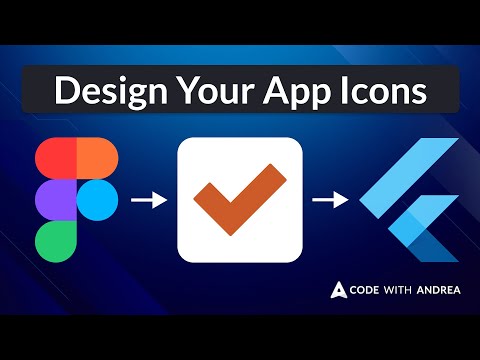
App icon template from the video: https://www.figma.com/design/2fR5TMDpzhDEVJyhQvhsiX/App-Icon-Template?node-id=1-131&t=wM1bxBAhlCe7XMWz-1 Summary of the steps: - Create your icon background as a 1000x1000px square - Design the foreground content as a combination of shapes,...
App icon template from the video: https://www.figma.com/design/2fR5TMDpzhDEVJyhQvhsiX/App-Icon-Template?node-id=1-131&t=wM1bxBAhlCe7XMWz-1
Summary of the steps:
- Create your icon background as a 1000x1000px square
- Design the foreground content as a combination of shapes, group them together, and center them
- For the iOS icon, scale the foreground content to **75%** of the icon size
- For the Android icon, scale the foreground content to **50%** of the icon size
- Create separate foreground and background icons on Android
- Export all the icons using `1024w` as the size selector
NEW COURSE: FLUTTER IN PRODUCTION
Learn about flavors, environments, error monitoring, analytics, release management, CI/CD, and finally ship your Flutter apps to the stores → https://codewithandrea.com/courses/flutter-in-production/
SIGN UP TODAY: https://nnbd.me/cfb I'm creating an extensive Flutter curriculum made of 3 courses, covering many advanced topics that you'll need to create full-stack apps with Flutter & Firebase. COURSE #1: Flutter Foundations - App Architecture - State Management with...
SIGN UP TODAY: https://nnbd.me/cfb
I'm creating an extensive Flutter curriculum made of 3 courses, covering many advanced topics that you'll need to create full-stack apps with Flutter & Firebase.
COURSE #1: Flutter Foundations
- App Architecture
- State Management with Riverpod
- Navigtion with go_router
- Local Data Persistence
- Testing
COURSE #2: Flutter & Firebase Masterclass
- Firebase Authentication
- Data Modeling with Firestore
- Firebase Local Emulator
- Cloud Functions with TypeScript
- Stripe Integration
- Search with Algolia
COURSE #3: Flutter in Production
- Flavors and Environments
- Error Reporting with Sentry
- CI/CD with GitHub Actions and Fastlane
- Deploy to the App Stores
Secure your pre-sale discount now today: 👇👇
https://nnbd.me/cfb
Written tutorial: 👇👇
https://codewithandrea.com/videos/flutter-web-html-css-js-performance-comparison/
Source code for Flutter clone: 👇👇
https://github.com/bizz84/code_with_andrea_flutter
HIGHLIGHTS
00:00 - Intro
00:35 - Website overview
01:27 - PageSpeed Insights benchmark
02:36 - WebPageTest.org benchmark
04:33 - Flutter web vs HTML, CSS & JS: take aways
05:24 - Conclusion
BLACK FRIDAY PROMOS (35% OFF!)
Flutter Animations Masterclass: https://codewithandrea.com/courses/flutter-animations-masterclass/
The Complete Dart Developer Guide: https://codewithandrea.com/courses/complete-dart-guide/
Join my FREE email course to become a Flutter expert with the best resources, at your own pace: https://codewithandrea.com/newsletter/
Happy coding!
Tips for learning how to build your own Flutter apps, overcome Tutorial Hell, and figure out what to do when you get stuck. Written tutorial: 👇👇 https://codewithandrea.com/videos/how-to-build-any-app-flutter/ HIGHLIGHTS 00:00 - Intro 00:42 - How I think about coding 01:53 -...
Tips for learning how to build your own Flutter apps, overcome Tutorial Hell, and figure out what to do when you get stuck.
Written tutorial: 👇👇
https://codewithandrea.com/videos/how-to-build-any-app-flutter/
HIGHLIGHTS
00:00 - Intro
00:42 - How I think about coding
01:53 - How I recently built a complex app
03:04 - Reading the documentation
03:50 - Googling and combining things
04:25 - Open source and sharing knowledge when you learn something valuable
04:51 - How to build apps without getting stuck
06:55 - Are tutorials and courses a valuable?
07:35 - Where to find good tutorials and courses?
08:21 - Wrap Up
Join my FREE email course to become a Flutter expert with the best resources, at your own pace: https://codewithandrea.com/newsletter/
Happy coding!