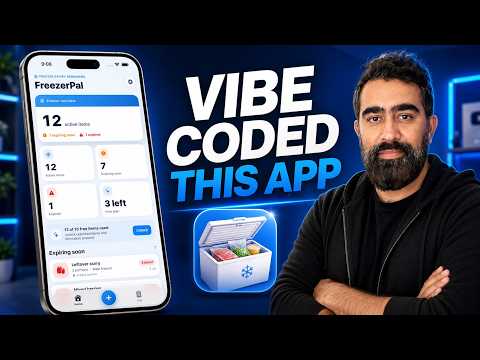
Product Website: https://awaisjamil.com/products/freezerpal Download Link: https://apps.apple.com/us/app/freezer-pal/id6787021888 In this video, I build a complete iOS app called FreezerPal using AI vibe coding, ChatGPT, Claude Code, Xcode, and App Store Connect. This is a full real-world walkthrough from the first app idea, writing prompts, designing the app, generating the icon, setting up the Xcode project, preparing App Store metadata, building the product website, screenshots, paywall, and finally making the app available on TestFlight. FreezerPal is a simple iOS freezer inventory app that helps users track freezer items, expiry dates, reminders, and reduce food waste. This video shows the full AI-assisted development workflow, including how I use ChatGPT and Claude Code together to design, build, modify, and prepare an iOS app for submission. Chapters: 00:00 - Intro 01:34 - Writing Prompts 02:18 - ChatGPT vs Claude Prompt 02:56 - Design Phase 04:34 - Claude Design System 05:21 - First Preview 06:51 - Cross ChatGPT Prompting for Modification 07:54 - Model Usage 08:47 - Xcode Empty Project 09:22 - Running App on iOS Emulator 09:39 - Claude Code 11:51 - Turning on Auto Mode 12:11 - Setting Up Xcode Project 15:42 - Testing While Building 16:07 - Claude Design Modification 17:21 - Workflow Explanation 17:45 - Making the App Submission Ready 17:56 - What You Need for the App Store 20:58 - Building the Icon 26:20 - Adding Splash Screen 26:32 - Generated App Metadata 26:47 - App Store Metadata Review 27:13 - Filling Out Information with Claude 30:43 - Pasting IAP Images via Claude 31:10 - Building Product Website 32:01 - FreezerPal Website 34:07 - App Screenshot for App Store Connect 37:12 - Building for Production Release 38:30 - Screenshot for Paywall 44:30 - Making it Available on TestFlight 47:15 - TestFlight Integration Topics covered: - AI vibe coding - Building an iOS app with Claude Code - Using ChatGPT for product planning and prompts - SwiftUI app design - Xcode project setup - iOS simulator testing - App Store Connect metadata - In-app purchase setup - Product website, privacy policy, terms, and support pages - TestFlight release workflow If you are interested in building apps with AI, Claude Code, ChatGPT, SwiftUI, and Xcode, this video shows the full process from idea to working TestFlight build. #VibeCoding #iOSDevelopment #ClaudeCode #ChatGPT #SwiftUI #Xcode #AIAppDevelopment #TestFlight
Product Website: https://awaisjamil.com/products/freezerpal
Download Link: https://apps.apple.com/us/app/freezer-pal/id6787021888
In this video, I build a complete iOS app called FreezerPal using AI vibe coding, ChatGPT, Claude Code, Xcode, and App Store Connect.
This is a full real-world walkthrough from the first app idea, writing prompts, designing the app, generating the icon, setting up the Xcode project, preparing App Store metadata, building the product website, screenshots, paywall, and finally making the app available on TestFlight.
FreezerPal is a simple iOS freezer inventory app that helps users track freezer items, expiry dates, reminders, and reduce food waste.
This video shows the full AI-assisted development workflow, including how I use ChatGPT and Claude Code together to design, build, modify, and prepare an iOS app for submission.
Chapters:
00:00 - Intro
01:34 - Writing Prompts
02:18 - ChatGPT vs Claude Prompt
02:56 - Design Phase
04:34 - Claude Design System
05:21 - First Preview
06:51 - Cross ChatGPT Prompting for Modification
07:54 - Model Usage
08:47 - Xcode Empty Project
09:22 - Running App on iOS Emulator
09:39 - Claude Code
11:51 - Turning on Auto Mode
12:11 - Setting Up Xcode Project
15:42 - Testing While Building
16:07 - Claude Design Modification
17:21 - Workflow Explanation
17:45 - Making the App Submission Ready
17:56 - What You Need for the App Store
20:58 - Building the Icon
26:20 - Adding Splash Screen
26:32 - Generated App Metadata
26:47 - App Store Metadata Review
27:13 - Filling Out Information with Claude
30:43 - Pasting IAP Images via Claude
31:10 - Building Product Website
32:01 - FreezerPal Website
34:07 - App Screenshot for App Store Connect
37:12 - Building for Production Release
38:30 - Screenshot for Paywall
44:30 - Making it Available on TestFlight
47:15 - TestFlight Integration
Topics covered:
- AI vibe coding
- Building an iOS app with Claude Code
- Using ChatGPT for product planning and prompts
- SwiftUI app design
- Xcode project setup
- iOS simulator testing
- App Store Connect metadata
- In-app purchase setup
- Product website, privacy policy, terms, and support pages
- TestFlight release workflow
If you are interested in building apps with AI, Claude Code, ChatGPT, SwiftUI, and Xcode, this video shows the full process from idea to working TestFlight build.
#VibeCoding #iOSDevelopment #ClaudeCode #ChatGPT #SwiftUI #Xcode #AIAppDevelopment #TestFlight